00195376-05_SM_D1_D1i_D2_D2i_EN.pdf - 第251页
Settings 6.6.6 Calibrating the Head Height Pick&Place Head Service Manual SIPLACE D1/D1i/D2/D2i 251 6.6.6 6 . 6 . 6 C a lib r a t in g t h e H e a d H e ig h t Calibrating the Head Height This menu is used to deter m…
Settings
Pick&Place Head 6.6.5 Calibrating the D Axis
250 Service Manual SIPLACE D1/D1i/D2/D2i
SITEST:
► Select P&P module
► Select Calibration Functions
► Open the Calibrate Zero Point DP Axis menu.
► When requested to do so by the SW, connect the D axis calibration nozzle.
The ZPC will be automatically determined through the angle recognition of the nozzle outline.
Repeat this procedure until the new value does not deviate more than +/- 0.01° from the previous
value.
See also
6.6.5.1 Manual Calculation of the D Axis Zero Point Correction [➙ 250]
6.6.5.1
6.6.5.1 Manual Calculation of the D Axis Zero Point Correction
Manual Calculation of the D Axis Zero Point Correction
SITEST:
► Select P&P module.
► Select Axis functions.
► Select the checkbox D-Axis.
► Select Positions...
► Set the zero point correction to 0.
► Perform an axis reference run for the D axis.
► Put the calibration nozzle for the TWIN Head/P&P head manually at the P&P head sleeve. Make
sure that the two adjust pins engage properly in the nozzle.
► Enable the D axis of the P&P head at the axis card.
► Manually rotate the nozzle into the zero position:
The drilling on the calibration nozzle must point to the center (from SW 505 onwards) of the machine
and the nozzle must be aligned parallel to the PCB conveyor.
► In order to display the position of the D axis, open the Z axis menu by checking the checkbox and
then return to D axis.
► Enter the value shown for the D axis as the zero point correction value.
► Activate the D axis of the P&P module at the axis card.
► Perform an axis reference run for the D axis.
► Now check the position of the nozzle:
The drilling on the calibration nozzle must point to the center (from SW 505 onwards) of the machine
and the nozzle must be aligned parallel to the PCB conveyor.
► Do not forget to perform D axis calibration afterwards. (see "6.6.5 Calibrating the D Axis" [ ➙ 249]).
NOTICE
If the calibration is not successful, you can roughly determine the zero point correction manually
and enter this value. (see "6.6.5.1 Manual Calculation of the D Axis Zero Point Correction"
[ ➙ 250])
Settings
6.6.6 Calibrating the Head Height Pick&Place Head
Service Manual SIPLACE D1/D1i/D2/D2i 251
6.6.6
6.6.6 Calibrating the Head Height
Calibrating the Head Height
This menu is used to determine the Z axis zero point correction.
SITEST:
► Select P&P module.
► Select Calibration Functions.
► Select Calibrating the head height.
6.6.7
6.6.7 Calibration of Vacuum Distributor on the P&P Head
Calibration of Vacuum Distributor on the P&P Head
The vacuum distributor is part of the P&P head and creates the vacuum and air blast for the pick up and
placement process. The zero calibration of the vacuum distributor should be performed on initial setup
at the customer site and after replacing the vacuum distributor or P&P head.
If you do not calibrate the vacuum generator, you will have incorrect threshold values for calculating the
"No component on the nozzle or nozzle is dirty" value.
With the aid of the zero calibration the motor of the vacuum generator is positioned into a middle or neu-
tral position, so that there is no vacuum or air blast present at the nozzle.
6.6.7.1
6.6.7.1 Zero Calibration of Vacuum Generator
Zero Calibration of Vacuum Generator
SITEST:
NOTICE
Make sure that the 517 nozzle is on the P&P head and has been entered.
The zero point correction, plus the maximum and minimum travel range for the Z axis will be
correctly set after performing "head height" calibration.
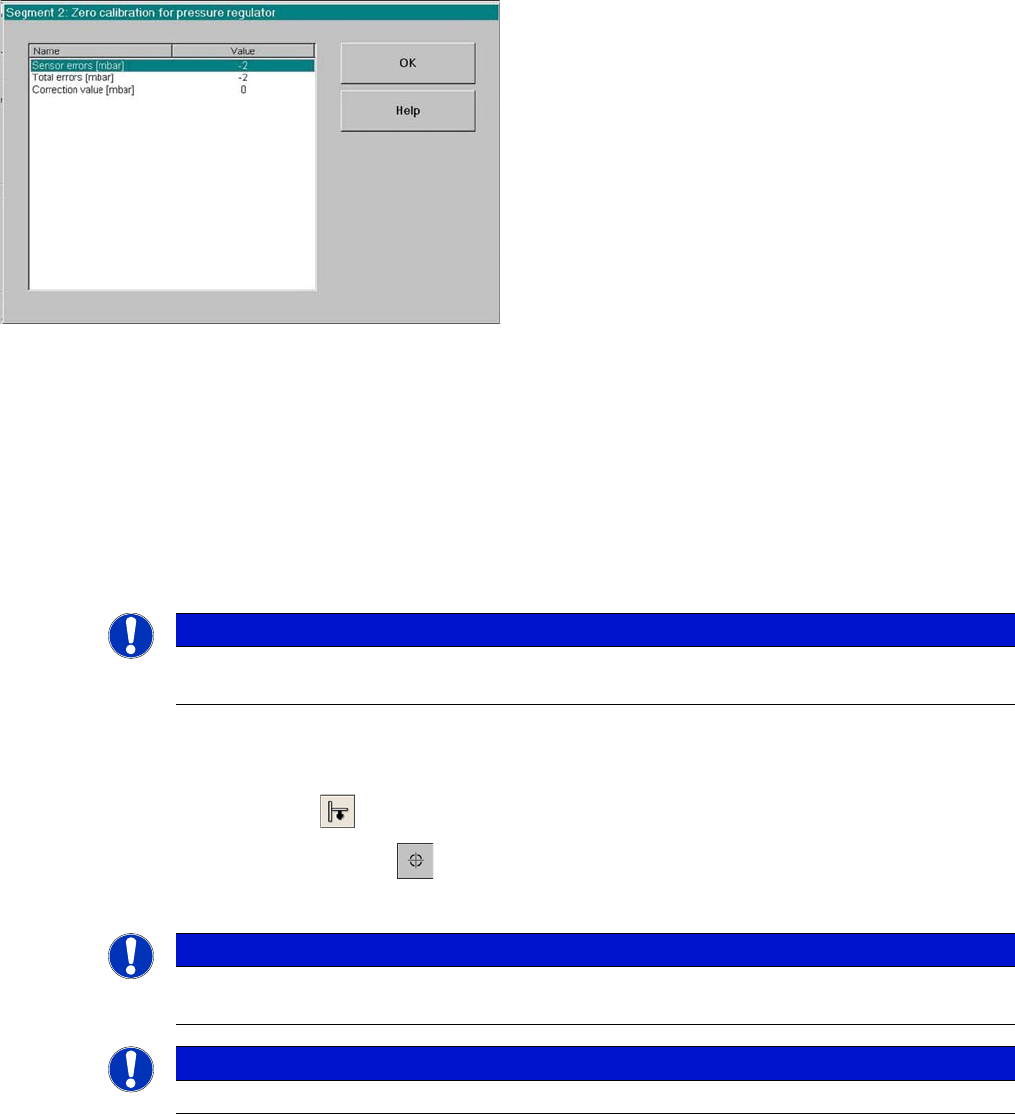
SITEST functions head board functions
► Start the SITEST program.
► Select P&P module.
► Select Head Board to open the adjacent menu.
► Close the nozzle of the appropriate P&P head (e.g.
by sealing it with your finger tip).
Settings
Pick&Place Head 6.6.7 Calibration of Vacuum Distributor on the P&P Head
252 Service Manual SIPLACE D1/D1i/D2/D2i
6.6.7.2
6.6.7.2 Checking the Zero Calibration
Checking the Zero Calibration
SITEST:
► Select P&P module.
► Select Head Board.
► Select Measure Pressure.
The zero calibration is performed with disabled vacuum and air blast (see "6.6.7.1 Zero Calibration of
Vacuum Generator" [ ➙ 251]).
6.6.7.3
6.6.7.3 Calibrating the Closed Vacuum
Calibrating the Closed Vacuum
SITEST:
► Select P&P module.
► Select Calibration Functions.
► Select Calibrate Closed Vacuum.
6.6.7.4
6.6.7.4 Checking the Pressure Tightness of the Vacuum System
Checking the Pressure Tightness of the Vacuum System
► Start SITEST.
► Move the gantry so that you can easily reach the nozzle of the Twin Head with one and the keyboard
with the other hand.
Correction values after zero calibration
► Select Zero calibration pressure regulator
The dialog box on the left shows the correction value
calculated.
► Click on OK.
The correction value will be accepted - now the reference
value equals the ambient pressure.
NOTICE
The pressure deviation to the ambient pressure at 0 - mbar (zero calibration) should not exceed
+/-10 mbar.
NOTICE
The value "Vacuum closed" is measured and stored for the P&P head.
The old and new values are shown in a dialog window.
NOTICE
The term "closed vacuum" corresponds to "threshold value closed".