00195376-05_SM_D1_D1i_D2_D2i_EN.pdf - 第167页
Service Work 4.5.2 Replacing the Vacuum Contro l System, Filter and Additiona l Volume Pick&Place Head Service Manual SIPLACE D1/D1i/D2/D2i 167 4.5.2.4 4 . 5 . 2 . 4 R e p la c in g t h e V a c u u m C o n t r o l S …
Service Work
Pick&Place Head 4.5.2 Replacing the Vacuum Control System, Filter and Additional Volume
166 Service Manual SIPLACE D1/D1i/D2/D2i
4.5.2.3
4.5.2.3 Installation Check
Installation Check
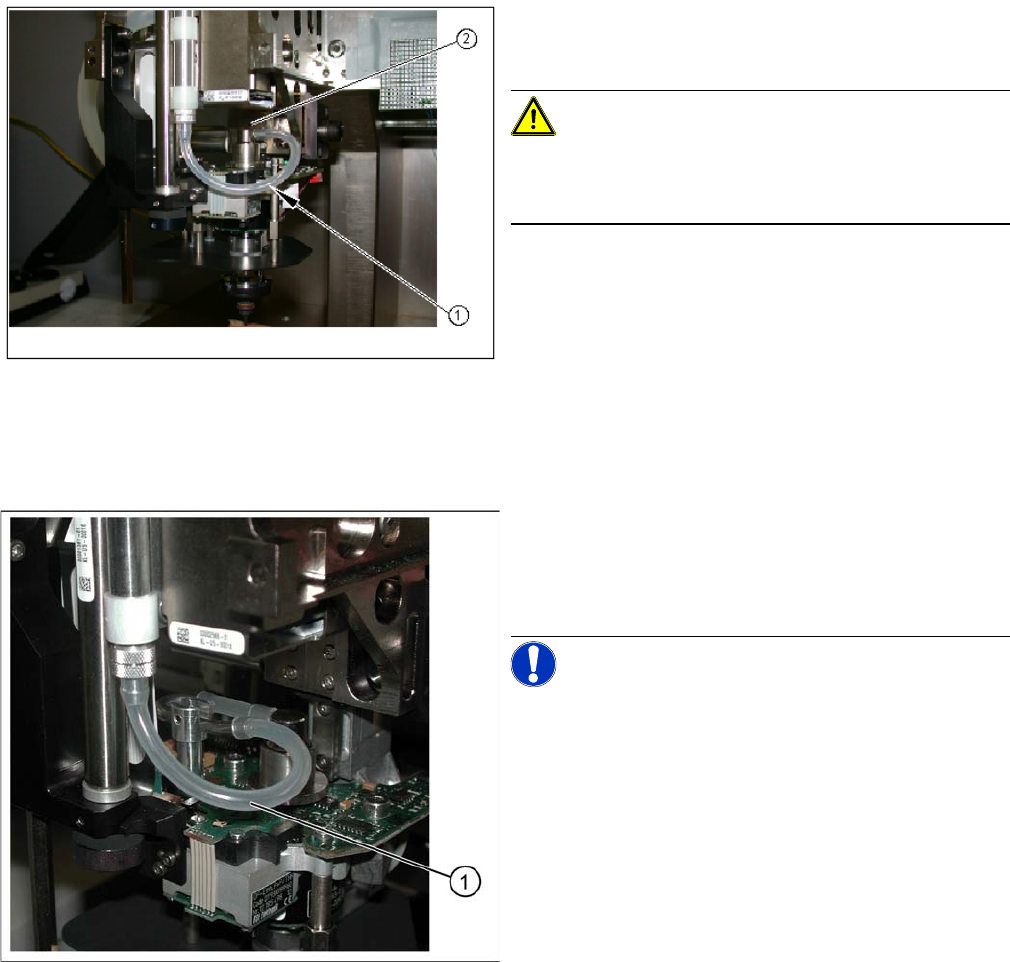
The following steps apply for the rotary axis of the P&P
head, version 14 (without metal elbow for vacuum feed-in
on the DP turning unit):
CAUTION! Check the alignment of the rotary ax-
is!
Check that the rotary axis is always aligned towards the
front.
► This means that the rotary axis must not hit any parts
when in the top Z axis position (2). Check this several
times by moving the Z axis to its minimum and maxi-
mum positions and turning the rotary axis, with the
vacuum hose connected. This should then automati-
cally revert to its original, free-moving position (1).
► Run the SITEST program to calibrate the vacuum
system (calibrate „Vacuum closed“ and „zero correc-
tion for the Pressure regulator“).
Rotary axis for P&P head version 5
Legend
1. Silicon inlet air hose for D axis vacuum air blast
The following steps apply for the rotary axis of the P&P
head, version 5:
NOTICE! The rotary axis does not need to be
aligned for P&P head version 5.
► Run the SITEST program to calibrate the vacuum
system (calibrate „Vacuum closed“ and „zero correc-
tion for the Pressure regulator“).
Service Work
4.5.2 Replacing the Vacuum Control System, Filter and Additional Volume Pick&Place Head
Service Manual SIPLACE D1/D1i/D2/D2i 167
4.5.2.4
4.5.2.4 Replacing the Vacuum Control System (Version 02 - Digital) [03058802-xx]
Replacing the Vacuum Control System (Version 02 - Digital) [03058802-xx]
Removal
TWIN segment 1 front view / TWIN segment 2 rear view
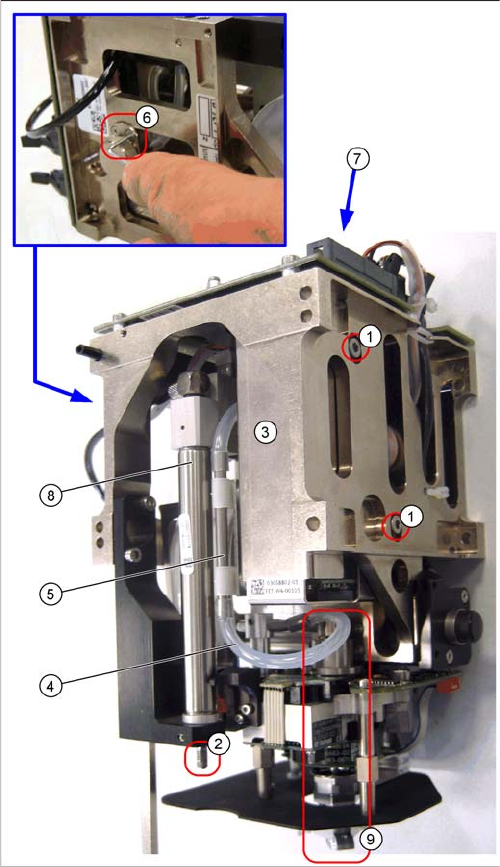
The digital vacuum generator has a thin high-precision
tube (additional volume tube) in the vacuum supply to the
nozzle. Between this pipe and the vacuum connection of
the vacuum generator, there is an air filter attached to the
TWIN segment.
► Open the threaded pin on the stopper ((2) already re-
moved in the diagram here) of the return unit and un-
screw the stopper.
► Pull the silicon hose (4) off the connecting piece of
the high-precision tube (5).
► Loosen the two clamping screws (6) on the air filter.
► Loosen the two fastening screws (1) on the vacuum
control system (3) and remove the vacuum control
system.
► Pull the vacuum control system downwards so that it
can be unplugged from the head main board (7).
► Unthread the vacuum control system next to the re-
turn cylinder (8) and above the DP turning unit (9) on
the Z mechanics.
Service Work
Pick&Place Head 4.5.3 Replacing the Z axis Return Unit [03001361]
168 Service Manual SIPLACE D1/D1i/D2/D2i
Installation
► Installation is performed by following the above instructions in the reverse order.
4.5.3
4.5.3 Replacing the Z axis Return Unit [03001361]
Replacing the Z axis Return Unit [03001361]
Overview
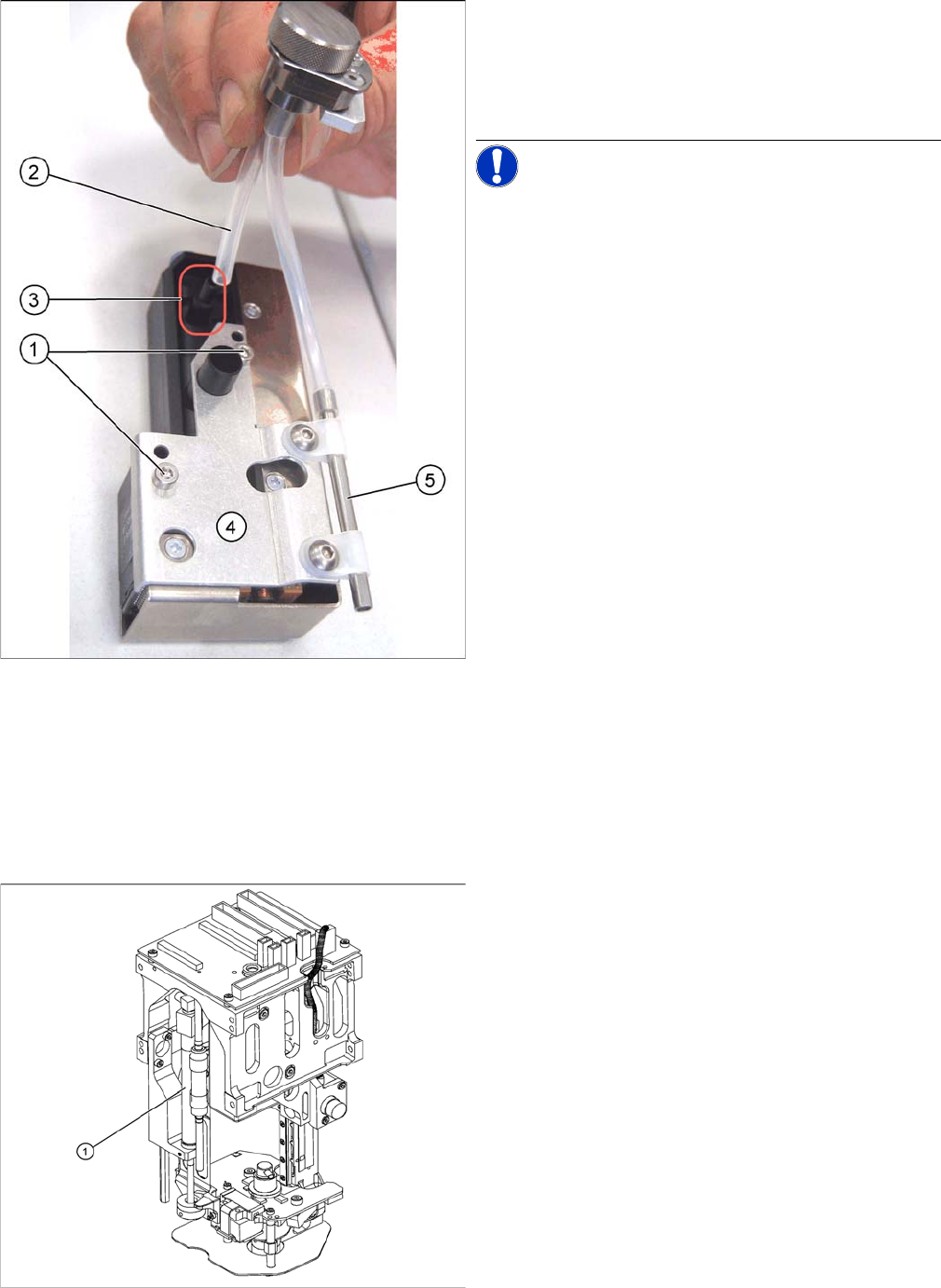
► Pull the silicon hose (2) off the vacuum connection (3)
of the vacuum control system.
► Loosen and remove the two fastening screws (1) for
the high-precision tube holder (5) from the vacuum
control system.
NOTICE! This holder for the digital vacuum con-
trol system has 4 fixture holes, of which the two lower
ones (1) are used.
Legend
1. Return unit
► Remove the relevant P+P module from the machine.