00195376-05_SM_D1_D1i_D2_D2i_EN.pdf - 第267页
Settings 6.7.5 Width Adjustment Unit Modular PCB Conveyor System Service Manual SIPLACE D1/D1i/D2/D2i 267 6.7.4.1 6 . 7 . 4 . 1 A d ju s t in g t h e L im it S w it c h f o r I n itia liz in g t h e A d ju s t m e n t U …
Settings
Modular PCB Conveyor System 6.7.4 Checking the Limit Switch Position
266 Service Manual SIPLACE D1/D1i/D2/D2i
6.7.4
6.7.4 Checking the Limit Switch Position
Checking the Limit Switch Position
► Check the minimum and maximum width and ensure that the conveyor rails are parallel.
Values
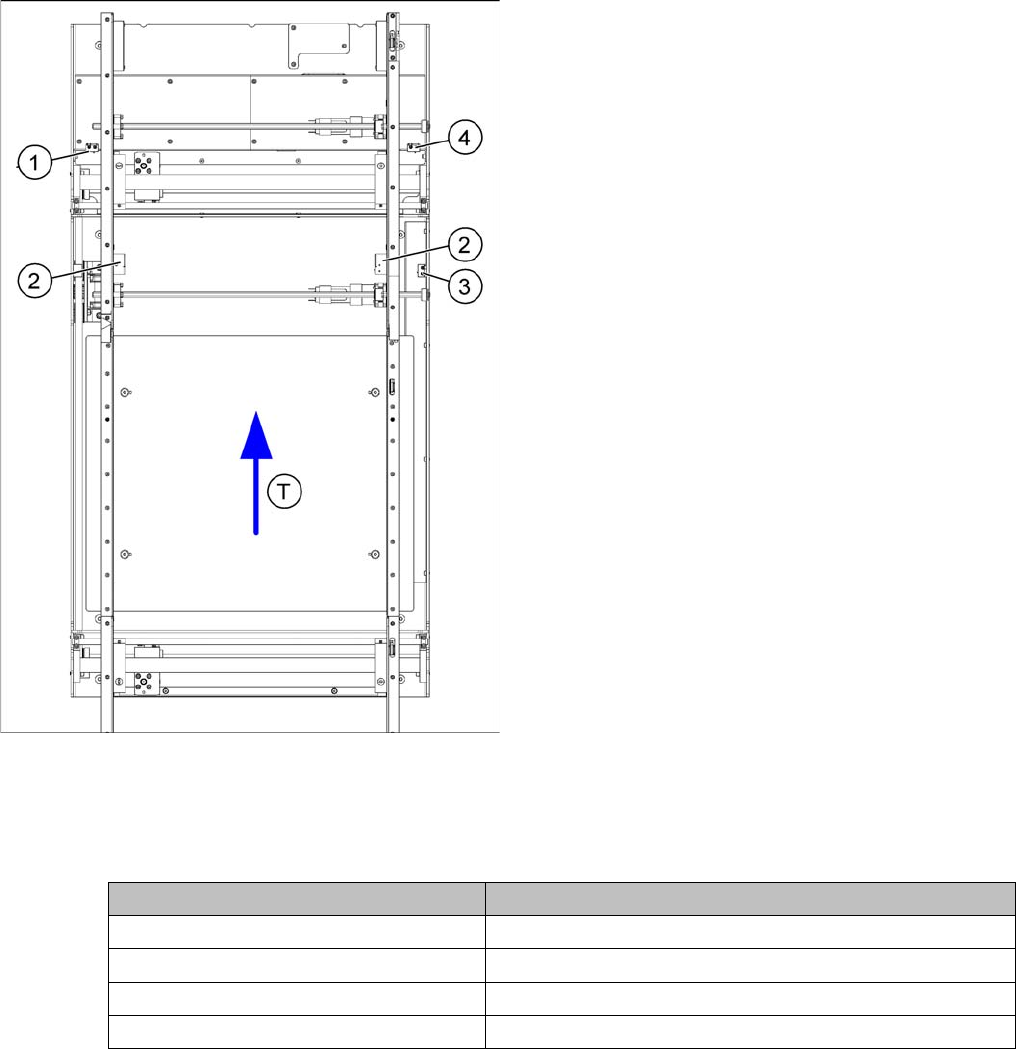
Position of the width adjustment and conveyor side limit
switches
Legend
1. Limit switch 1 for width adjustment system of the ad-
justment unit
2. Limit switch for width adjustment system (for side)
3. Limit switch for assembly tub (for side)
4. Limit switch 2 for width adjustment system of the ad-
justment unit
▪ T = transport direction
Limit switch on the input conveyor:
There are 5 limit switches below the conveyor rails near
the input conveyor. The limit switch is designed to pre-
vent the conveyor sides hitting one another or the con-
veyor frame.
Limit switch on the output conveyor:
In the vicinity of the output conveyor there are 2 limit
switches for the adjustment unit. They protect the trave-
ling range and initialize (right side) the adjustment unit for
width adjustment.
Setup Value
Minimum width: 49.7 mm
Maximum width of single conveyor 508.5 mm
Maximum width of dual conveyor 216.5 mm (standard)
Maximum width of dual conveyor 242.5 mm (Standard)
Settings
6.7.5 Width Adjustment Unit Modular PCB Conveyor System
Service Manual SIPLACE D1/D1i/D2/D2i 267
6.7.4.1
6.7.4.1 Adjusting the Limit Switch for Initializing the Adjustment Unit
Adjusting the Limit Switch for Initializing the Adjustment Unit
6.7.5
6.7.5 Width Adjustment Unit
Width Adjustment Unit
6.7.5.1
6.7.5.1 Setting the Proximity Switch on the Adjustment Unit
Setting the Proximity Switch on the Adjustment Unit
► When installing the proximity switch (4) , make sure that the proximity switch is level with the adjust-
ment unit housing.
► The switching point is set via the actuator on the conveyor side.
► Move the adjustment unit under the conveyor side, then loosen the actuator using the screw.
► Place the driver onto the 2/10 mm end position scale, press the actuator against the end position
scale and fix with the screw.
► Check the adjustment functions for the relevant adjustment unit and correct the proximity switch po-
sition, where necessary.
► In rare cases, you may need to adjust the actuator.
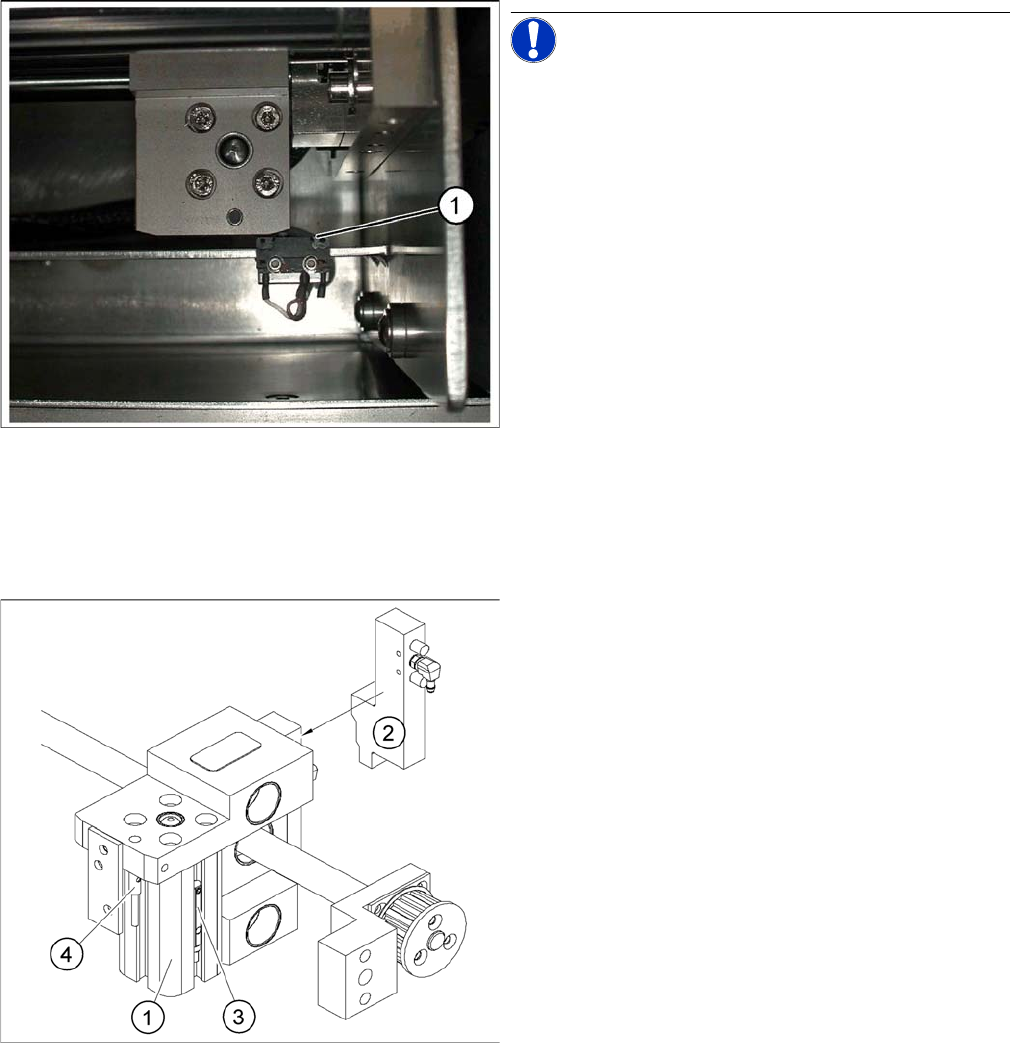
Limit /initialize switch
NOTICE! This setting is only required after re-
placing the switch or other error functions in the width ad-
justment reference run.
► Move the adjustment unit for the width adjustment by
hand (via the toothed belt) to the conveyor side.
► Loosen the two screws on the limit switch (1).
► Move the limit switch in the slot towards the adjust-
ment unit and make sure that the limit switch is safely
switched on.
► Check the switching state of the corresponding LED
(H11 for TSP 201) (H41 for TSP 301) in the conveyor
control software.
► Fit the limit switch in this position.
► Calibrate the conveyor width via the SITEST pro-
gram.
Overview of the proximity switches on the width adjust
-
ment unit
Legend
1. Short-stroke cylinder
2. Solenoid valve
3. Proximity switch for pneumatic cylinder (for "locking
pin up" recognition)
4. Proximity switch for adjustment unit(for conveyor side
recognition)
▪ The proximity switch (3) serves as a signal for con-
trolling the pneumatic valve of the adjustment unit.
Once the switching point "conveyor side present" has
been reached, the conveyor side is connected via the
pneumatic valve.
Settings
Modular PCB Conveyor System 6.7.5 Width Adjustment Unit
268 Service Manual SIPLACE D1/D1i/D2/D2i
► Perform Calibrate Conveyor in SITEST.
6.7.5.2
6.7.5.2 Setting the Pneumatic Cylinder Proximity Switch on the Adjustment Unit
Setting the Pneumatic Cylinder Proximity Switch on the Adjustment Unit
► Start SITEST
► Set any conveyor width. The adjustment units are positioned directly under the conveyor side.
► Start the I/O menu.
► Activate the pneumatic cylinder.
► Set the proximity switch on the pneumatic cylinder so that the LED (H36/H37 TSP 301) (H64/65
TSP 201) shines when connected.
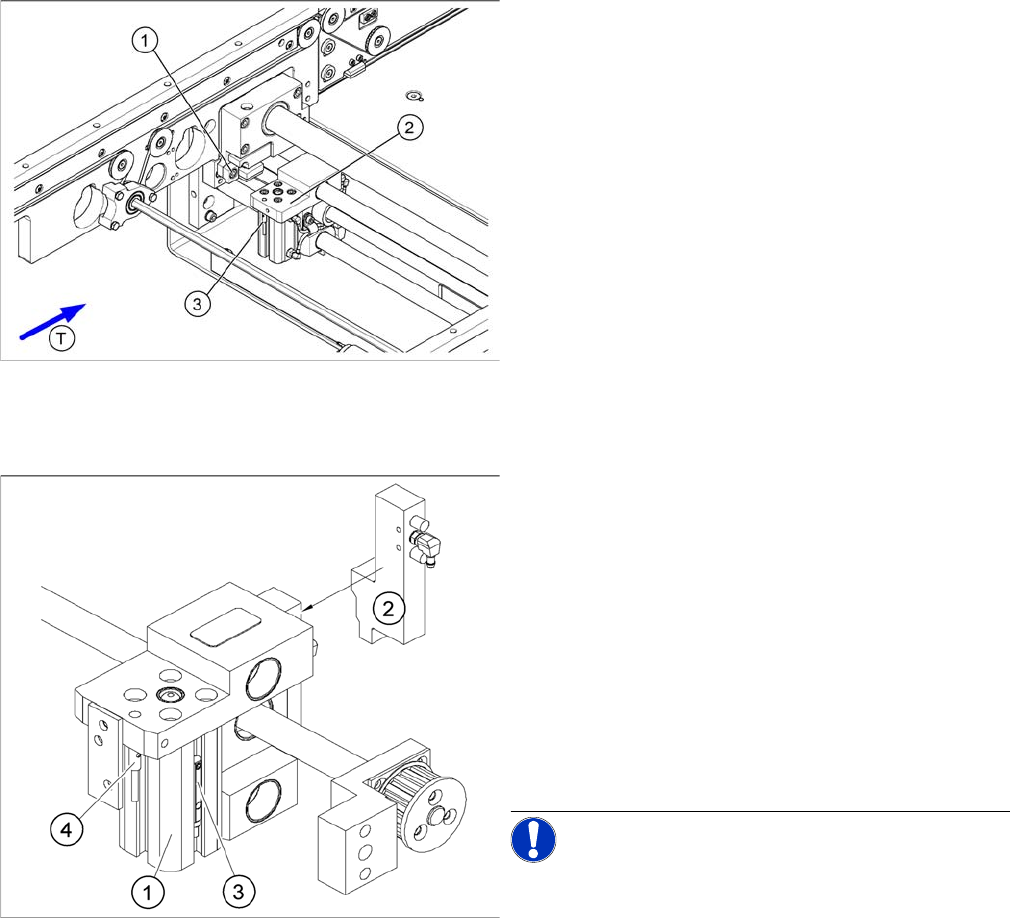
Setting the actuator block for the width adjustment
Legend
1. Fastening screw for the adjustment unit actuator
2. Adjustment unit
3. Proximity switch, adjustment unit
Overview of the proximity switches on the width adjust
-
ment unit
Legend
1. Short-stroke cylinder
2. Solenoid valve
3. Proximity switch for pneumatic cylinder (for "locking
pin up" recognition)
4. Proximity switch for adjustment unit (for conveyor
side recognition)
▪ The proximity switch (3) on the adjustment unit cylin-
der should operate when the adjustment unit pin is
pushed out by the pneumatic cylinder and therefore
connected to the conveyor side. This signal enables
the width adjustment motor.
NOTICE! The proximity switch on the pneumatic
cylinder is set in its engaged state.The proximity switch is
off when the cylinder extended into free space.