00198439-03_SIPLACE_JTF-ML2_TX12_V1-V2_DE_EN_CHS.pdf - 第152页
4 Setting up and commissioning 4.2 Retrofitting in the SIPLACE TX-Series 152 User Manual / Bedienungsanleitung / 用户手册 SIPLACE TX V1/V2 Series JEDEC Tray Feeder (JTF-ML2) 11/2019 4.2.5.15 Teaching the refill position Rete…
4 Setting up and commissioning
4.2 Retrofitting in the SIPLACE TX-Series
User Manual / Bedienungsanleitung / 用户手册 SIPLACE TX V1/V2 Series JEDEC Tray Feeder (JTF-ML2) 11/2019 151
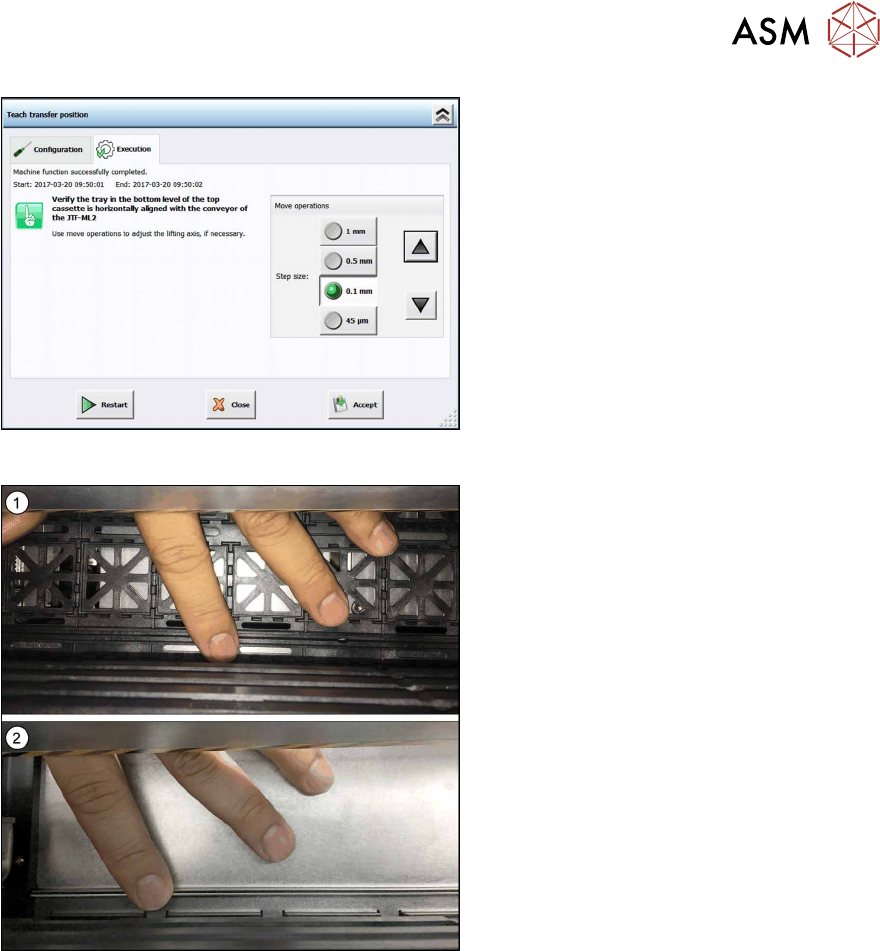
Fig.103: Teach transfer position 4
► Check if the tray in the bottom level of
the top cassette is horizontally aligned
with the conveyor of the SIPLACE
JTF‑ML2.
Use the arrow buttons to adjust trans-
port and tower to each other.
Fig.104: Adjusting transfer position
► Use your finger to feel the levelling and
adjust accordingly.
You may use a JEDEC(1) or a cookie
tray(2).
► Click the Accept button to save the
new transfer position.
4 Setting up and commissioning
4.2 Retrofitting in the SIPLACE TX-Series
152 User Manual / Bedienungsanleitung / 用户手册 SIPLACE TX V1/V2 Series JEDEC Tray Feeder (JTF-ML2) 11/2019
4.2.5.15 Teaching the refill position
Reteach the refill position if a cassette does not slide easily into the tower.
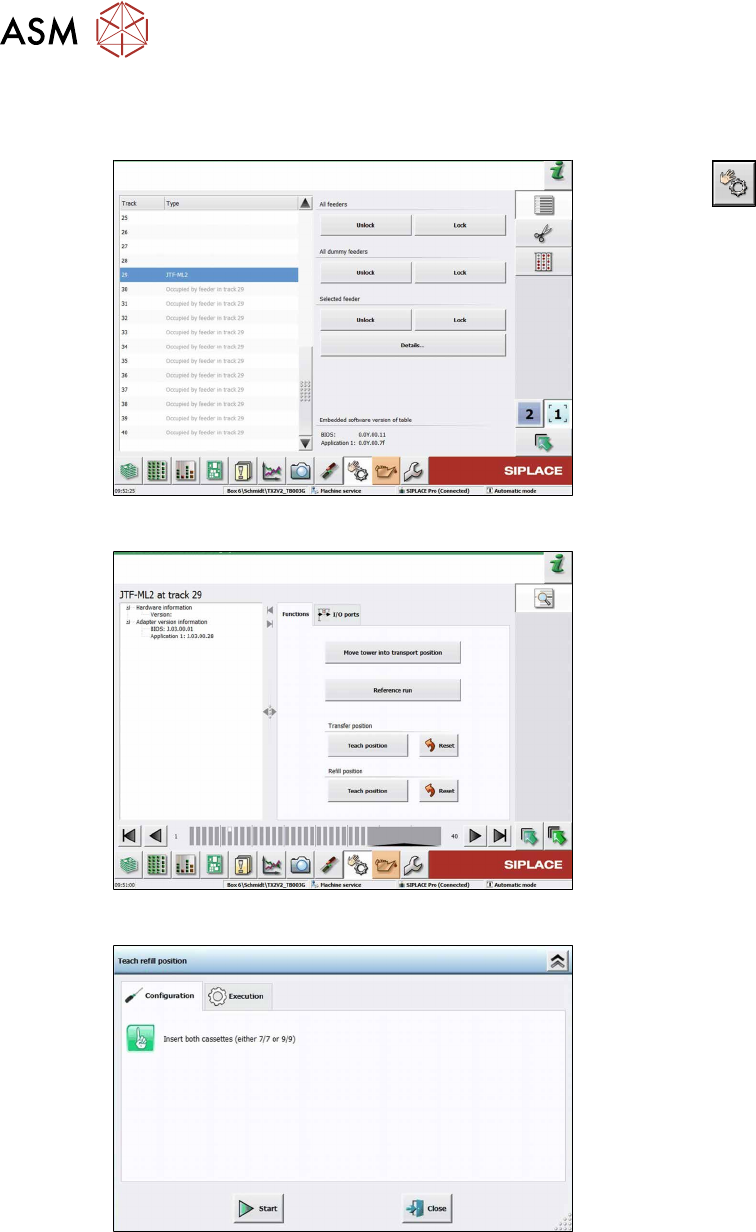
Fig.105: Teach refill position 1
► Click the
button.
► Select the button Location 1.
► Select Track 29.
► Click the Details… button.
Fig.106: Teach refill position 2
► Select the Functions tab.
► Click the Teach position button be-
neath Refill position.
Fig.107: Teach refill position 3
► Insert two cassettes into the SIPLACE
JTF‑ML2. The cassettes have to be of
the same type (7or 9slots).
4 Setting up and commissioning
4.2 Retrofitting in the SIPLACE TX-Series
User Manual / Bedienungsanleitung / 用户手册 SIPLACE TX V1/V2 Series JEDEC Tray Feeder (JTF-ML2) 11/2019 153
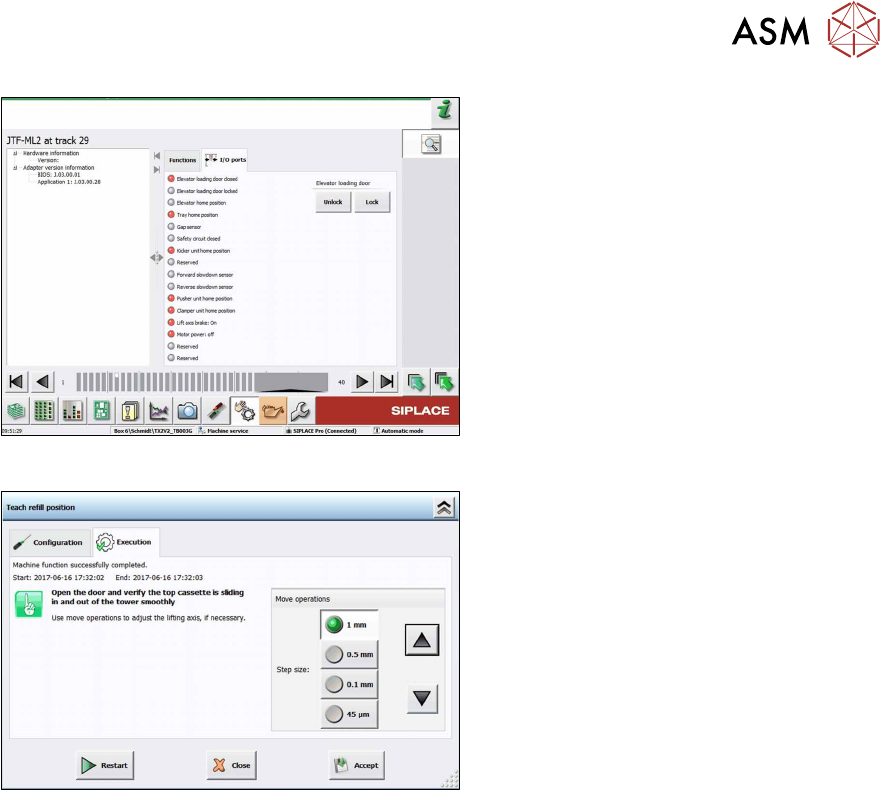
Fig.108: Teach refill position 4
► Unlock/lock the door to teach or check
the refill position.
Fig.109: Teach refill position 5
► Open the door and check if the top cas-
sette is sliding in and out of the tower
smoothly.
Use the arrow buttons to adjust the re-
fill position.
► Click the Accept button to save the
new refill position.