00198439-03_SIPLACE_JTF-ML2_TX12_V1-V2_DE_EN_CHS.pdf - 第168页
5 Tasks on the machine 5.3 Operating the JEDEC tray feeder in the station software 168 User Manual / Bedienungsanleitung / 用户手册 SIPLACE TX V1/V2 Series JEDEC Tray Feeder (JTF-ML2) 11/2019 5.3.2 "Display, Check and S…
5 Tasks on the machine
5.3 Operating the JEDEC tray feeder in the station software
User Manual / Bedienungsanleitung / 用户手册 SIPLACE TX V1/V2 Series JEDEC Tray Feeder (JTF-ML2) 11/2019 167
5.3 Operating the JEDEC tray feeder in the station software
SIPLACE JTF-ML2 feeders are available from station software version 710.1 upwards.
Former software versions do not support this feeder family.
The JEDEC tray feeder is not displayed at the station until a job has been defined.
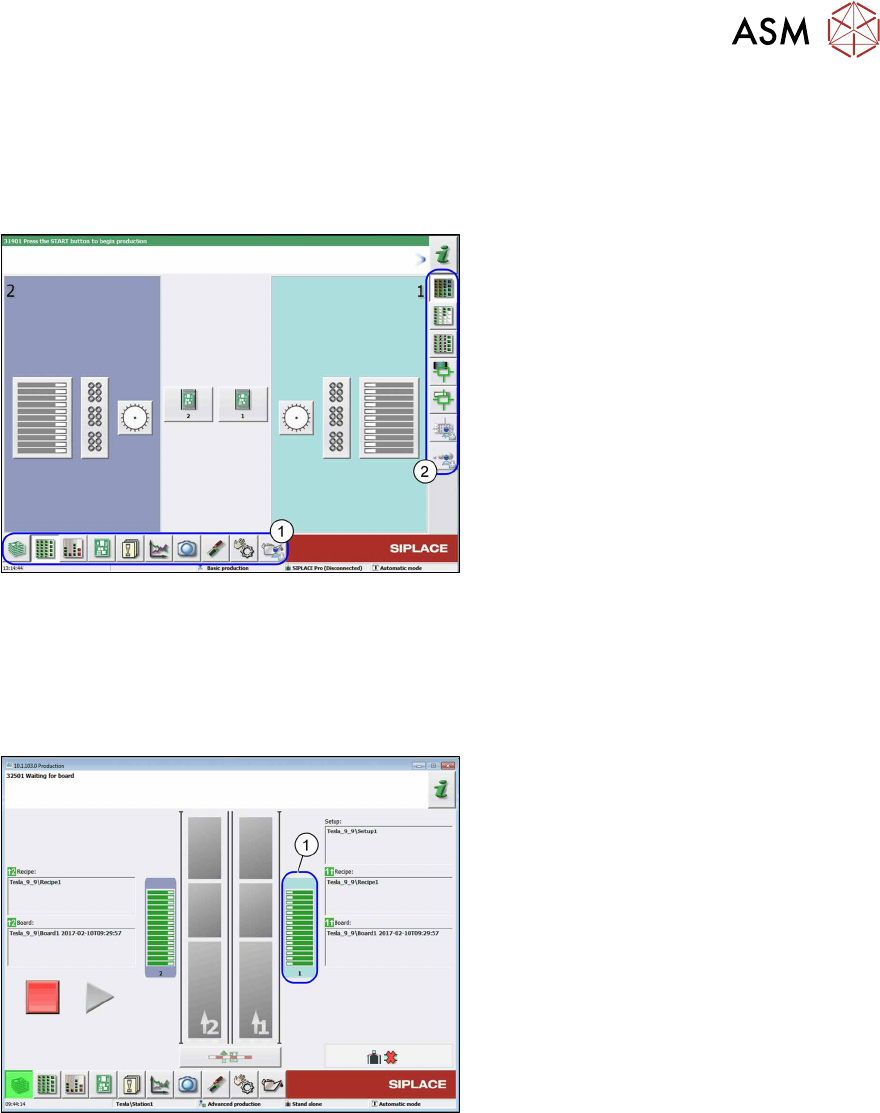
Fig.137: Main view (example of SIPLACETX2)
The following terms are used in the sections:
1. Menu
2. Submenu
5.3.1 JEDEC Tray Feeder Configured in SIPLACE Pro and Defined at the Machine
If a JEDEC tray feeder has been configured in SIPLACE Pro, the corresponding location is divided
into two areas when the job is defined for the machine. For X-Series S machines the location is not
divided.
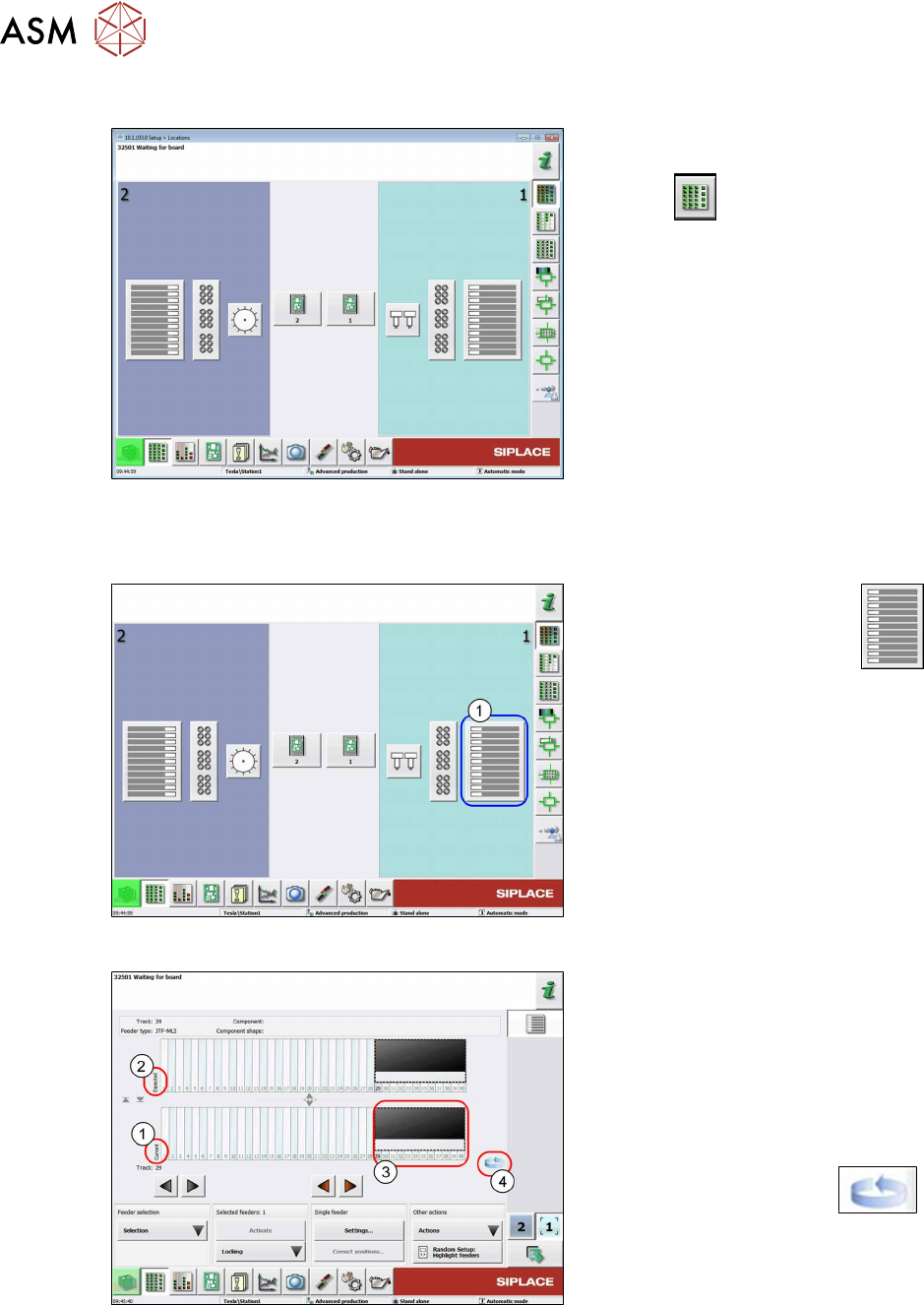
Fig.138: Location view (example of SIPLACETX2)
1. Location 1
5 Tasks on the machine
5.3 Operating the JEDEC tray feeder in the station software
168 User Manual / Bedienungsanleitung / 用户手册 SIPLACE TX V1/V2 Series JEDEC Tray Feeder (JTF-ML2) 11/2019
5.3.2 "Display, Check and Set up Feeders, Components and Nozzles" Menu
Fig.139: Select menu (example of SIPLACETX2)
► Select the Display, check and set up
feeders, components and nozzles
menu to display the sub views of
the relevant locations.
5.3.3 Selecting the JEDEC Tray Feeder at the Location
Fig.140: Select Location
► Select the relevant location
(1)
to display the view of the current setup.
Fig.141: Current setup - location 1 selected (example of
SIPLACETX2)
1. Current setup (currently set-up feeders)
2. Expected setup (setup expected by
SIPLACE Pro)
3. SIPLACEJTF‑ML2 on track 29
4. Change button for switching to the
Track information submenu.
► Press the change button to
display the Track information sub-
menu.
5 Tasks on the machine
5.3 Operating the JEDEC tray feeder in the station software
User Manual / Bedienungsanleitung / 用户手册 SIPLACE TX V1/V2 Series JEDEC Tray Feeder (JTF-ML2) 11/2019 169
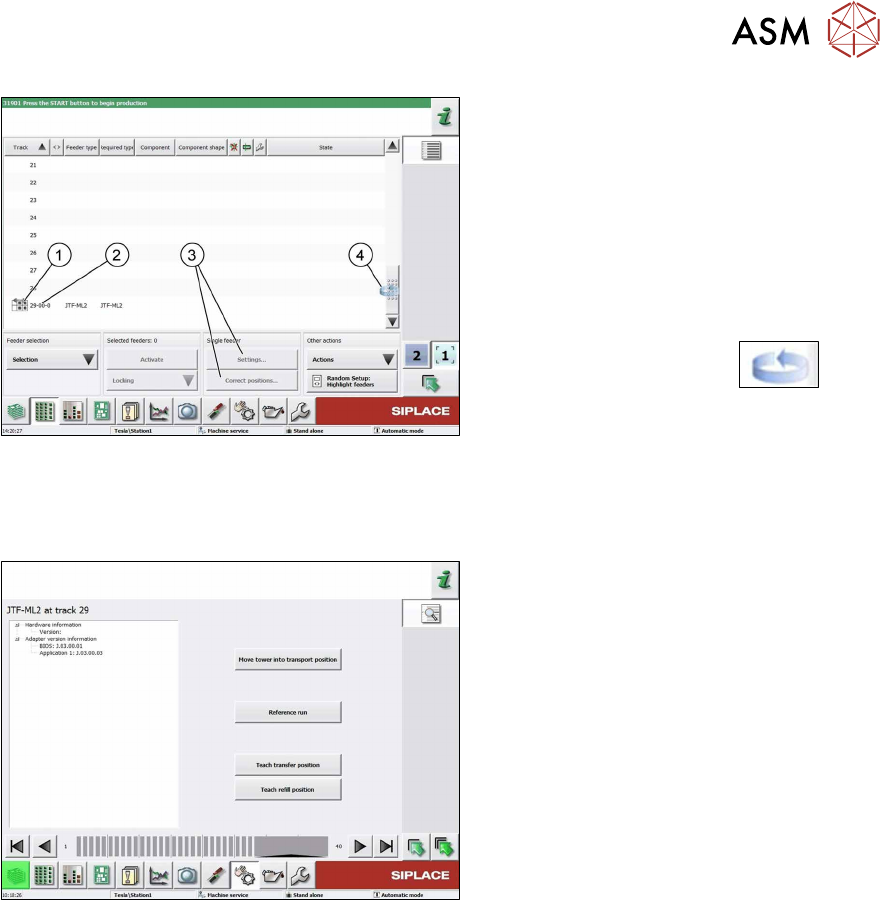
Fig.142: Track information - track 29 selected (example of
SIPLACETX2)
1. SIPLACEJTF‑ML2
2. Abbreviation for the SIPLACEJTF
feeder (visualization)
3. The settings menu is not active until the
relevant track has been selected (high-
lighted in blue color).
4. Change button to switch back to the
Current setup view
► Press the change button to
display the Current setup submenu.
5.3.4 SIPLACEJTF-ML2 – Additional Functions
Fig.143: SIPLACEJTF-ML2 – Additional Functions
●
Move tower into transport position
Move the tower into parking position
before removing tower from machine.
●
Reference Run
The module will be checked for general
readiness.
The cassettes are moving up and down
(control visually).
An error message is shown if any prob-
lems are encountered.
●
Teach transfer position
Whenever the tower or the conveyor of
the SIPLACE JTF-ML2 has been
mounted to the machine, the teach
transfer position has to be teached
again.
●
Teach refill position
Reteach the refill position if a cassette
does not slide easily into the tower.