00197725-12_GS_SE3.11_EN.pdf - 第100页
Annex Getting Started SIPLACE Explorer Recording Data with Backflush Edition 11/2020 EN 100 Description of Generated XML Files The XML file is generated according to t he component consumptio n r ecording option you sele…
Getting Started SIPLACE Explorer Annex
Edition 11/2020 EN Recording Data with Backflush
99
Annex
Recording Data with Backflush
Consumption data can be recorded with Backflush. This data can be generated for a time period,
for a machine/board and/or per day. 4
Additionally, you can record the downloaded recipes and the E10 state. 4
Backflush generates the recording as an xml file. The target folder for this xml file can be specified
as required. 4
The recording settings are defined in the Line Configuration function. For a detailed description
of these settings, please see Section “Step 6 - Modify Application Parameters” on page 45. 4
ATTENTION
The files generated by Backflush are not managed with Backflush To avoid overloading your hard
drive, you will need to archive or delete these files as individually required. 4
NOTE
The system performance of SIPLACE Explorer is reduced if the option MS-DOS-Readable File
Name is enabled in the operating system. This option stores more than 300000 files in the target
folder. If SIPLACE Explorer needs to process many boards, the number of files stored in the target
folder might even exceed 500000, which significantly reduces the system performance of
SIPLACE Explorer.
To prevent this, archive or delete the data from the target folder at regular intervals.
We also recommend that you disable the MS-DOS-Readable File Name option for the operating
system. Please contact your system administrator.
If the MS-DOS-Readable File Name option for the operating system is disabled, the number of
files in the target folder will have no effect on the system performance of SIPLACE Explorer, even
of the volume of files exceeds 1000000. 4
Annex Getting Started SIPLACE Explorer
Recording Data with Backflush Edition 11/2020 EN
100
Description of Generated XML Files
The XML file is generated according to the component consumption recording option you select:4
– Recording for a time period
An xml file is generated in the set target folder, for the whole line and over the defined period
(see page 101).
– Recording by machine/board
An individual xml file is generated in the target folder for each machine and for each board in
the line (see page 103).
– Recording per day
An individual xml file is generated in the target folder for each line, every day (see page 101).
The factory/shift calendar indicates when a production day begins or ends.
– Recording of the downloaded recipes
An individual xml file is generated in the target folder for each downloaded recipe in the line
(see page 105).
– Recording of the E10 state
An individual xml file is generated in the target folder for each machine of the line including the
E10 state transition (see page 106).
The xml files are shown and described below. 4
Getting Started SIPLACE Explorer Annex
Edition 11/2020 EN Recording Data with Backflush
101
Recording by Time or by Day
The time-based and day-based records are generated in xml files. 4
4
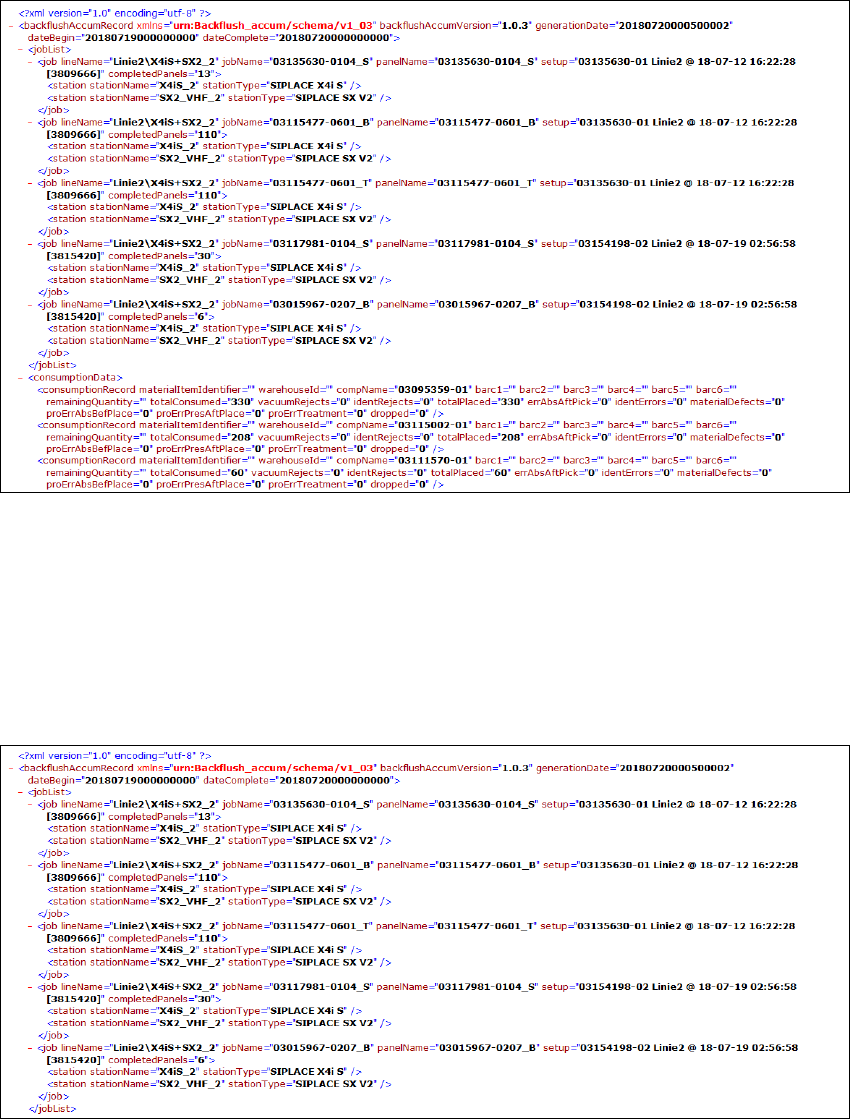
Fig.: XML file - time-based or day-based data recording
The XML file presents the data from the table. 0
This file contains the following information: 0
– Beginning and end of recording
(generationDate="" dateBegin="" dateComplete="")
– Job list (<jobList>):
0
Fig.: XML file - data recording for a time period - job list