00197725-12_GS_SE3.11_EN.pdf - 第43页
Getting Started SIPLACE Explorer 3 SIPLACE Explorer Runtime Envi ronment from 3.11 (R20-2) Edition 11/2020 EN 4 3 3 Fig. 3 - 27 DB backup Check your entries and confir m with OK .
3 SIPLACE Explorer Runtime Environment Getting Started SIPLACE Explorer
Edition 11/2020 EN from 3.11 (R20-2)
42
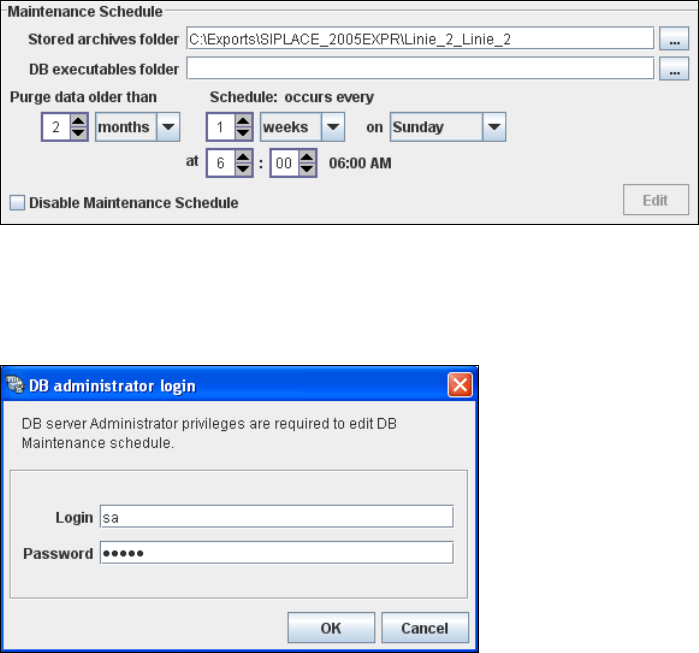
– A schedule specifying the intervals and times when data is to be removed from the line
system database and stored in the archive.
– When to execute the maintenance schedule.
– The archiving schedule defined here will be stored in the database and can be called up
when required.
3
Fig. 3 - 25 DB maintenance
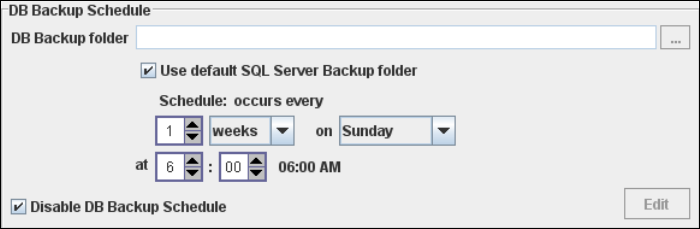
In the DB Backup Schedule panel click on the Edit button.
The DB Administrator Login dialog box will open.
3
Fig. 3 - 26 DB administrator login
Enter the access data here and confirm your entries with OK.
The input fields in the DB Maintenance dialog box will be enabled. The following details
can be defined:
– The file and path for the saved data
– A schedule specifying the intervals and times when data is to be removed from the line
system database and stored in the archive.
– When to execute the backup schedule.
– The backup schedule defined here will be stored in the database and can be called up
when required.
– Database compression with the next database maintenance.
Getting Started SIPLACE Explorer 3 SIPLACE Explorer Runtime Environment
from 3.11 (R20-2) Edition 11/2020 EN
43
3
Fig. 3 - 27 DB backup
Check your entries and confirm with OK.
3 SIPLACE Explorer Runtime Environment Getting Started SIPLACE Explorer
Edition 11/2020 EN from 3.11 (R20-2)
44
NOTE
If you want to recover the data with the help of the Archive Browser, you must define a DB
maintenance schedule and disable Disable Maintenance Schedule. 3
NOTE
If you want to compress the database at next DB maintenance, you must enable Compress
one time at next DB maintenance.
We recommend enabling this DB compression step, when the user has restored the
SIPLACE Explorer line database or has moved the raw database files to another disk or to
another computer.
With the DB compression it is possible to avoid extended access times of the websites.
Follow the instructions at “Compressing the Database” on page 60. 3
Once you have defined all settings in Step 5, click on Next to continue with the next step.