00197725-12_GS_SE3.11_EN.pdf - 第101页
Getting Started SIPLACE Explorer Annex Edition 11/2020 EN Recording Data with Backflush 1 0 1 Recording by T ime or by Day The time-based and day-b ased rec or ds are generated in xml files . 4 4 Fig.: XML file - time-ba…
Annex Getting Started SIPLACE Explorer
Recording Data with Backflush Edition 11/2020 EN
100
Description of Generated XML Files
The XML file is generated according to the component consumption recording option you select:4
– Recording for a time period
An xml file is generated in the set target folder, for the whole line and over the defined period
(see page 101).
– Recording by machine/board
An individual xml file is generated in the target folder for each machine and for each board in
the line (see page 103).
– Recording per day
An individual xml file is generated in the target folder for each line, every day (see page 101).
The factory/shift calendar indicates when a production day begins or ends.
– Recording of the downloaded recipes
An individual xml file is generated in the target folder for each downloaded recipe in the line
(see page 105).
– Recording of the E10 state
An individual xml file is generated in the target folder for each machine of the line including the
E10 state transition (see page 106).
The xml files are shown and described below. 4
Getting Started SIPLACE Explorer Annex
Edition 11/2020 EN Recording Data with Backflush
101
Recording by Time or by Day
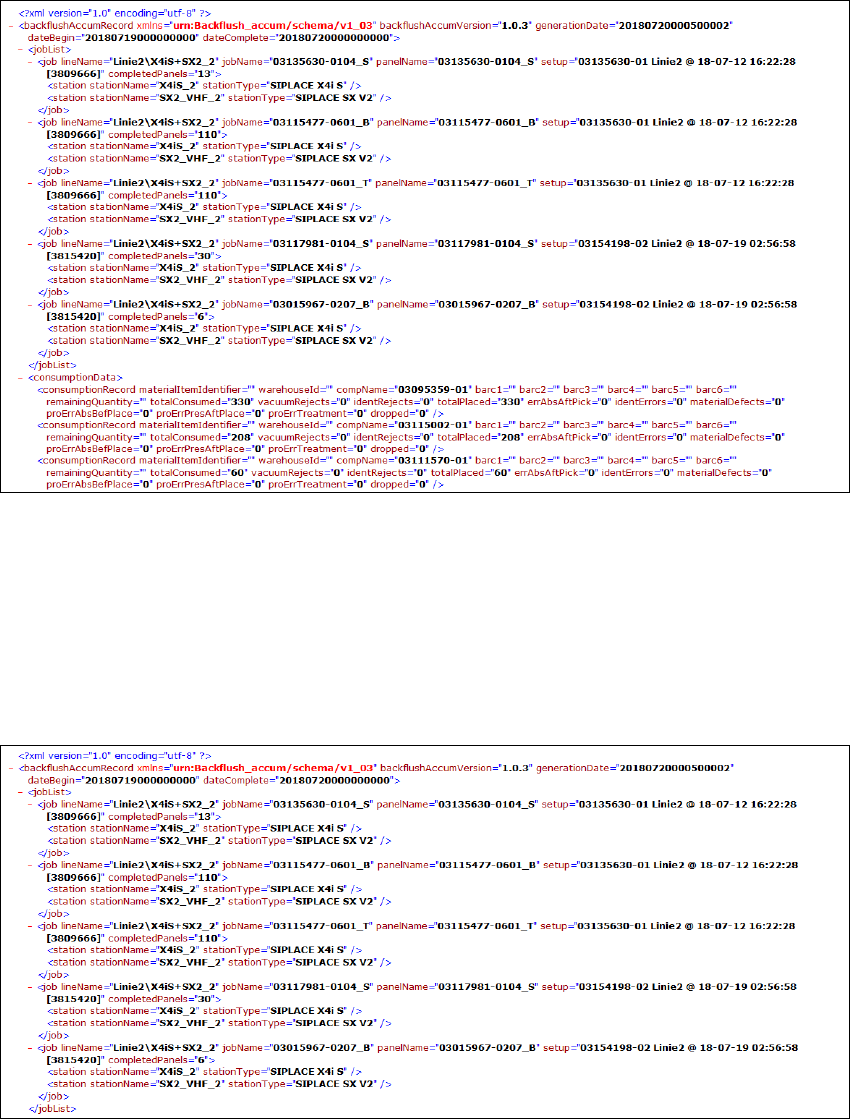
The time-based and day-based records are generated in xml files. 4
4
Fig.: XML file - time-based or day-based data recording
The XML file presents the data from the table. 0
This file contains the following information: 0
– Beginning and end of recording
(generationDate="" dateBegin="" dateComplete="")
– Job list (<jobList>):
0
Fig.: XML file - data recording for a time period - job list

Annex Getting Started SIPLACE Explorer
Recording Data with Backflush Edition 11/2020 EN
102
– Line name (lineName="")
– Recipe name (jobName="")
– Board name (panelName="")
–Setup (setup="")
– Number of completed boards in recording period (completedPanels="")
– Names of all stations in line
(<station stationName="" stationType=""/>)
– Consumption data (<consumptionData>)
The table displays lines with the individual component consumption data:
0
Fig.: XML file - data recording for a time period - consumption data
– Component name (compName="")
– Total component consumption (totalConsumed="")
– Pickup errors after vacuum (vacuumRejects="")
– Pickup errors after ident (identRejects="")
– Error for component absent after pickup (errAbsAftPick)
– Error after ident (identErrors)
– Total component placed (totalPlaced)
– Material defect (materialDefects)
– Process error for component not present before placing (proErrAbsBefPlace)
– Process error for component present after placing (proErrPresAftPlace)
– Process error for component rejected after dipping, glueing problem (proErrTreatment)
– Component rejected after board abortion (dropped)
– Other parameters
When using Backflush with SIPLACE Explorer, the following parameters are not used and will
therefore be shown as empty in the xml file (="").
– Material item identifier
– Warehouse ID
–barc1-6