00197725-12_GS_SE3.11_EN.pdf - 第24页
3 SIPLACE Explorer Runtime Environment Getting Started SIPLACE E xplorer Edition 11/2020 EN from 3.11 (R20-2) 24 – Coordination of st ation names in OIS and SI P LACE Explorer S tation names hav e been changed in OIS. In…
Getting Started SIPLACE Explorer 3 SIPLACE Explorer Runtime Environment
from 3.11 (R20-2) Edition 11/2020 EN
23
All currently existing warnings and all warnings for which the problem has been fixed are
shown on the SMA page Warnings. For a detailed description of this page, please refer to
SIPLACE Explorer SMA User Guide. 3
The following information categories exist: 3
– Critical error
The problem must be fixed before data monitoring can continue.
– Data loss
The problem must be fixed. Data monitoring will continue before the problem is fixed but
the data will not be complete.
– Notification
The problem must be fixed. However, if you ignore this problem, there may be
inconsistencies between the data in the SIPLACE Explorer and the OIS/SIS databases.
NOTE
To fix a problem, perform the following steps:
- Stop the monitoring procedure
- Correct the data accordingly
- Rebuild the application
- Start the monitoring procedure
For a detailed description of this procedure, refer to Section “Manually Checking the
SIPLACE Explorer Configuration for Problems” on page 26. 3
The following settings will be checked for possible problems: 3
– Coordination of line names in SIS and OIS:
The station or line name was changed in SIS but not in OIS. In this case, SIPLACE Explorer
can not receive information about the current setup data and will therefore be unable to
supply the user with information about component names and component shapes. 3
In this case, a message of category 'data loss' will be issued. 3
This check is performed automatically, when setup data are altered in the OIS. SIPLACE
Explorer will try to locate the new setup data in SIS. 3
3 SIPLACE Explorer Runtime Environment Getting Started SIPLACE Explorer
Edition 11/2020 EN from 3.11 (R20-2)
24
– Coordination of station names in OIS and SIPLACE Explorer
Station names have been changed in OIS. In this case, you will receive a message about
this change, in SIPLACE Explorer. If you want to synchronize the station names in OIS and
SIPLACE Explorer, proceed as described at “Manually Checking the SIPLACE Explorer
Configuration for Problems” on page 26. If you do not synchronize the station names, data
monitoring will be continued but the database data will not correspond to the line
configuration data. 3
In this case, a message of category 'notification' will be issued. 3
This check is also performed automatically, each time OIS data are called up. 3
– Coordination of IP address in OIS and SIPLACE Explorer
The station IP address has been changed in OIS but not in SIPLACE Explorer. In this case,
SIPLACE Explorer will not be able to monitor and provide new data for the station. 3
In this case, a message of category 'critical error' will be issued. 3
This check is also performed automatically, each time OIS data are called up. 3
– Coordination of machine ID (MID) in SIPLACE Explorer and OIS
The station MID is not the same in OIS and SIPLACE Explorer. In this case, you will receive
a message about this change, in SIPLACE Explorer. If you want to synchronize the MID in
OIS and SIPLACE Explorer, proceed as described at “Manually Checking the SIPLACE
Explorer Configuration for Problems” on page 26. If you do not synchronize the MID, data
monitoring will be continued but the data in the SE database will not correspond to the data
from the OIS. 3
In this case, a message of category 'notification' will be issued. 3
This check is also performed automatically, each time you restart the monitoring process
with SIPLACE Explorer. 3
Getting Started SIPLACE Explorer 3 SIPLACE Explorer Runtime Environment
from 3.11 (R20-2) Edition 11/2020 EN
25
3.5.2 Starting Production Line Monitoring in SIPLACE Explorer
3
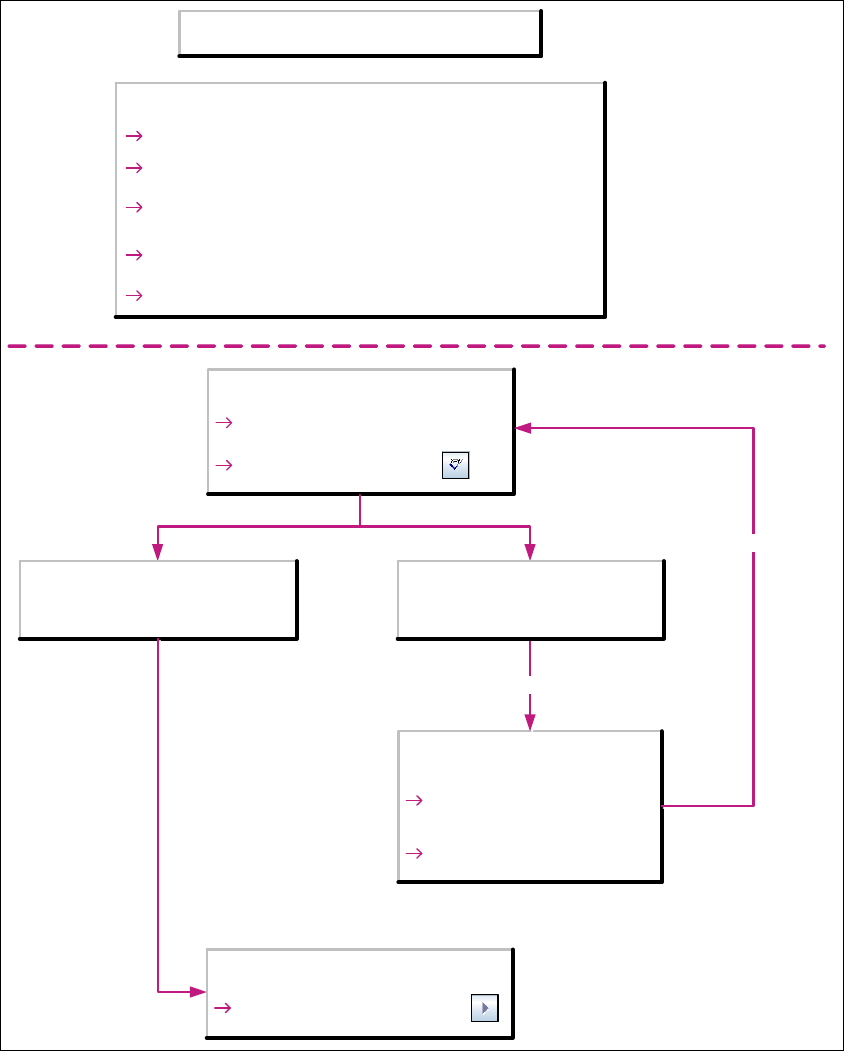
Fig. 3 - 7 Starting production line monitoring in SIPLACE Explorer
SE Manager
Select the production line
Check setting with Check
There are no deviations in the line
configuration in OIS/SIS and in
SIPLACE Explorer
There are deviations in the line
configuration in OIS/SIS and in
SIPLACE Explorer
Line Configuration
Step 2:
Change configuration of the
production line accordingly
Re-check of the settings
Correction of the problem required
Step 7:
Rebuild the application
Starting Monitoring in SIPLACE Explorer
SE Manager
Start the monitoring procedure
with Start
Preconditions
MS SQL Server is started (Windows service)
Apache Tomcat is started (Windows service)
SIPLACE Explorer Runtime Environment is started
(Windows service )
Database must have been created in MS SQL Server and
the connection to the database must have been established
Production line must have been configured in SIPLACE Explorer