00197725-12_GS_SE3.11_EN.pdf - 第56页
3 SIPLACE Explorer Runtime Environment Getting Started SIPLACE E xplorer Edition 11/2020 EN from 3.11 (R20-2) 56 – Step 2 - Perform Configuration T est At S tep 2 you can ch ange your se ttings. This is also where you …
Getting Started SIPLACE Explorer 3 SIPLACE Explorer Runtime Environment
from 3.11 (R20-2) Edition 11/2020 EN
55
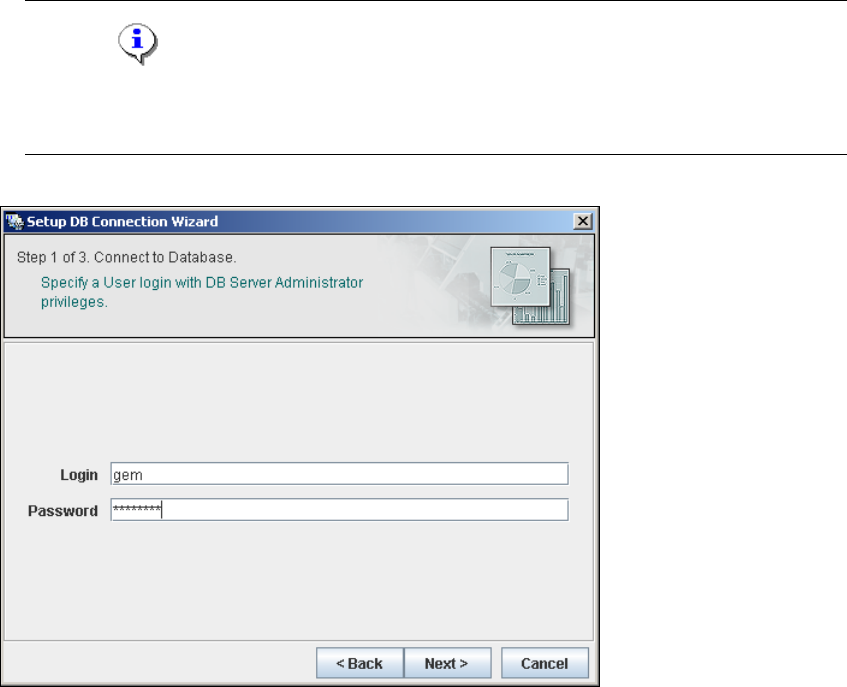
– Step 1- Connection to Database
At Step 1 you will need to specify your login and password to access the Microsoft SQL
Server. Click on Next to continue.
NOTE
Please note that users must have DB administrator privileges to perform the necessary tests
and configuration. 3
3
Fig. 3 - 34 Step 1- database connection wizard
At this point, the wizard will connect to the Microsoft SQL Server and run tests to identify
whether the specified database, login and user roles exist. You will see a list of changes
that the wizard will undertake, to perform setup and configure the system database. 3
3 SIPLACE Explorer Runtime Environment Getting Started SIPLACE Explorer
Edition 11/2020 EN from 3.11 (R20-2)
56
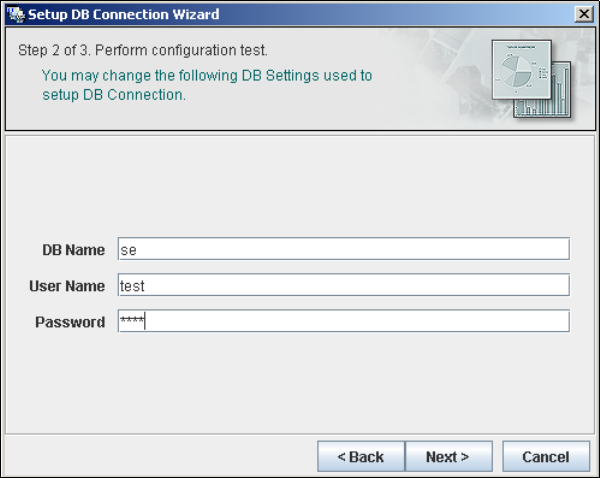
– Step 2 - Perform Configuration Test
At Step 2 you can change your settings. This is also where you define the name of the SE
system database for the line and where you specify the user (and password) who is to have
access to this database.
3
Fig. 3 - 35 Step 2 - database connection wizard
Once you have made and checked all entries, click on Next to continue.
Getting Started SIPLACE Explorer 3 SIPLACE Explorer Runtime Environment
from 3.11 (R20-2) Edition 11/2020 EN
57
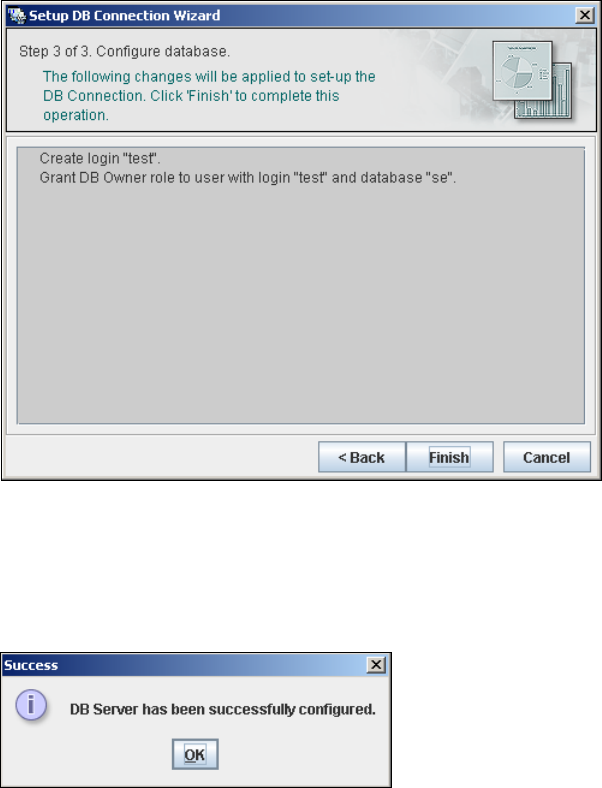
– Step 3 - Configure Database
Step 3 takes your modifications from Step 2 and uses them to configure the database
connection.
3
Fig. 3 - 36 Step 3 - database connection wizard
Click on Finish and the wizard will carry out the required configuration. The DB settings are
now correctly specified for your project. The database and set user will be created.
You will receive a success message.
3
Fig. 3 - 37 Step 3 - database connection wizard
Click OK. You can now configure your system database.