00198382-03_UM_SIPLACE-CA4-V2_EN.pdf - 第154页
4 Setting up and commissioning Instruction manual SIPLACE CA4 V2 4.2 Infrastructure at the installation location From software ve rsio n 713.0 Edition 12/2019 154 4.2.2.2 Compressed air connection on the placement m achi…
Instruction manual SIPLACE CA4 V2 4 Setting up and commissioning
From software version 713.0 Edition 12/2019 4.2 Infrastructure at the installation location
153
4.2.2.1 Checking the compressed air supply
Check whether the compressed air supply complies with the prescribed machine specifications
(see table in section 3.2
, page 100).
Record the compressed air characteristics at the installation location.
4
WARNING
Risk of injuries!
Risk of injuries from pressurized compressed air lines.
NEVER detach compressed air lines while they are still pressurized.
4 Setting up and commissioning Instruction manual SIPLACE CA4 V2
4.2 Infrastructure at the installation location From software version 713.0 Edition 12/2019
154
4.2.2.2 Compressed air connection on the placement machine
4
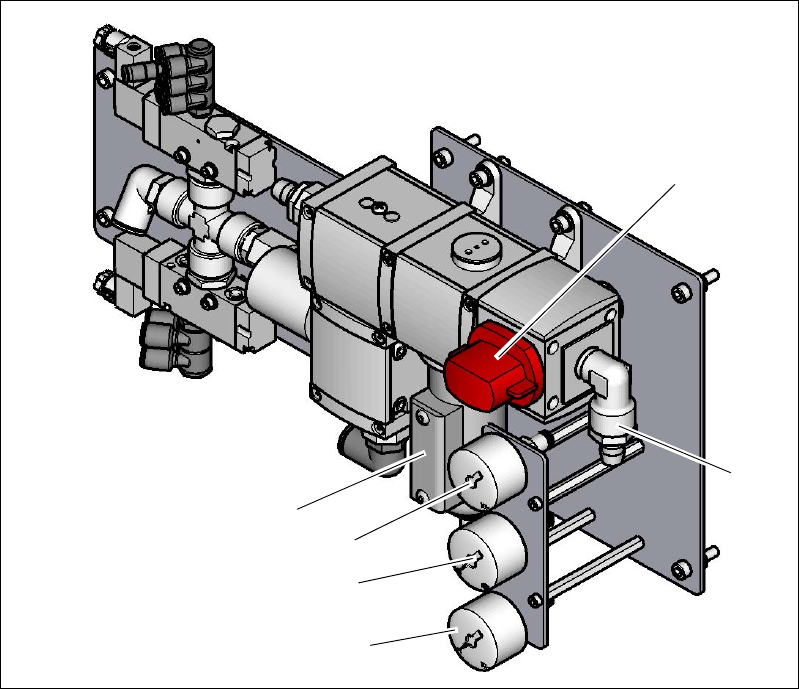
Fig. 4.2 - 2 Compressed air unit on the placement machine
Legend for fig.4.2 - 2
(1) Compressed air filter
(2) Shutoff valve in the "OPEN" position (lockable)
(3) Compressed air connection
(4) Manometer for the machine component supply pressure
Target pressure: 0.5 ± 0.025 MPa, 5 ± 0.25 bar (display range 0 - 1.0 MPa, 0 - 10 bar)
(5) Manometer for supply pressure of gantries 1 to 4
Target pressure: 0.46 ± 0.01 MPa, 4.6 ± 0.1 bar (display range 0 - 1.0 MPa, 0 - 10 bar)
(6) Manometer for inlet pressure
Target pressure: 0.5 - 1.0 MPa, 5 - 10 bar (display range: 0 - 1.0 MPa, 0 - 10 bar)
(6)
(1)
(3)
(2)
(5)
(4)
Instruction manual SIPLACE CA4 V2 4 Setting up and commissioning
From software version 713.0 Edition 12/2019 4.2 Infrastructure at the installation location
155
4.2.3 Mains supply to placement machine
4
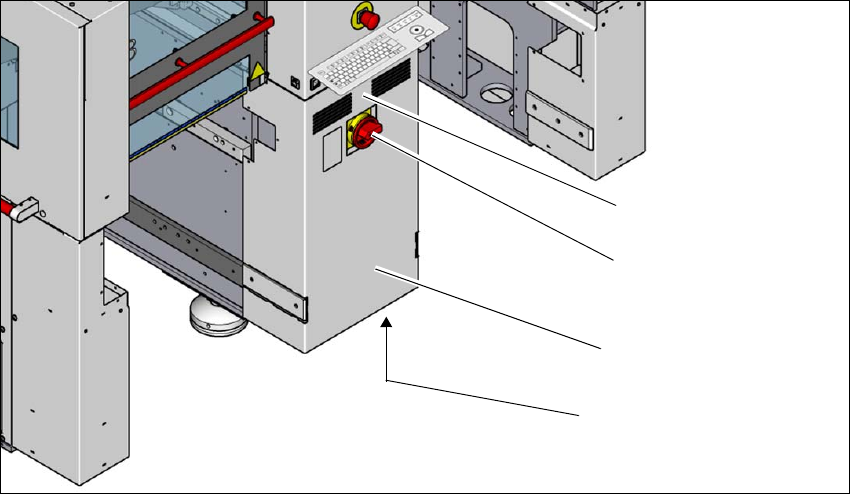
Fig. 4.2 - 3 Position of the power supply in the placement machine
(1) Lock
(2) Main power switch secured to prevent switching on again
(3) Power supply unit (behind the cover)
(4) Main connection cable from below to the power supply
(1)
(2)
(3)
(4)