00198382-03_UM_SIPLACE-CA4-V2_EN.pdf - 第79页
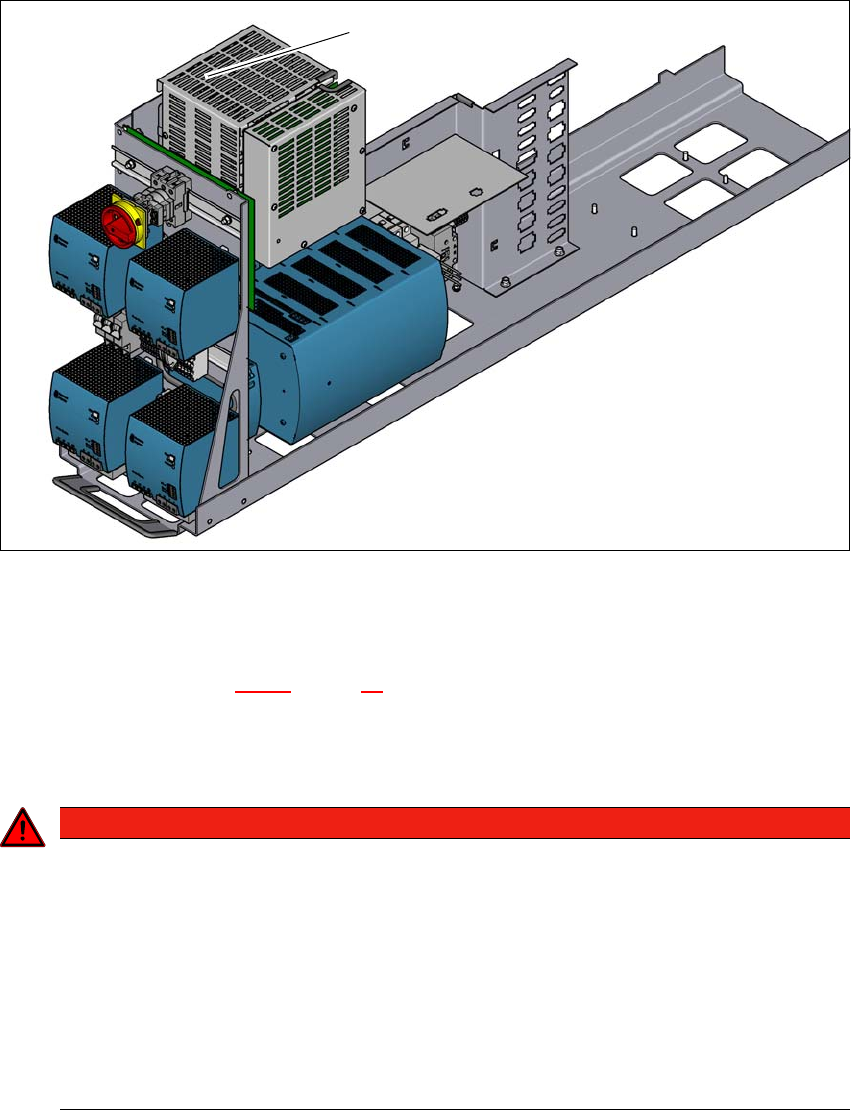
Instruction manual SIPLACE CA4 V2 2 Operational safety From software version 713.0 Edition 12/2019 2.6 Safety features 79 2.6.4 Safety cutoff (CSB) 2 Fig. 2.6 - 7 Position of the safety cutoff (CSB) (1) Safety cuto ff (C…

2 Operational safety Instruction manual SIPLACE CA4 V2
2.6 Safety features From software version 713.0 Edition 12/2019
78
Component counter 2
The number of placed components (component counter) can be read on the station software. For
more information, refer to the Online Help.
EMERGENCY STOP button with forced locking (item 3 in fig. 2.6 - 4, page 74 and item 3 in fig.
2.6 - 5, page 75) 2
The EMERGENCY STOP button is red and latches in the ON position when pressed. When you
press the EMERGENCY STOP button, the switching contact of the EMERGENCY STOP circuit
opens and the safety cutoff (CBS) trips. The intermediate circuit voltage (300 V-) for the gantry
axes and the intermediate circuit voltage (160 V-) for the star axes plus the drive voltage for the
PCB conveyor are switched off. The servo amplifiers for the DP and Z axes are still supplied with
42 V- and therefore held in position. The signaling contact of the EMERGENCY STOP button
opens and the message "EMERGENCY STOP pressed" appears on the screen. The following
modules are deactivated:
– PCB conveyor
– PCB clamping
– Width adjustment
– PCB stopper
– Compressed air supply for empty tape cutter
2
Protective cover switch 1 to 4 (items 1 to 4 in fig. 2.6 - 6, page 76) 2
These switches check whether the protective covers are closed. When they are closed, the
EMERGENCY STOP contact, the signaling contact and also the EMERGENCY STOP circuit are
closed. If one of the covers is opened, the EMERGENCY STOP contact and the signaling contact
will open. Individual components are disabled or remain enabled (see fig. 2.6 - 8
, page 81 ).
Position switch, side sliding doors (item 2 in fig. 2.6 - 6, page 76) 2
This position switch checks whether the side sliding doors are open or closed. The position
switches on the side sliding doors trigger the safety cutoff when a door is opened. Individual com-
ponents are disabled or remain enabled (see fig. 2.6 - 8
, page 81 ).
PLEASE NOTE
Placement will be interrupted and can then either be continued or canceled once the
placement machine is working correctly again.
Instruction manual SIPLACE CA4 V2 2 Operational safety
From software version 713.0 Edition 12/2019 2.6 Safety features
79
2.6.4 Safety cutoff (CSB)
2
Fig. 2.6 - 7 Position of the safety cutoff (CSB)
(1) Safety cutoff (CSB)
Safety cutoff (CSB) (item 1 in fig. 2.6 - 7, page 79) 2
The safety cutoff (CSB) is located in the power supply unit. It is used to monitor the protective fea-
tures and checks for hazardous voltages or movements.
2
(1)
DANGER
Lethal voltages under the safety cutoff (CSB) cover!
Under the cover there are components which could still carry lethal voltages, even when
the placement machine is switched off and the mains plug has been disconnected. After
disconnecting the mains plug, wait approx. 5 minutes until the capacitors have dis-
charged.
Never open the covers.
Only ASM Assembly Systems GmbH&Co.KG service engineers or the machine
owner's service engineers, who have been trained by ASM, may perform work on the
power supply and the safety cutoff (CBS).
2 Operational safety Instruction manual SIPLACE CA4 V2
2.6 Safety features From software version 713.0 Edition 12/2019
80
There are three conditions that must be fulfilled in order to release the safety cutoff (CBS):
– All protective features and the EMERGENCY STOP buttons must be released.
– The start button must have been pressed.
– The "software release" or "Control ON" signal must be issued.
2.6.4.1 Overview of safety cutoff
When the placement machine is ready for operation, the contacts of all position switches and the
EMERGENCY STOP buttons are unlocked. If a protective cover, for example, is raised, the cor-
responding switch and safety cutoff will be triggered. For the operator's information, this status
change is signaled to the control computer via a digital CAN bus input signal from the I/O control
unit. An error message to this effect appears on the user interface.
Prerequisites 2
The following conditions must be fulfilled in order to start and operate the SIPLACE CA4 V2:
– All component trolleys must be docked into place.
– The SIPLACE wafer system modules must be fitted and connected (interface connector X1x).
– The sliding door of the installed SIPLACE Wafer System modules must be closed.
– All protective covers on the SIPLACE CA4 V2 must be closed.
– All side sliding doors on the SIPLACE CA4 V2 must be closed.
– The two EMERGENCY STOP buttons on the SIPLACE CA4 V2 and the SIPLACE Wafer Sys-
tem (one EMERGENCY STOP button per SWS) must be released.
– The minimum operating pressure must have been reached.
– The software release ("Control ON") must be enabled.
If one of the start buttons is now pressed, the safety cutoff (CBS) will switch the safety-controlled
supply voltages on and the placement machine will be ready for operation.
Safety cutoff components 2
The following components are monitored by the safety cutoff:
– Position switch of the four protective covers on the SIPLACE CA4 V2
– Position switch of the four side sliding doors on the SIPLACE CA4 V2
– Position switch for the sliding door on the SIPLACE Wafer System (SWS)
– Two EMERGENCY STOP buttons on the SIPLACE CA4 V2
– EMERGENCY STOP button on the SIPLACE Wafer System (SWS)
– Position switch on the COT inserts of the SIPLACE CA4 V2