00198382-03_UM_SIPLACE-CA4-V2_EN.pdf - 第222页
5 Tasks at the placement machine Instruction manual SIPLACE CA4 V2 5.9 Carrying out a sight check Fro m software version 713.0 Editio n 12/2019 222 5.9 Carrying out a sight check 5.9.1 Checking the X feeder modules 5 Fig…
Instruction manual SIPLACE CA4 V2 5 Tasks at the placement machine
From software version 713.0 Edition 12/2019 5.8 Shift changeover
221
5.8.2 Safety instructions for emptying the waste tape container
5
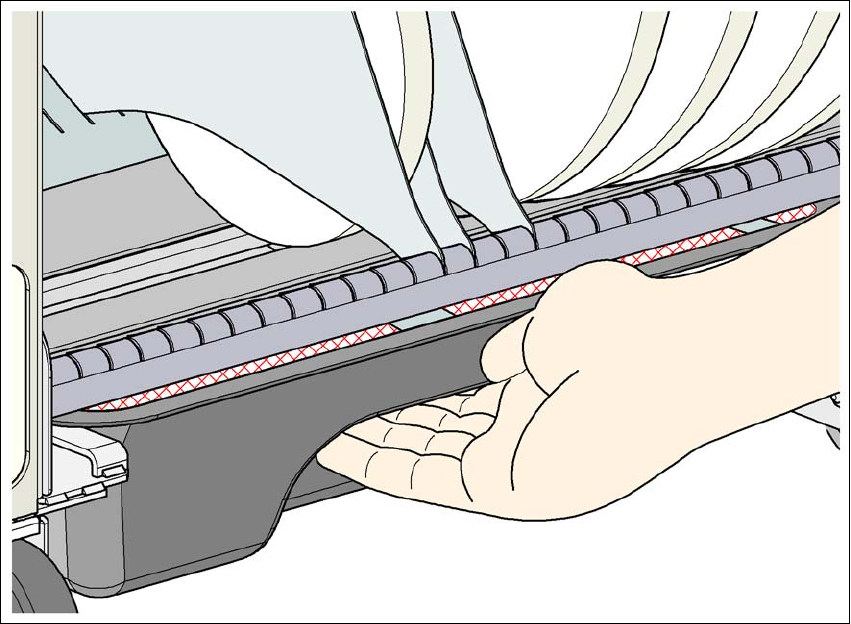
Fig. 5.8 - 1 Safety instructions for emptying the waste tape container
The waste tape container must be pulled out of the component trolley for emptying. There is a risk
of catching your thumbs as you do so.
To avoid this risk, take hold of the underside of the grab recess on the waste tape container
with your fingers and place your thumbs on top of the grab recess.
Do NOT put your thumbs in the gap between the tape container and waste tape container as
you could trap your thumbs if you do.
5 Tasks at the placement machine Instruction manual SIPLACE CA4 V2
5.9 Carrying out a sight check From software version 713.0 Edition 12/2019
222
5.9 Carrying out a sight check
5.9.1 Checking the X feeder modules
5
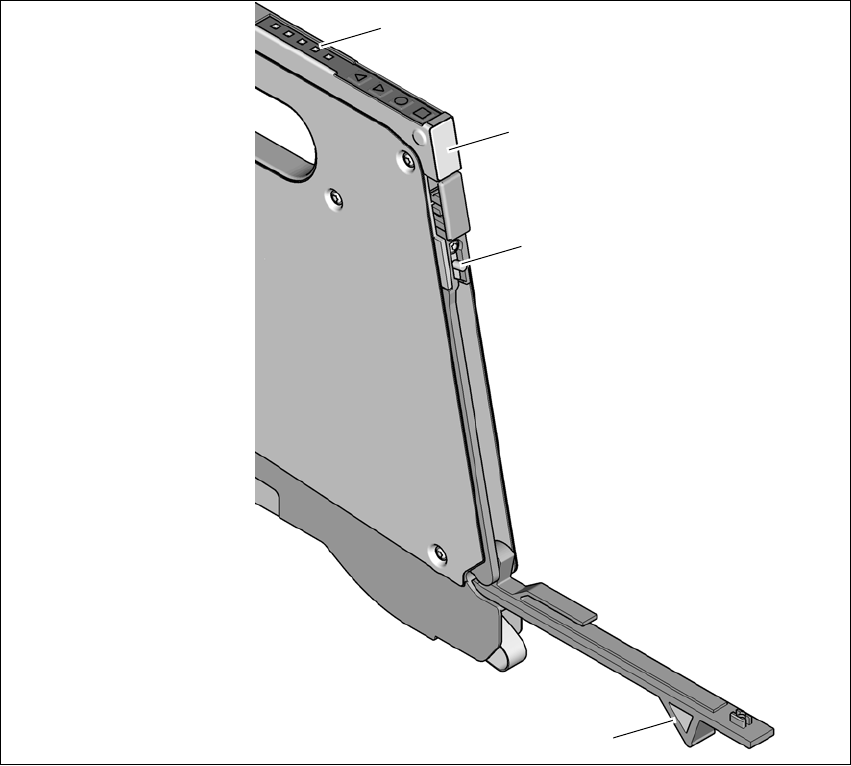
Fig. 5.9 - 1 Checking the X feeder modules
(1) Flap
(2) Blade
(3) Status display
(1) LED display
5
Check to see whether the tape foil removal container for the X tape feeder module is full.
Open the flap (item 1). Pull out the cover foil and cut it off with scissors or the blade (item 2).
(1)
(2)
(3)
(4)
Instruction manual SIPLACE CA4 V2 5 Tasks at the placement machine
From software version 713.0 Edition 12/2019 5.9 Carrying out a sight check
223
5
Check the multicolor status display (item 3 in fig. 5.9 - 1, page 222).
– If it lights up green, the feeder module is on standby.
– If it lights up orange, it is signaling a warning. The LEDs will shine accordingly.
– If the status display lights up red, a malfunction has occurred. The LEDs will shine ac-
cordingly.
A list of the LED and status displays on the Smart Feeder operator panel is given in sec-
tion 5.11.1
, page 236. 5
If the status display is off, the cause may be as follows: 5
– The feeder module is not in the current setup.
– The feeder module is defective.
– The feeder module has been disabled (due to a drop in pressure, for example)
5.9.2 Splicing the tapes in good time
5
5.9.3 Checking the PCB supports
Check the position of the magnetic PCB supports on the lifting table:
– Make sure that the PCB supports do not collide with components on the underside of the
PCBs.
– In addition, make sure that the PCB supports do not collide with the PCB conveyor pan-
els.
– Only use PCB supports as described in section 6.11
, page 339.
CAUTION
Problems with cover foil withdrawal!
If the cover foil tears, this could lead to problems with the cover foil withdrawal.
PLEASE NOTE
Late splicing of tapes
Late splicing of tapes can lead to prolonged down times.
Splice the tapes early enough so that the feeder modules do not run out of compo-
nents.
PLEASE NOTE
Early splicing of tapes
Early splicing of tapes can have the following consequence: when the old tape is rolled
up onto the new reel, the new reel could become too full and the tape will slide off it and
get caught up. This will again result in pick-up errors and prolonged down times.
Splice the tapes at the right time so that the old and new tapes do not get caught.