00198382-03_UM_SIPLACE-CA4-V2_EN.pdf - 第71页
Instruction manual SIPLACE CA4 V2 2 Operational safety From software version 713.0 Edition 12/2019 2.6 Safety features 71 2 Fig. 2.6 - 1 Protective covers and other covers (1) Protectiv e covers on the loc ations (2) SWS…

2 Operational safety Instruction manual SIPLACE CA4 V2
2.6 Safety features From software version 713.0 Edition 12/2019
70
2.6 Safety features
2.6.1 Protective covers and sliding doors
The travel range of the gantries is covered with four movable protective covers. Side sliding doors
make it easier to access the inside of the SWS. The protective hoods, sliding doors and covers
serve as protective devices which prevent unauthorized access to the inside of the placement ma-
chine.
2
2
CAUTION
Risk of damage!
The protective hoods, sliding doors and other covers could be damaged if too much force
is exerted.
Do not stand on or climb up the protective hoods, sliding doors or covers.
CAUTION
Make sure that foreign bodies do not fall into the inside of the placement machine!
Foreign bodies could fall into the placement machine through the vents in the pro-
tective covers. Small parts such as components could fall into the placement ma-
chine.
Do not use the protective covers as a surface on which to place objects. Do not
place anything on the vents in the protective covers. Small parts such as compo-
nents could fall into the placement machine.
Instruction manual SIPLACE CA4 V2 2 Operational safety
From software version 713.0 Edition 12/2019 2.6 Safety features
71
2
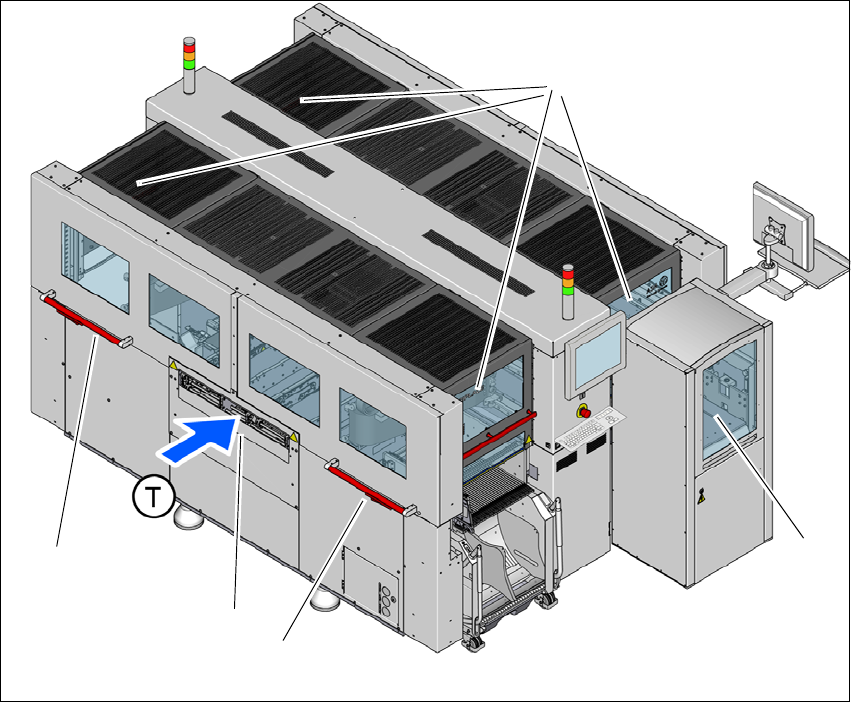
Fig. 2.6 - 1 Protective covers and other covers
(1) Protective covers on the locations
(2) SWS magazine lift with sliding door (optional)
(3) Side sliding door
(4) Hand guard on the input conveyor
(T) Direction of PCB conveyor
The traveling range of the gantries has four protective covers that can be swung upwards (item
1). Side sliding doors (item 3) make it easier to access the inside area. The SWS magazine lift is
covered by a sliding door (item 2). The hand guard (item 4) over the input or output conveyor pre-
vents unauthorized access to the PCB conveyor.
(1)
(2)
(3)
(4)
(3)
2 Operational safety Instruction manual SIPLACE CA4 V2
2.6 Safety features From software version 713.0 Edition 12/2019
72
Function 2
If one of the protective covers is swung upwards or if one of the sliding doors is opened upwards,
the power supply to the gantry axes and all SWS axes will be immediately interrupted. The gantry
axes and all SWS axes will come to a standstill. The message "Close cover" is displayed on the
screen.
Close the protective covers and the side sliding doors.
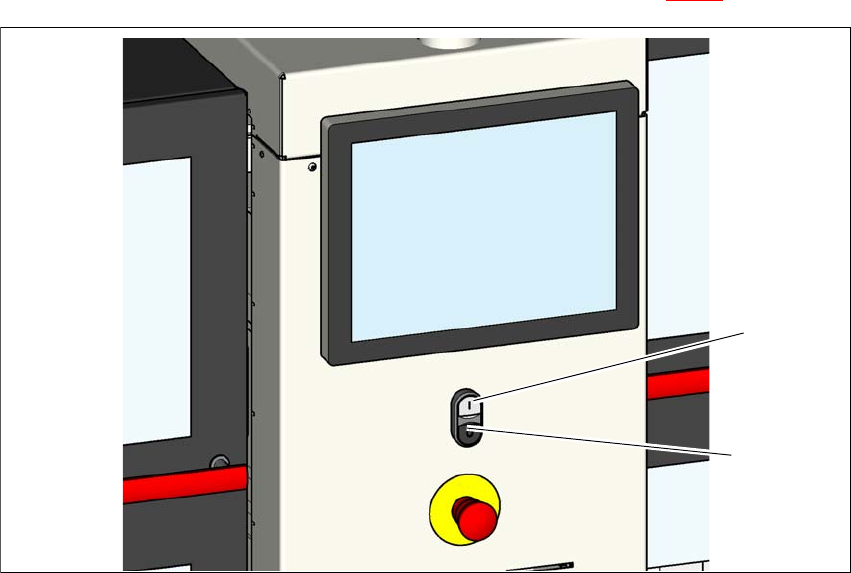
Press one of the start buttons on the placement machine (item 1 in fig. 2.6 - 2)
2
Fig. 2.6 - 2 Position of the start buttons (white) on the placement machine
(1) Start button (white) on the placement machine
(2) Stop button (black) on the placement machine
2.6.2 Hand guard on the board conveyor
The hand guard on the PCB conveyor prevents access to the placement machine when it is run-
ning. Make sure that the hand guard is always fitted.
(2)
(1)