00198382-03_UM_SIPLACE-CA4-V2_EN.pdf - 第263页
Instruction manual SIPLACE CA4 V2 6 Component handling From software version 713.0 Ed ition 12/2019 6.1 SIPLACE tape feed er modules for SIPLACE CA4 V2 263 6.1.6.1 T echnical dat a 6 6.1.6.2 Number of waffle p ack trays …
6 Component handling Instruction manual SIPLACE CA4 V2
6.1 SIPLACE tape feeder modules for SIPLACE CA4 V2 From software version 713.0 Edition 12/2019
262
6.1.6 Tray holder for component trolley
Item no. 00141285-xxTray holder for X-Series
6
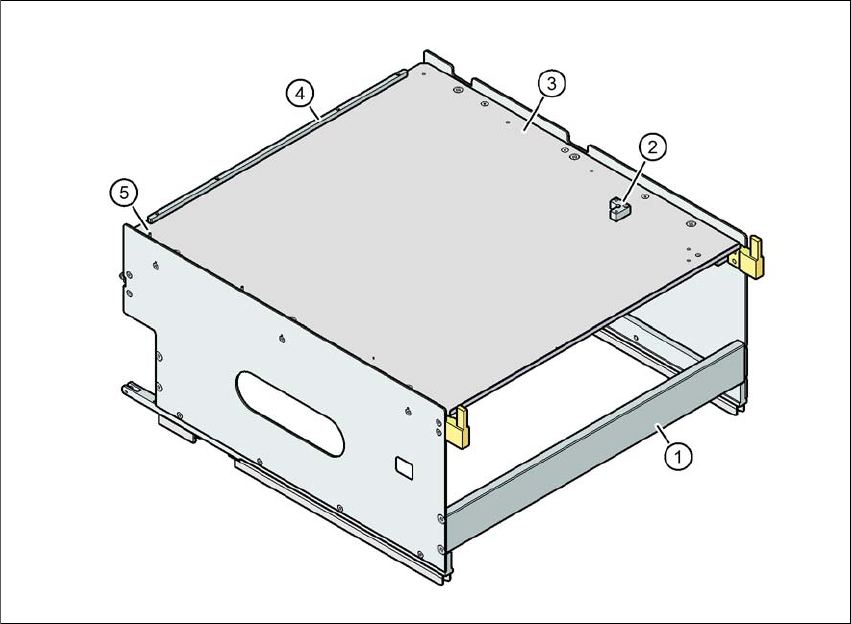
Fig. 6.1 - 9 Tray holder
(1) Tray holder
(2) Bracket for 2nd JEDEC waffle pack tray
(3) Waffle pack tray carrier
(4) Stop bar for the JEDEC waffle pack tray
(5) Locating pin - zero point of JEDEC waffle pack tray
6
Individually placed JEDEC waffle pack trays or waffle pack magazines can be fixed to the waffle
pack tray carrier with magnets. If two JEDEC waffle pack trays are placed, these will need to be
fixed into place with locking bars or mounting rails, as used for the MTC waffle pack tray carriers.
Parts: Item no.:
Magnet 00316593-xx
Locking bar/mounting rail for JEDEC magazines 00372615-xx
Instruction manual SIPLACE CA4 V2 6 Component handling
From software version 713.0 Edition 12/2019 6.1 SIPLACE tape feeder modules for SIPLACE CA4 V2
263
6.1.6.1 Technical data
6
6.1.6.2 Number of waffle pack trays per location and placement machine
6.1.6.3 Inserting the waffle pack tray into the component trolley
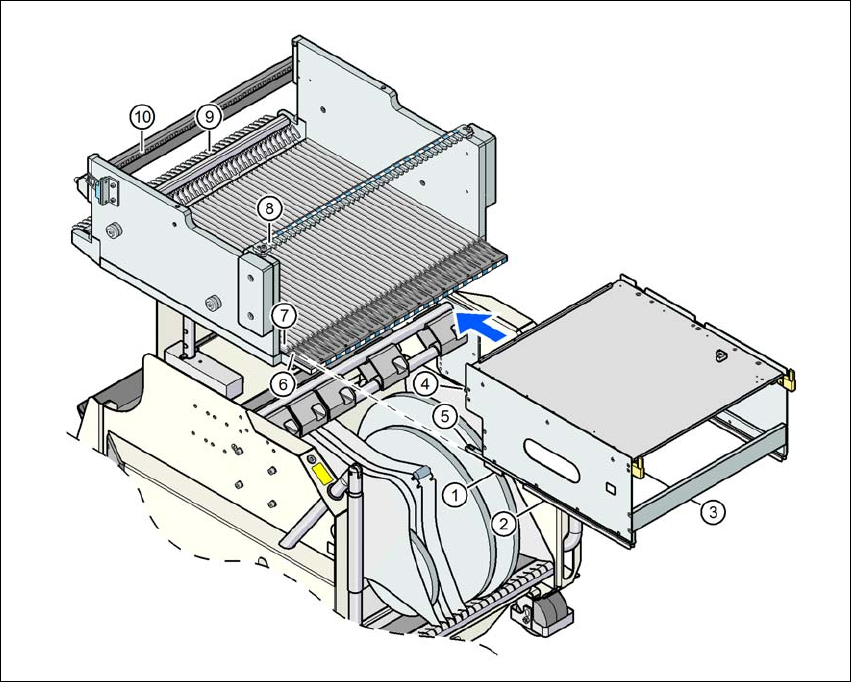
Place the two front slider guides (item 1 in fig. 6.1 - 10, page 264) for the holder onto the in-
sertion aid (item 6 in fig. 6.1 - 10, page 264 ).
Push the holder along the guide profiles (item 7 in fig. 6.1 - 10, page 264), towards the front.
The holder slides with the front (item 1) and back slide guides (item 2 in fig. 6.1 - 10, page
264) on the guide profiles.
Continue pushing the holder, until the two centering pins "front" (item 4 in fig. 6.1 - 10, page
264) disappear into the centering holes (item 10 in fig. 6.1 - 10, page 264).
Check the two "back" centering pins (item 3 in fig. 6.1 - 10, page 264) for the holder. They
should slide easily into the recesses (item 8 in fig. 6.1 - 10, page 264) of the centering rail.
At the end stop of the holder, the locking latches (item 9 in fig. 6.1 - 10, page 264) engage
with the locking rollers (item 5) of the holder.
The waffle pack tray holder can be locked and released via the user interface. You can therefore
easily change the holder without interruption to machine operation.
6
Dimensions L x W x H 429 mm x 376 mm x 200 mm
Location occupied on the changeover table 32 locations
*a
*)a X feeder modules can be placed on the remaining 8 locations. When using locking bars/mounting rails, the
locations available are reduced to 6, due to the fixation lever which protrudes at the side.
Possible position in the SIPLACE CA4 V2 Locations 2 and/or 4
Placement head range CPP M
*b
*)b Only permitted in high assembly position (CPP M_H).
PLEASE NOTE
Further information
The maximum component height for the waffle pack tray holder depends on the maxi-
mum component height for the placement head used. When using waffle pack trays,
bear in mind that the components may not higher than the pickup height of a standard
feeder.
Placement machine Location 2 Location 4
CA4 V2 1 1
WARNING
Occupation of locations!
Always follow the safety instructions about occupying locations, in section 2.6.5
, page 83.
6 Component handling Instruction manual SIPLACE CA4 V2
6.1 SIPLACE tape feeder modules for SIPLACE CA4 V2 From software version 713.0 Edition 12/2019
264
6
Fig. 6.1 - 10 Inserting the tray holder into the component trolley
(1) Front slider guide (6) Insertion aid
(2) Back slider guide (7) Sliding rail (omega profile)
(3) "Back" centering pin (8) Recesses in the centering bar for holding the
"back" centering pin
(4) "Front" centering pin (9) Locking latches
(5) Locking roller (10) Centering holes on the changeover table for
holding the "front" centering pin