1OM-1086-002.pdf - 第157页
2. V arious Functions 2.1 Paste Kneading Function Stable printing can be realized by mixing solder paste before printing, making use of the rolling phenomenon of solder paste (solder paste stirred due to the excessive fl…
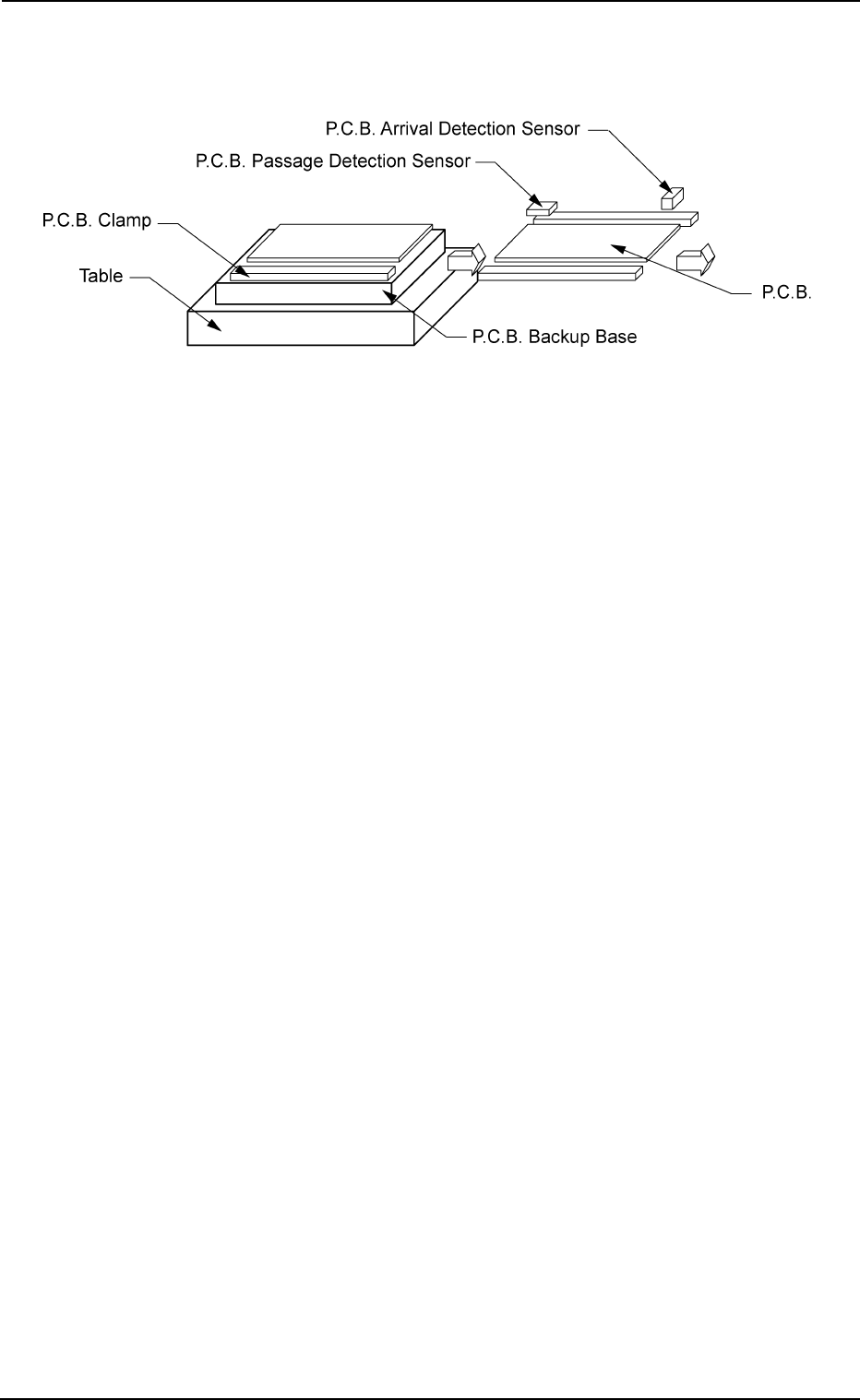
1.4 P.C.B. Output
Fig. 2B4
(1) The horizontal clamp releases the P.C.B. at the P.C.B. positioning
section and the P.C.B. backup base moves down. Then, the P.C.B.
is transferred onto the belt conveyor at the P.C.B. positioning sec-
tion.
(2) The table ( θ axis) is zeroed and the table (X axis) moves to the
P.C.B. unloading section. At this time, the gear of the P.C.B. posi-
tioning section meshes with the gear of the R conveyor.
(3) The R conveyor is driven. When the P.C.B. passage detection
sensor checks that the P.C.B. is transferred onto the R conveyor,
the table provided with the P.C.B. positioning section moves to its
origin.
(4) When the P.C.B. arrival detection sensor detects the P.C.B., the R
conveyor stops running.
(5) When the machine receives a P.C.B. requirement signal from the
output machine, the R conveyor is driven to transfer the P.C.B. to
the output machine.
(6) When the P.C.B. requirement signal stops coming from the output
machine, the R conveyor also stops running.
1.4 P.C.B. Output
0211-005 Chapter 2 2-5 Tg0582-PM-D1

2. Various Functions
2.1 Paste Kneading Function
Stable printing can be realized by mixing solder paste before printing,
making use of the rolling phenomenon of solder paste (solder paste
stirred due to the excessive flowing between the squeegee and the
screen).
Refer to "9.5 "Paste Scraping" Tab" in "Section 5 Menus for Automatic
Operation " for details.
When solder paste is used right after stirred and mixed by the
kneader, kneading is not required.
2.2 Coordinate Teaching Function
This function is used to teach the coordinates of fiducial marks for P.C.B./
screen recognition operations.
The positional coordinates of two fiducial marks can be taught in each
recognition mode.
Refer to "6.2 "Coordinate Teaching" Tab" in "Section 6" for details.
2.3 Jig Position Coordinate Teaching Function
This function is used to teach the positional coordinates of the vacuum
plate to pick up and hold a P.C.B. firmly.
Refer to "6.3 "Vac. Plate Pos. Teaching" Tab" in "Section 6" for details.
2.4 Device Check and Management Functions
These functions are used to view the input status of various sensors
and motor controllers, the versions of the programs, and the zeroing
condition of each device for management purposes.
Refer to "2. "DEVICE CHECK" Window (Submenu)" in "Section 6" for
details.
2.5 Blower Unit (Vacuum Source)
The machine is equipped with a blower that generates vacuum for screen
cleaning and P.C.B. picks.
Refer to "11. Vacuum Source" in "Section 1" of "chapter 3" (Vol. 2) for
details.
2.1 Paste Kneading Function
0211-005 Chapter 2 2-6 Tg0582-PM-D1

2.6 Cleaning Function
This function is used to clean the screen in three modes (combinations
of "Dry", "Wet", and "Vacuum") for stable printing.
Refer to "9.1 "Screen Cleaning" Tab" in "Section 5" for details.
2.7 Conveyor Width Automatic Adjustment Function
This function is used to automatically adjust the widths of the L/R con-
veyors according to the parameters registered in the pattern program.
2.8 Table Chute Width Automatic Adjustment Func-
tion
This function is used to automatically adjust the width of the table chutes
according to the parameters registered in the pattern program.
2.9 P.C.B. Stopper Position Automatic Adjustment
Function
This function is used to automatically adjust the position of the P.C.B.
stopper according to the parameter registered in the pattern program.
2.10 P.C.B. Support Pin Up/Down or Jig Automatic
Adjustment Function
This function is used to automatically adjust the up/down movement
(distance) of the P.C.B. support pins or the jig according to the param-
eters registered in the pattern program.
2.11 Printing Pressure Feedback Function
This function works to get the result of subsequent printing close to the
specified value by changing the pressure of air supplied to the cylinder
that generates printing pressure based on the difference between the
specified value of the printing pressure and the actual printing pressure
(mean value in the printing range).
Refer to "5.2 "Operation Mode" Tab" in Section 5 Menus for Automatic
Operation for details.
(Turn on (check) the "Use" check box in the "Printing Press. Feedback"
group box.)
0211-005
Chapter 2 2-7 Tg0582-PM-D1