1OM-1086-002.pdf - 第238页
6. "RECOVER Y" Submenu This window can be used to correct the current pattern program data. The data can be corrected regardless of the state of the automatic operation but cannot be saved during operation. • W…

*2 Squeegee Limit Stop Setting
This enables the operator to set the percentage of printing opera-
tions to stop the automatic operation due to the end of squeegee
life.
The rate (percentage) can be determined, regarding the life speci-
fied in *1 (Squeegee Limit Warning) as 100%.
Press the up arrow on the right side of the spinner to make
the number change in increments of one. Pressing the
down arrow makes the number change in decrements of
one.
*3 [SAVE] Button
Press this button when the above-described settings *1 and *2 are
completed. The set values are saved on the machine side.
0211-005
Chapter 2 5-30 Tg0582-PM-D1
5.4 "Auto Stop Setting" Tab Sheet
6. "RECOVERY" Submenu
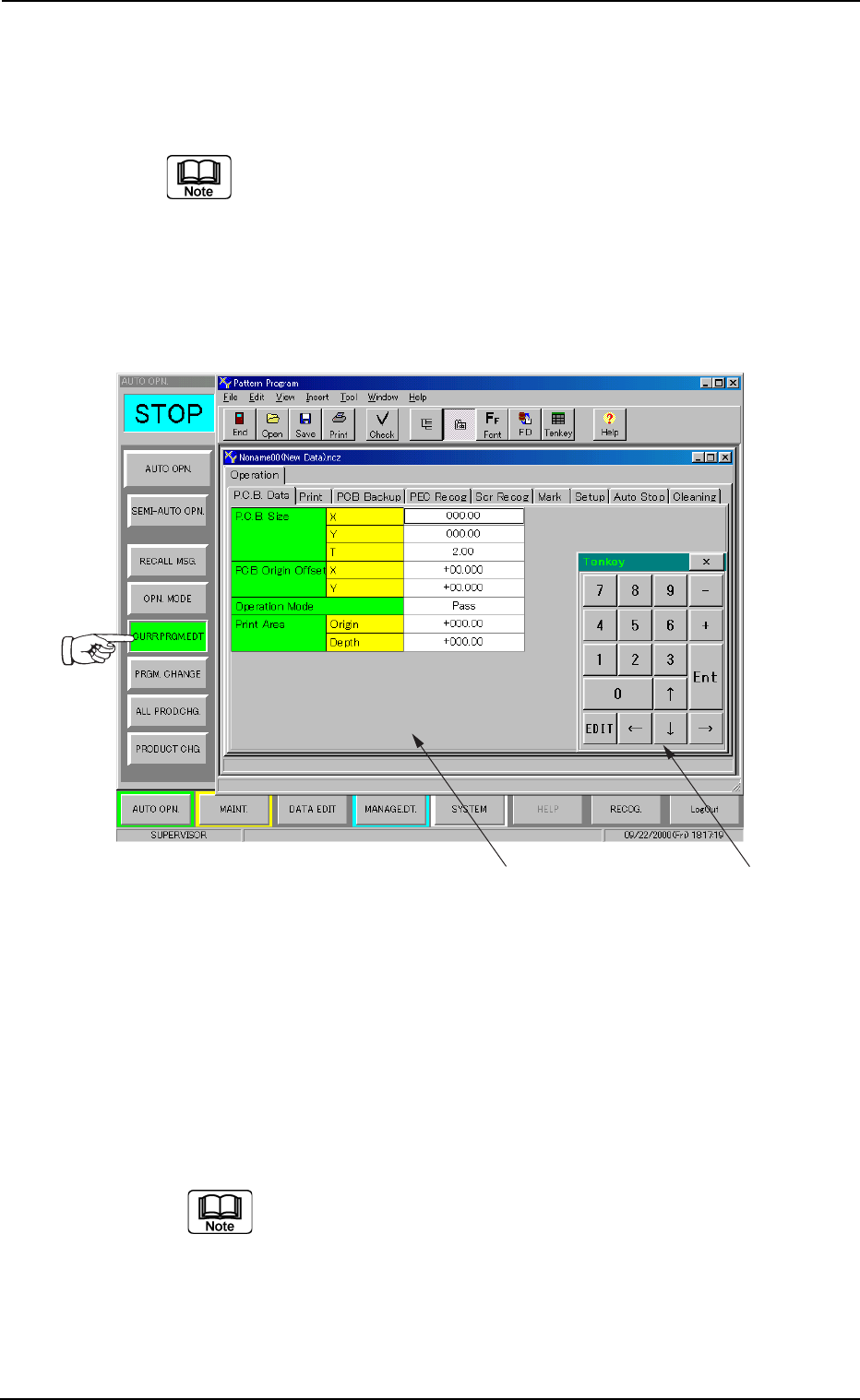
This window can be used to correct the current pattern program data.
The data can be corrected regardless of the state of the
automatic operation but cannot be saved during operation.
• Window Layout
When the [RECOVERY] button is pressed in the "AUTO OPERA-
TION" submenu bar, the following window opens.
Fig. 2E20 "RECOVERY" Window (Submenu)
• Window Composition
*1 "Pattern Program" Edit Sheet
This sheet can be used to correct the current pattern program data.
*2 Ten-Key Window
This window can be used to enter numerical values.
Refer to "Section 2 Pattern Program in Chapter 1 Pro-
gramming of Volume 2" for the detailed information on
how to correct (edit) and save the data.
6. "RECOVERY" Submenu
*1
*2
0211-005 Chapter 2 5-31 Tg0582-PM-D1
7. "PROGRAM CHANGE" Submenu
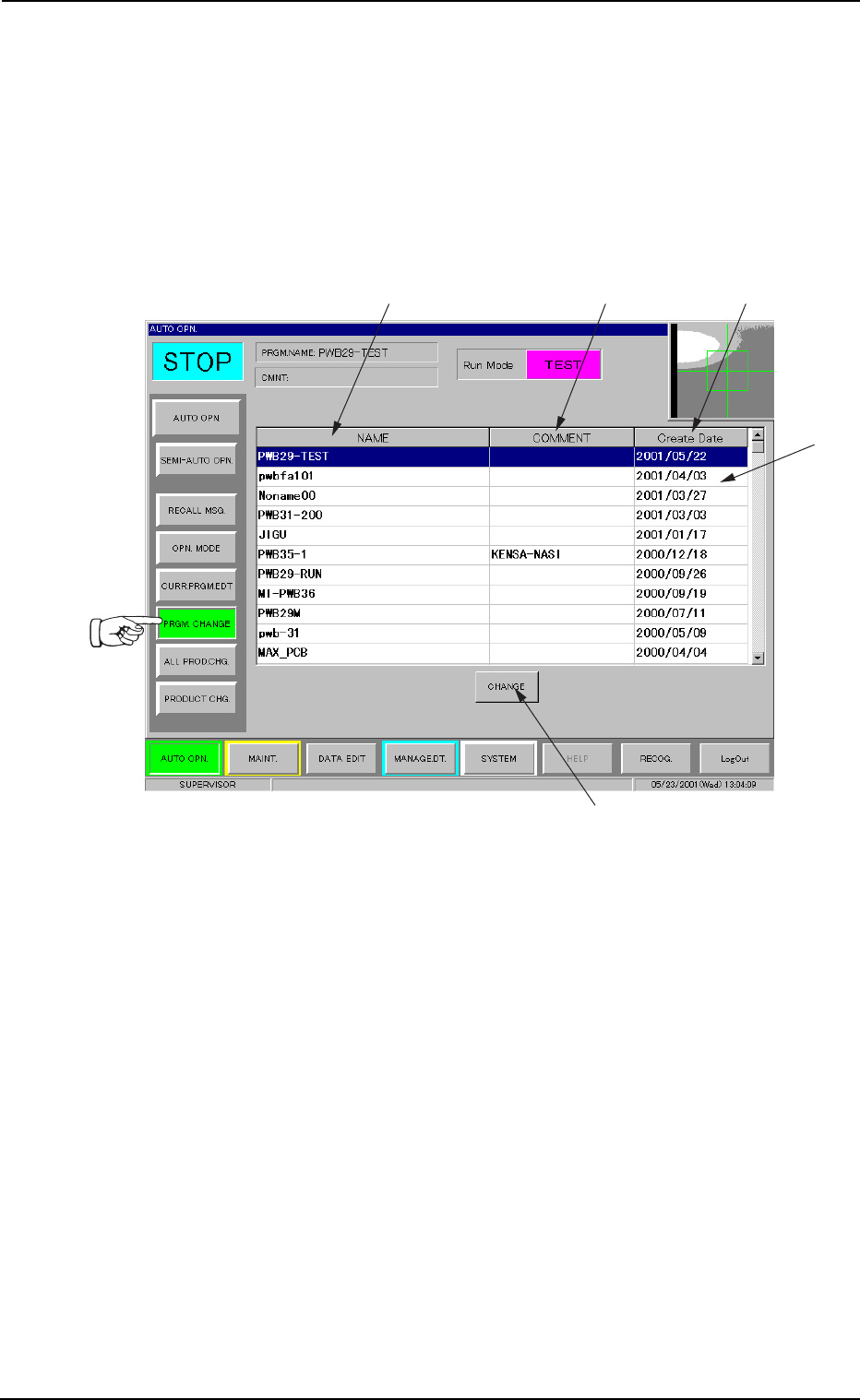
This window can be used to change the object model (pattern program)
for production.
• Window Layout
When the [PRGM. CHANGE] button is pressed in the "AUTO OP-
ERATION" submenu bar, the following window opens.
Fig. 2E21 "PROGRAM CHANGE" Window (Submenu)
• Window Composition
*1 List of Model Names
Listed are the registered model names (pattern program names).
When one (the line) of the model name is selected from the list, it
is highlighted in blue.
*2 [NAME] Button
When this button is pressed, the model names in the list *1 are
arranged in ascending or descending order (alphabetical order).
*3 [COMMENT] Button
When this button is pressed, the comments on the models in the
list *1 are arranged in ascending or descending order (alphabetical
order).
7. "PROGRAM CHANGE" Submenu
0211-005 Chapter 2 5-32 Tg0582-PM-D1
*2 *3 *4
*5
*1