1OM-1086-002.pdf - 第247页
[Paste Scrap. Pos. Move (ST ART)] Button When this button is pressed, the background color turns blue. When the [ST A RT] button on the front operation panel is pressed subsequently , the squeegees and the screen move to…
9.2 "Squeegee Change" Tab
This tab sheet enables the operator to move the squeegees and the
screen for squeegee cleaning or replacement and perform the paste
removal operation.
• Sheet Layout
When the [Squeegee Chg.] tab is pressed in the "PRODUCT
CHANGE" window (submenu), the following tab sheet appears.
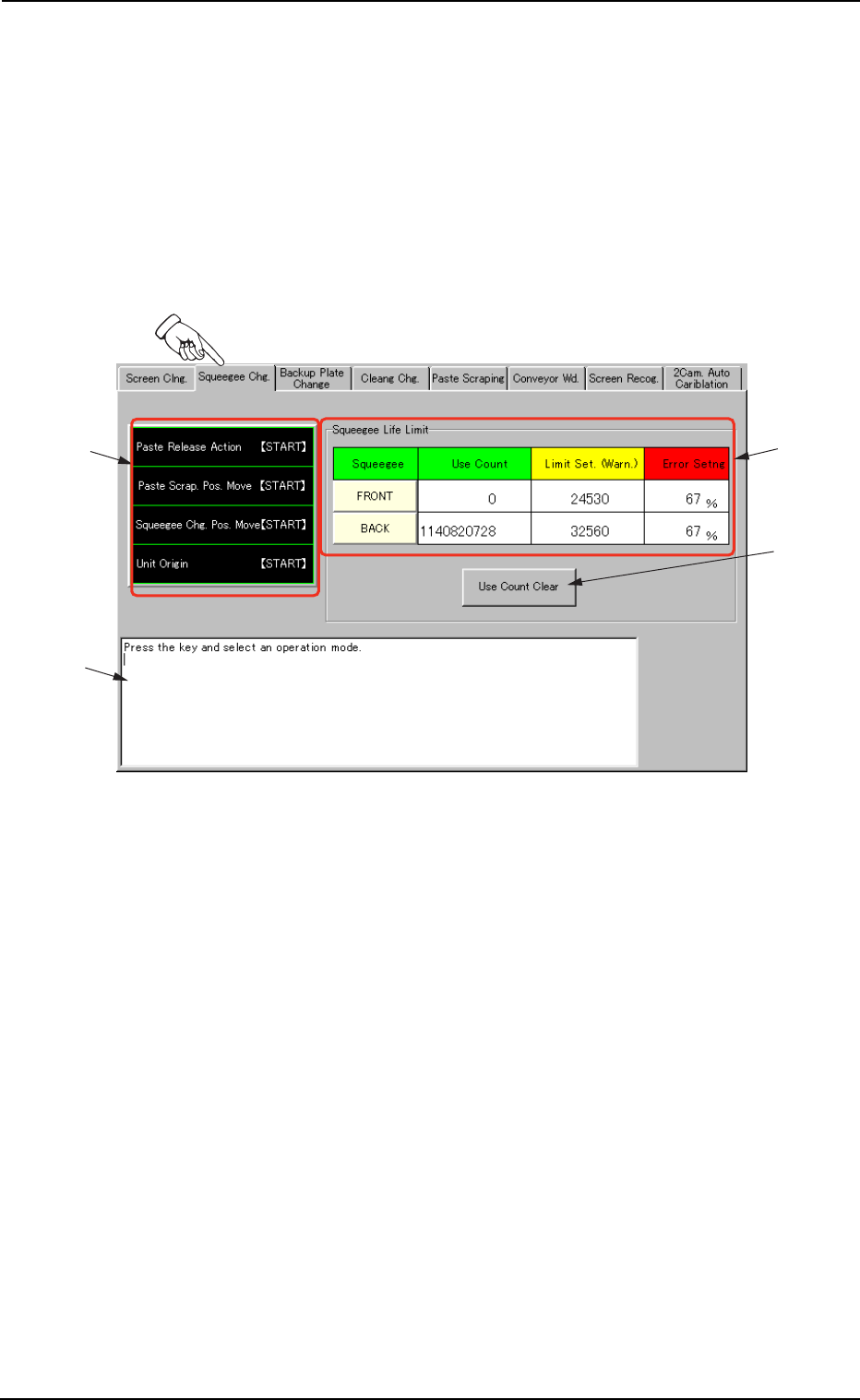
Fig. 2E27 "Squeegee Change" Tab Sheet
• Sheet Composition
*1 Operation Buttons
The "Squeegee Chg" tab sheet is provided with the following but-
tons.
[Paste Release Action (START)] Button
When this button is pressed, the background color turns blue.
When the [START] button on the front operation panel is pressed
subsequently, solder paste on the squeegees is removed from the
squeegees and adheres to the screen.
9.2 "Squeegee Change" Tab
*1
*2
*4
*3
0211-005 Chapter 2 5-39 Tg0582-PM-D1

[Paste Scrap. Pos. Move (START)] Button
When this button is pressed, the background color turns blue.
When the [START] button on the front operation panel is pressed
subsequently, the squeegees and the screen move to the position
where solder paste can be scraped.
Squeegee Chg. Pos. Move (START)] Button
When this button is pressed, the background color turns blue.
When the [START] button on the front operation panel is pressed
subsequently, the squeegees and the screen move to the speci-
fied positions for squeegee replacement.
[Unit Origin (START)] Button
When this button is pressed, the background color turns blue.
When the [START] button on the front operation panel is pressed
subsequently, the squeegees and the screen move to the printing
position.
*2 Squeegee Life Limit
Displayed is the data related to the longevity of the front and rear
squeegees.
Squeegee : The squeegees are classified as "Front
One" and "Rear One".
Use Count : Displayed are how many times the squee-
gees are used so far.
Limit Set. (Warn.) : Displayed are the numbers of squeegee
uses specified in the "OPERATION MODE"
submenu.
Error Setng : Regarding the full longevity of the squee-
gees as 100%, the displayed percentages
(ratio between the full longevity and the
number of squeegee uses) indicate that the
machine stops automatically when the
number of either front or rear squeegee
uses has reached the specified value.
*3 [Use Count Clear] Button
When this button is pressed, the number of the squeegee uses so
far is cleared to "0" (zero).
*4 Message
A message is issued, giving a guideline of the operations related
to the above-described buttons *1.
9.2 "Squeegee Change" Tab
0211-005 Chapter 2 5-40 Tg0582-PM-D1
9.3 "Backup Plate Change" Tab
This tab sheet enables the operator to move each unit for detachment/
attachment of the backup jig and set a jig replacement mode.
• Sheet Layout
When the [Backup Plate Change] tab is pressed in the "PRODUCT
CHANGE" window (submenu), the following tab sheet appears.
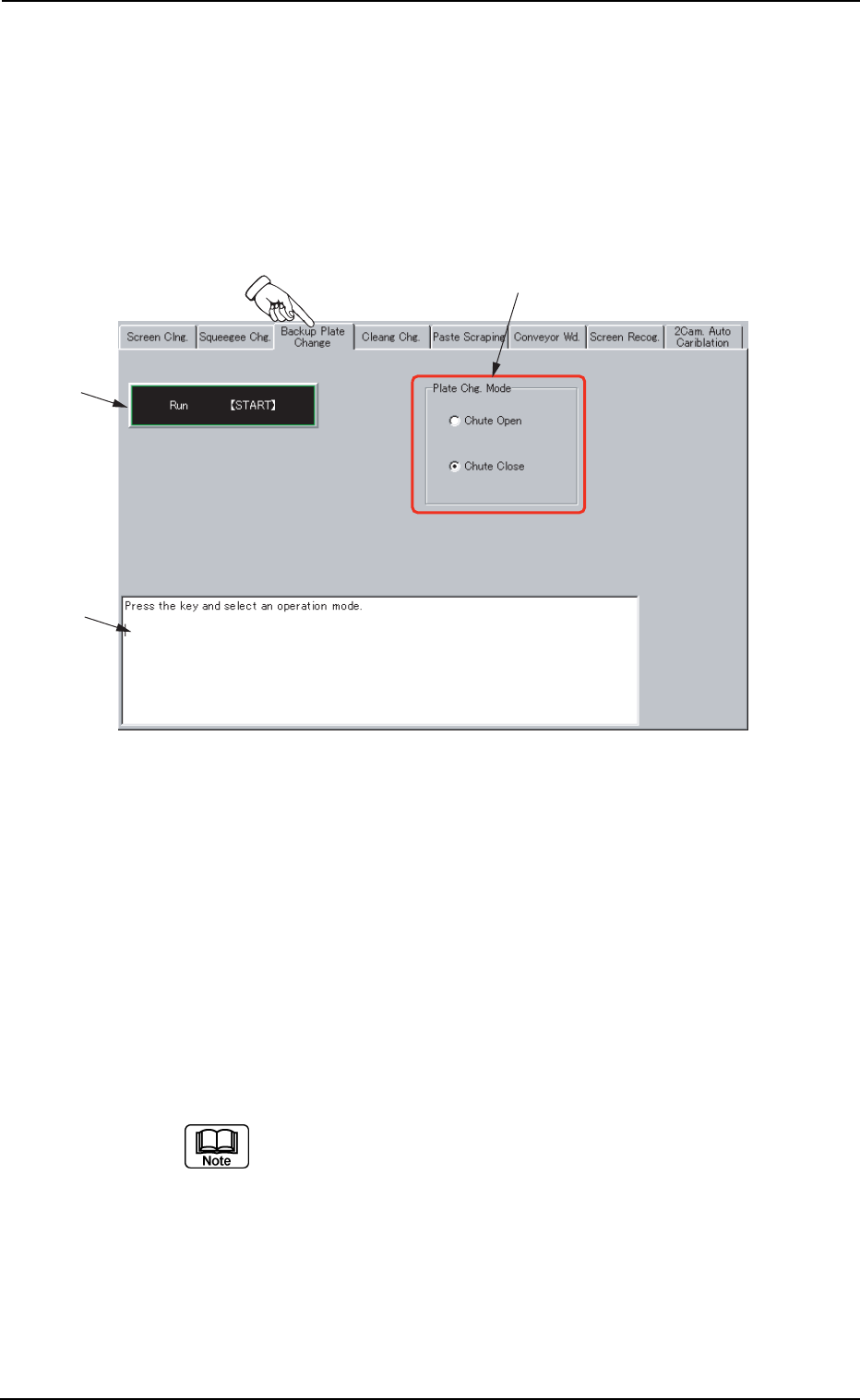
Fig. 2E28 "Backup Plate Change" Tab Sheet
• Sheet Composition
*1 Plate Chg. Mode
Turn on the "Chute Open" or the "Chute Close" option button to
determine whether or not the table chute (conveyor) should be
opened or closed for backup jig replacement.
Chute Open : The selection of this option button facilitates the
replacement work of the backup jig.
Chute Close : The selection of this option button facilitates the
positional adjustment of the support pins.
*2 [Run (START)] Button
When this button is pressed, the background color turns blue.
When an option button is turned on (selected), a dot ap-
pears inside the circle.
When a blank circle is turned on, a dot appears inside the
circle, indicating that it is selected.
When the [START] button on the front operation panel is pressed
subsequently, each unit moves to its specified position.
*3 Message
A message is issued, giving a guideline of the operations related
to the above-described button *1 or *2.
9.3 "Backup Plate Change" Tab
*1
*3
*2
0211-005 Chapter 2 5-41 Tg0582-PM-D1