1OM-1086-002.pdf - 第207页
1.1.1 Submenus and T abs The "AUTO OPERA TION" window is provided with 8 submenu buttons. "AUTO OPERA TION" Window Submenus T abs Reference Item Nos. AUTO OPN. Prod. State (2.1) Org./Signal Info. (2.2…

*3 Current Mode
The current mode of the machine is displayed.
There are four modes - "RUN", "PAUSE", "STOP", and "WAIT".
*4 Run Mode
PRINT: The machine should be set in this mode for automatic
operation.
PASS : The machine should be set in this mode for non-produc-
tion (pass) operation.
TEST : The machine should be set in this mode for test opera-
tion.
*5 Program Name and Comment
PRGM.NAME : Model (Pattern Program) Name for Automatic Op-
eration
CMNT : Displayed is the comment attached to the current
program.
*6 Submenu Sheet
Displayed is an operation sheet which corresponds to the button
selected from the submenu bar.
*7 Tabs
Multiple operation sheets have extensions called "tabs".
When a tab is pressed, the corresponding operation sheet appears.
When there is only one operation sheet, no tab is provided.
1.1 Composition of Menus for Automatic Operation
0211-005 Chapter 2 5-3 Tg0582-PM-D1
1.1.1 Submenus and Tabs
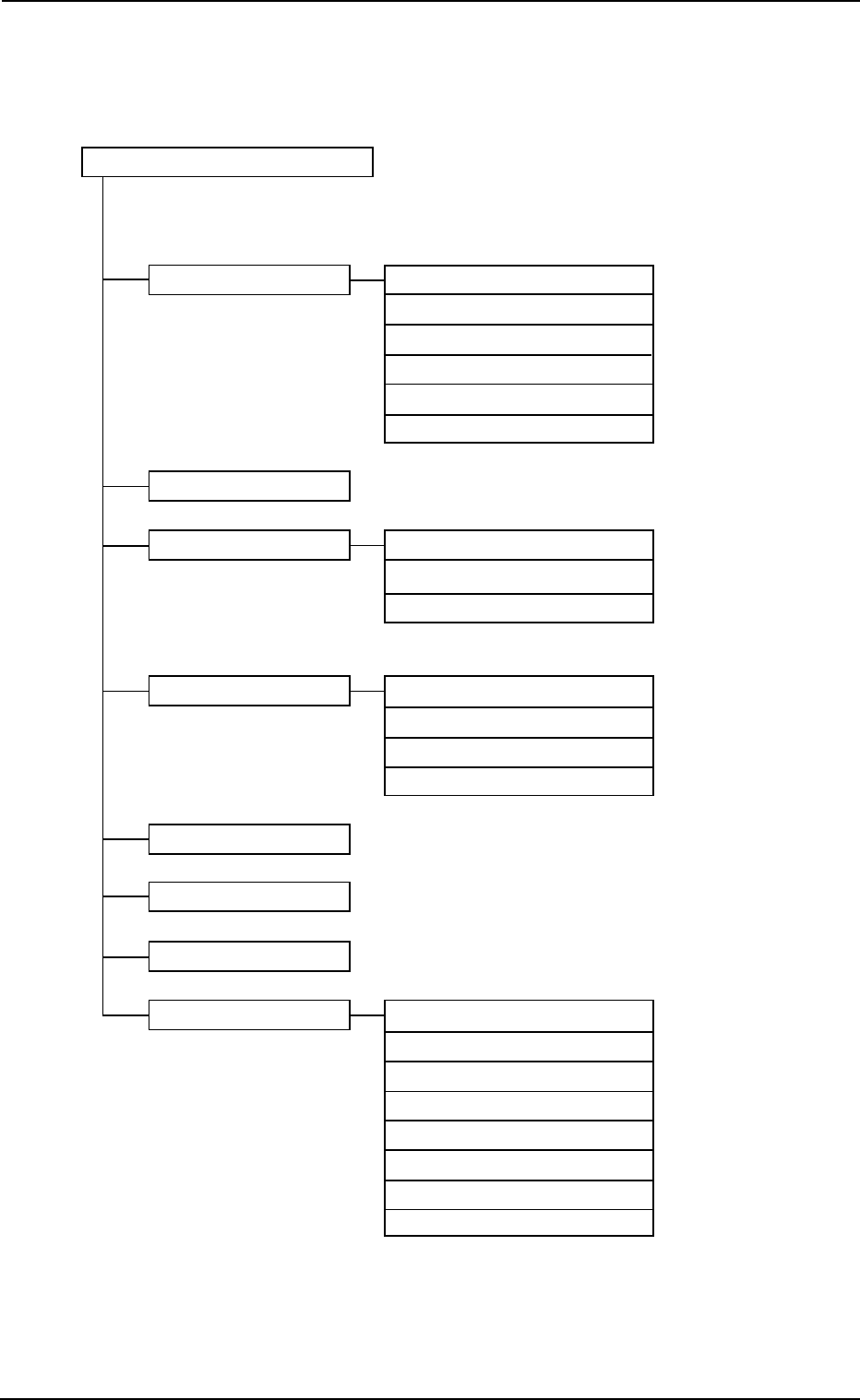
The "AUTO OPERATION" window is provided with 8 submenu buttons.
"AUTO OPERATION" Window
Submenus Tabs Reference Item Nos.
AUTO OPN. Prod. State (2.1)
Org./Signal Info. (2.2)
Crnt.Prgm.Info. (2.3)
Auto Stop Info (2.4)
Printing Pressure (2.5)
Recog. Data (2.6)
SEMI-AUTO OPN. (3)
RECALL MSG. Machine Error Recall (4.1)
Information Recall (4.2)
System Info. (4.3)
OPN. MODE TEST Opn. Mode (5.1)
Operation Mode (5.2)
Printing Condition (5.3)
Auto Stop Setting (5.4)
RECOVERY (6)
PRGM. CHANGE (7)
ALL PROD.CHG. (8)
PRODUCT CHG. Screen Clng. (9.1)
Squeegee Chg. (9.2)
Backup Plate Change (9.3)
Cleang Chg. (9.4)
Paste Scraping (9.5)
Conveyor Wd. (9.6)
Screen Recog. (9.7)
2Cam. Auto Calibration (9.8)
Note: The numbers in ( ) represent Nos. of items which can
be referred to for details.
Fig. 2E2
1.1 Composition of Menus for Automatic Operation
0211-005 Chapter 2 5-4 Tg0582-PM-D1
2. "AUTO OPERATION" Submenu
• Window Layout
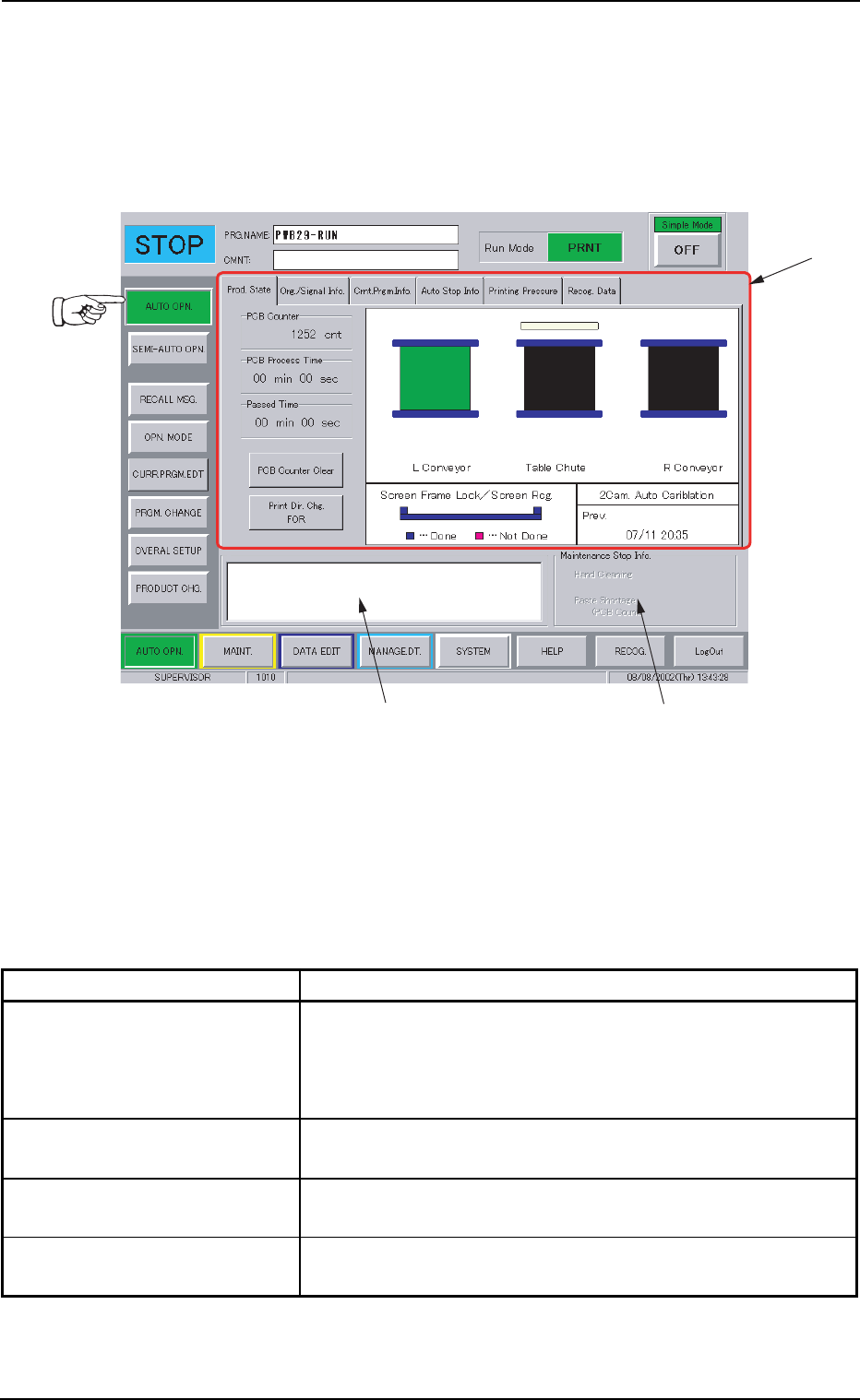
When the [AUTO OPN.] button is pressed on the "AUTO OPERA-
TION" submenu bar, the following window opens.
Fig. 2E3 "AUTO OPERATION" Window (Submenu)
• Window Composition
*1 Tabs
The "AUTO OPERATION" window (submenu) has 6 tab sheets.
When a tab is pressed, the corresponding tab sheet appears.
Table 2E
1-1
Tabs Description
Prod. State Displayed in this tab sheet are the number of produced
P.C.B.’s (PCB Counter), the time required for printing (PCB
Process Time), the elapsed time after printing (Passed Time),
etc.
Org./Signal Info. Displayed in this tab sheet are the origin information on each
unit and the real-time signal exchange condition (ON/OFF).
Crnt.Prgm.Info. Displayed in this tab sheet is the outline of the current pattern
program are displayed in this tab sheet.
Auto Stop Info Displayed in thsi tab sheet are various set values for manual
operation.
(To be continued)
2. "AUTO OPERATION" Submenu
0211-005 Chapter 2 5-5 Tg0582-PM-D1
*1
*2
*3