1OM-1086-002.pdf - 第267页
4. "MANUAL SUB-SYSTEM" Window (Submenu) This window can be used to perform the manual operation of each unit. • Window Layout When the [MAN. SUB-SYS] button submenu bar is pressed in the "MAINTENANCE"…

*2 STATUS
Displayed is the origin status of each unit.
• Status Display
ORIGIN : This indicates that the device is already zeroed and
located at its origin.
------
------
---
: This indicates that the device is not zeroed completely.
DONE : This indicates that the device is already zeroed but
not located at its origin.
*3 [All Sel.] Button
All units except for "Table Chute Width", "L Conveyor Width", and
"R Conveyor Width" are selected.
When the [All Sel.] button is selected and the [START] button on
the front operation panel is pressed, the selected units are zeroed.
*4 [All Can.] Button
When this button is pressed, the selection of each unit (axis that
represents the direction of movement) is canceled.
3. "ZEROING OPERATION" Window (Submenu)
0211-005 Chapter 2 6-9 Tg0582-PM-D1
4. "MANUAL SUB-SYSTEM" Window (Submenu)
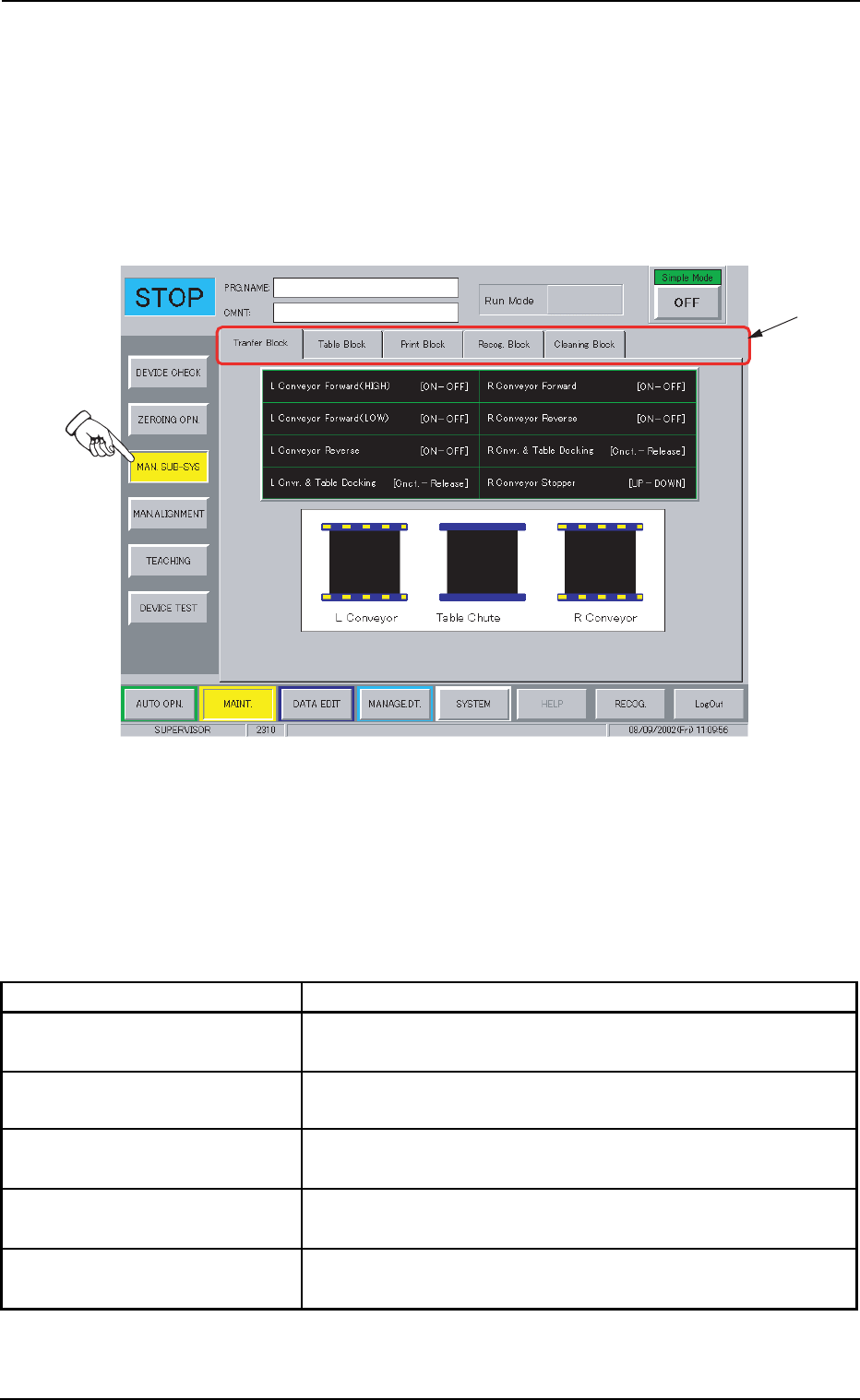
This window can be used to perform the manual operation of each unit.
• Window Layout
When the [MAN. SUB-SYS] button submenu bar is pressed in the
"MAINTENANCE" submenu bar, the following window opens.
Fig. 2F8 "MANUAL SUB-SYSTEM" Window (Submenu)
• Window Composition
*1 Tabs
The "MANUAL SUB-SYSTEM" window (submenu) has 5 tab sheets.
When a tab is pressed, the corresponding tab sheet appears.
Table 2F2
Tabs Description
Transfer Block This tab sheet enables the operator to perform the manual
operation of the L and R conveyors.
Table Block This tab sheet enables the operator to perform the manual
operation for each table axis "X, Y, and θ ".
Print Block This tab sheet enables the operator to perform the manual
operation of the printing section.
Recog. Block This tab sheet enables the operator to perform the manual
operation of the recognition section.
Cleaning Block This tab sheet enables the operator to perform the manual
operation of the cleaning section.
4. "MANUAL SUB-SYSTEM" Window (Submenu)
*1
0211-005 Chapter 2 6-10 Tg0582-PM-D1
4.1 "Transfer Block" Tab
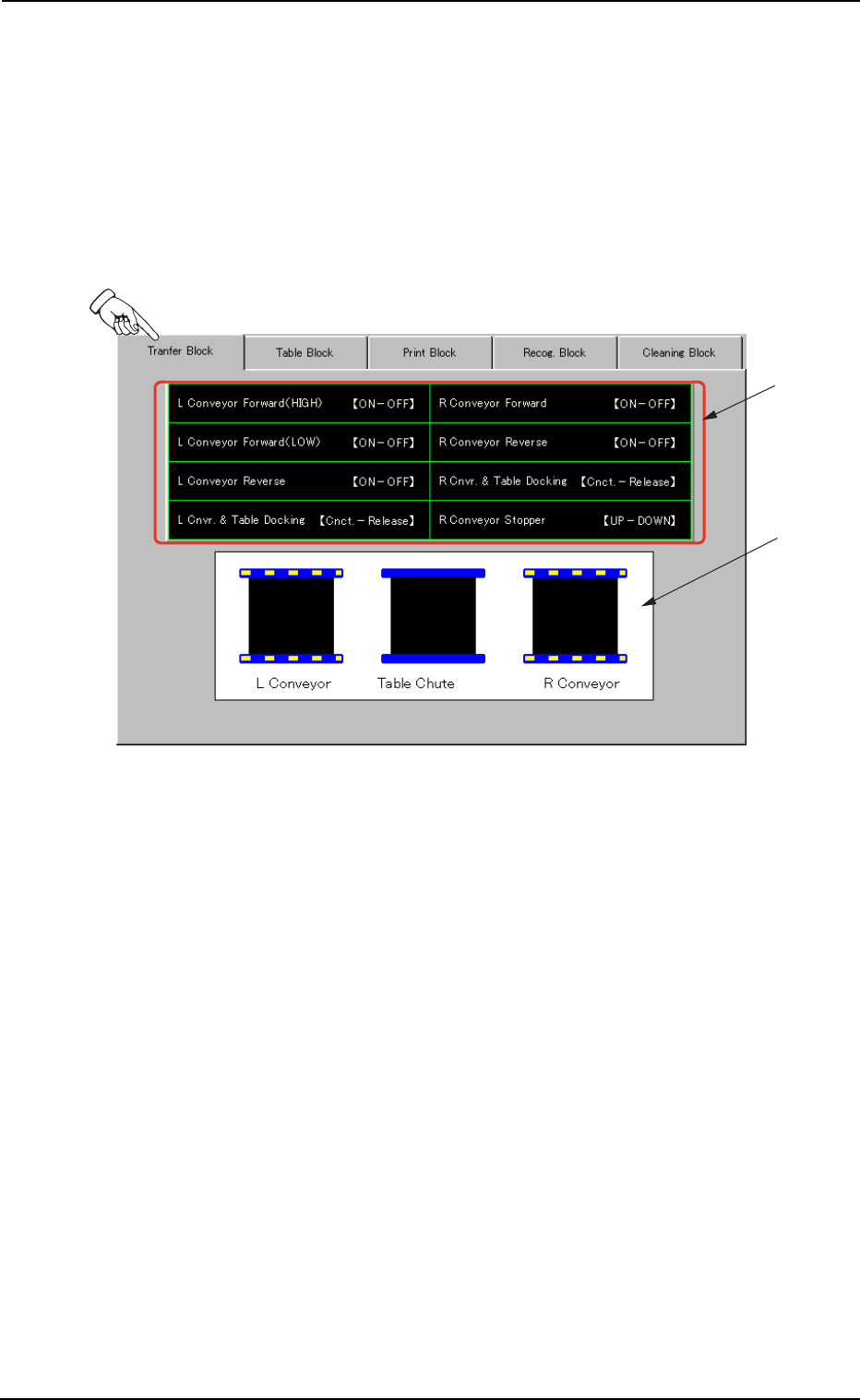
This tab sheet can be used to perform the manual operation of the L
and R conveyors.
• Sheet Layout
When the [Transfer Block] tab is pressed in the "MANUAL SUB-
SYSTEM" window (submenu), the following tab sheet appears.
Fig. 2F9 "Transfer Block" Tab Sheet
• Sheet Composition
*1 Unit Select Buttons
When a button is pressed, the background color turns blue, indi-
cating that the unit is selected.
When the [START] button on the front operation panel is pressed,
the selected unit starts moving. When the button is released, the
unit stops moving and is reset to the original position.
[L Conveyor Forward (HIGH) (ON-OFF)] Button
When this button is pressed, the L conveyor starts running in nor-
mal direction and transfers the P.C.B. to the downstream side at a
high speed.
[L Conveyor Forward (LOW) (ON-OFF)] Button
When this button is pressed, the L conveyor starts running in nor-
mal direction and transfers the P.C.B. to the downstream side at a
low speed.
4.1 "Transfer Block" Tab
*1
*2
0211-005 Chapter 2 6-11 Tg0582-PM-D1