1OM-1086-002.pdf - 第294页
*2 " Setting " When the [Data Save] button is pressed, the set values are en- tered. *3 [Posn. Correction Execute (ST ART)] Button When this button is pressed, positional deviations are corrected. *4 [Unit Retu…
6.1 "Inaccurate Posn. Correction" Tab
This tab sheet enables the operator to move the table (P.C.B.) under
the screen and correct the positional deviation between the P.C.B. and
the screen through the manual alignment operation, using the screen
recognition camera.
It is also possible to correct the positional deviation through the manual
alignment operation without using the camera.
(a) The data specified through the inaccurate position cor-
rection operation is reflected as parameters for "Prntng.
Correction (Back)" and "Prntng. Correction (For.)" in the
"Print" data (DATA EDIT) by pressing the [Data Save] but-
ton.
The same parameters as the obtained ones are set for
both forward and backward movements of the squeegee
in each movement direction.
(b) Default Values at Shipment: "0" (zero)
••
••
• Sheet Layout
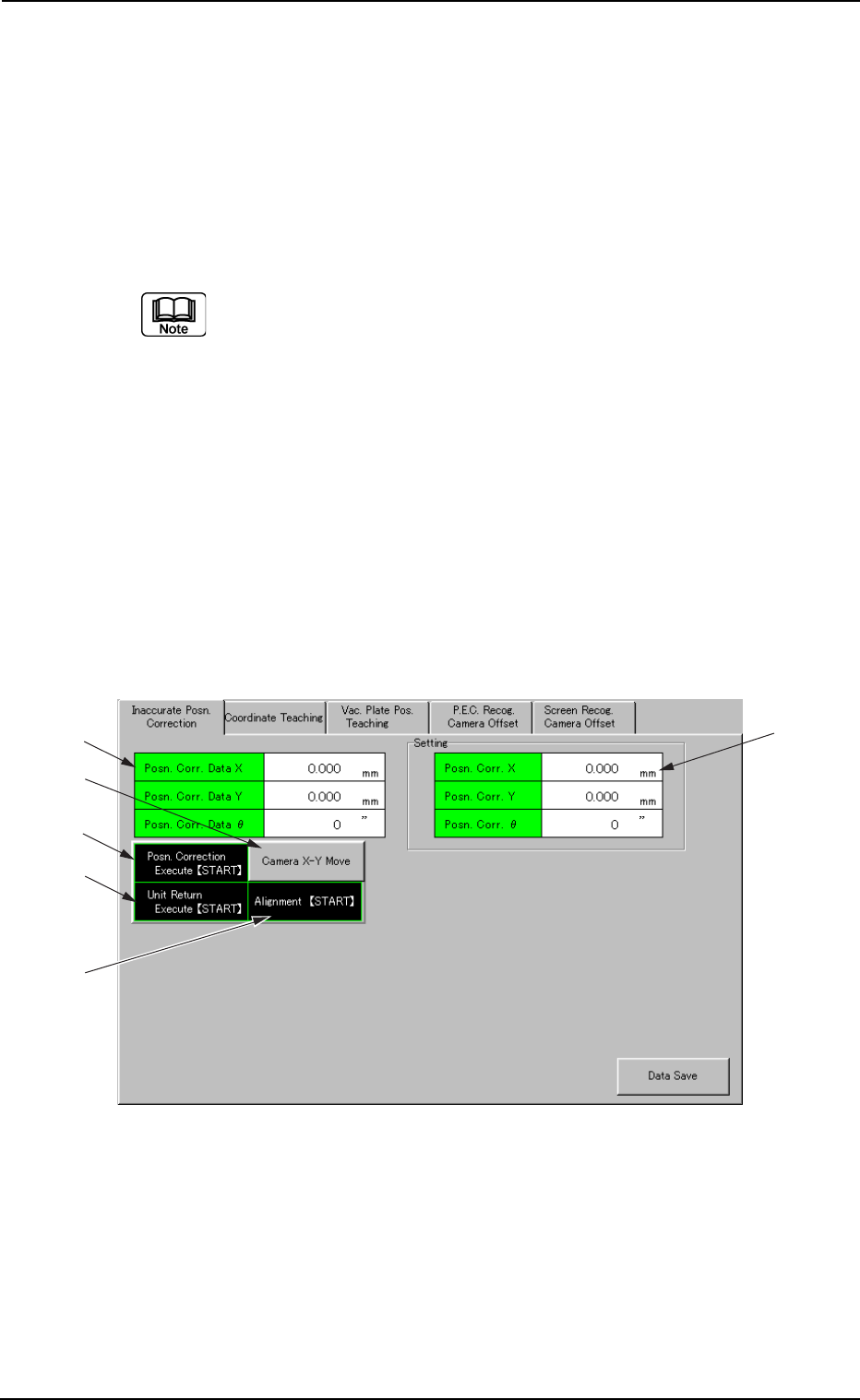
When the [Inaccurate Posn. Correction] tab is pressed in the "TEACH-
ING" window (submenu), the following tab sheet appears inside the
window.
Fig. 2F28
••
••
• Sheet Composition
*1 "Posn. Corr. Data X, Y,
θθ
θθ
θ"
The amount of deviations at the positional setting are automati-
cally set in each text box.
6.1 "Inaccurate Posn. Correction" Tab
*2
*1
*6
*3
*4
*5
0211-005 Chapter 2 6-36 Tg0582-PM-D1

*2 "Setting"
When the [Data Save] button is pressed, the set values are en-
tered.
*3 [Posn. Correction Execute (START)] Button
When this button is pressed, positional deviations are corrected.
*4 [Unit Return Execute (START)] Button
When this button is pressed, each unit is zeroed.
*5 [Alignment (START)] Button
When this button is pressed, the screen and the P.C.B. are aligned
with each other.
*6 [Camera X-Y Move] Button
When this button is pressed, the "Screen Recog. Camera Move
Opn. Scrn." window opens.
6.1.1 Procedure for Inaccurate Position Correction
(1) Set a P.C.B. to the dummy P.C.B. input location.
(2) When the [Posn. Correction Execute (START)] button is selected
and the [START] button on the front operation panel is pressed,
the machine starts the position correction operation.
After transferring the P.C.B. at the dummy P.C.B. input location
and positioning it, move the table under the screen so that the
machine is set ready for the manual alignment operation, using the
screen recognition camera.
(3) When the [Camera X-Y Move] button is pressed, the "Screen
Recog. Camera Move Opn. Scrn." window opens.
Move the recognition camera to the coordinates (positioning point)
of a recognition mark (a foot pattern, etc.).
Refer to "6.1.2 Camera X-Y Move" for details.
(4) When the [Alignment (START)] button is pressed, the window for
adjustment of the screen and table positions opens.
Refer to "6.1.3 Alignment Operation" for details.
(5) When the [Unit Return Execute (START)] button is selected and
the [START] button on the front operation panel is pressed after
the end of the above-described operations, each unit is zeroed.
6.1 "Inaccurate Posn. Correction" Tab
0211-005 Chapter 2 6-37 Tg0582-PM-D1
6.1.2 Camera X-Y Move
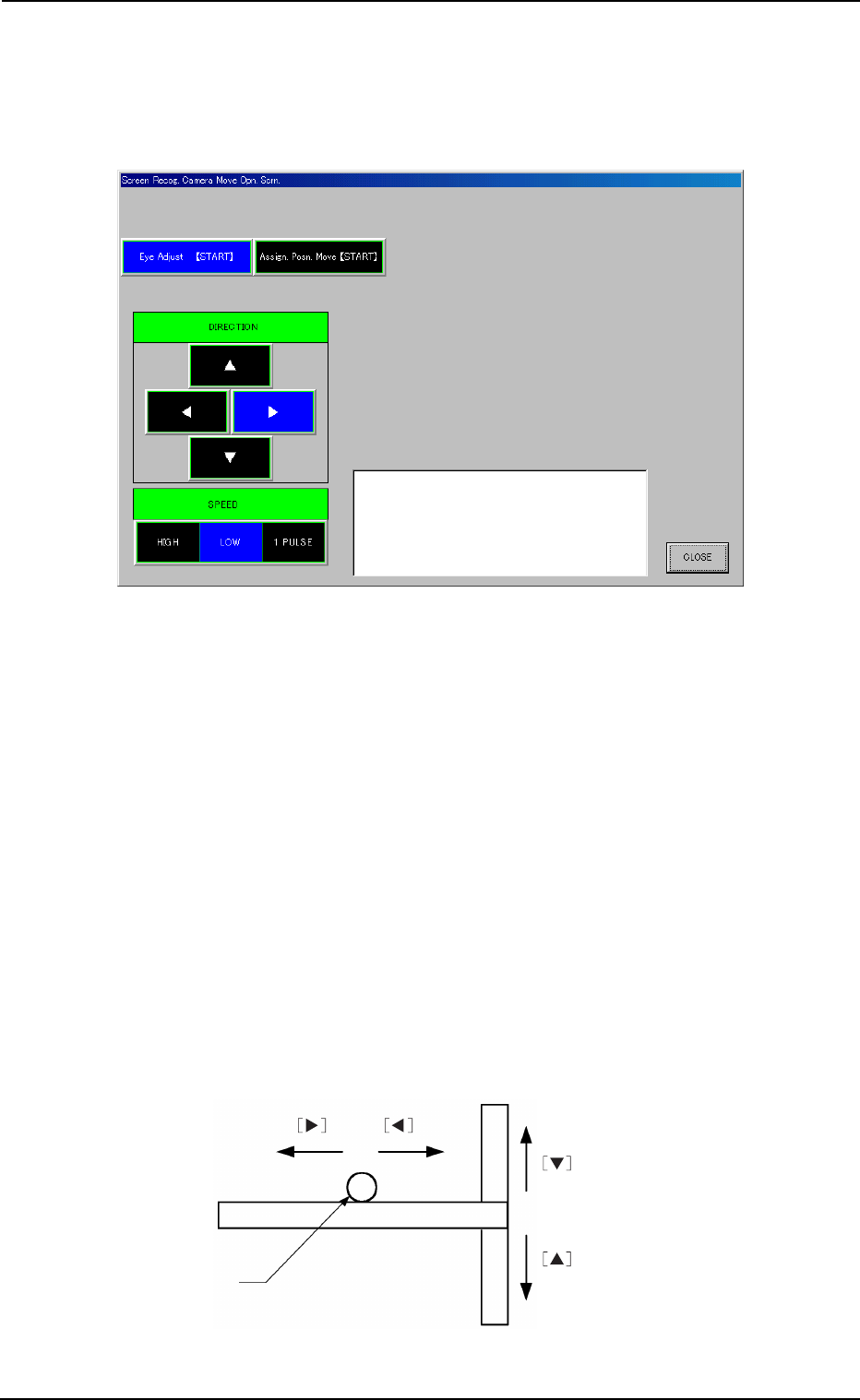
When the [Camera X-Y Move] button is pressed in the "Inaccurate Posn.
Correction" tab sheet, the following window (Fig. 2F29) opens.
Fig. 2F29
There are two ways to move the camera to a recognition mark (or a
pattern).
••
••
• Manual Alignment
(1) Select the [Eye Adjust (START)] button.
(2) Press one of the "DIRECTION" button to select a direction and
select one of the "SPEED" buttons to specify a speed.
(3) When the [START] button on the front operation panel is pressed,
the camera starts moving in the designated direction at the speci-
fied speed.
While the [START] button is kept pressed, the camera keeps on
moving.
(4) After the camera has moved to the recognition mark (or the pat-
tern), press the [Close] button. The previous window appears.
Fig. 2F30
0211-005 Chapter 2 6-38 Tg0582-PM-D1
Direction of Camera X Movement
Camera X
Camera
Direction of Camera
Y Movement
Camera Y
6.1 "Inaccurate Posn. Correction" Tab