1OM-1086-002.pdf - 第216页
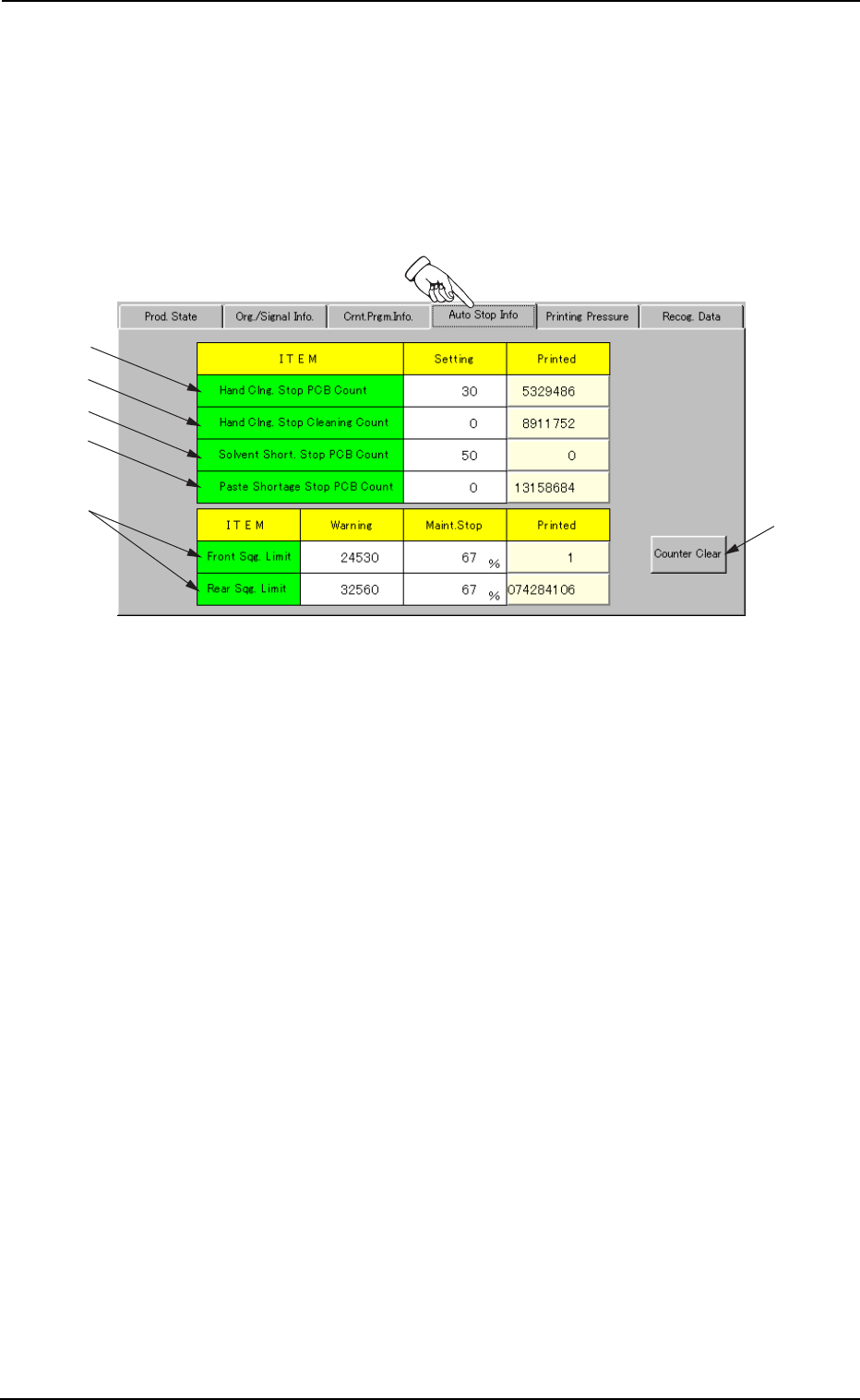
*4 Paste Shortage Stop PCB Count Displayed in the "Setting" test box is the number of P .C.B.’s to be produced before the machine is stopped for replenishment of sol- der paste. The number of processed P .C.B.’…
2.4 "Auto Stop Information" Tab
Various set values for the manual operation are displayed.
• Sheet Layout
When the [Auto Stop Info] tab is pressed at the "AUTO OPERA-
TION" window (submenu), the following tab sheet opens.
Fig. 2E7 "Auto Stop Information" Tab Sheet
• Sheet Composition
*1 Hand Clng. Stop PCB Count
Displayed in the "Setting" text box is the number of P.C.B.’s to be
produced before the machine is stopped for manual cleaning
operation. The number of processed P.C.B.’s at present (since
the previous machine stop) is in the "Printed" text box.
*2 Hand Clng. Stop Cleaning Count
Displayed in the "Setting" text box is the number of cleaning
operations before the machine is stopped for manual cleaning
operation. The number of processed P.C.B.’s at present (since
the previous machine stop) is in the "Printed" text box.
*3 Solvent Short. Stop PCB Count
Displayed in the "Setting" text box is the number of P.C.B.’s to be
produced before the machine is stopped for replenishment of
screen frame cleaning solvent. The number of processed
P.C.B.’s at present (since the previous machine stop) is in the
"Printed" text box.
2.4 "Auto Stop Information" Tab
*1
*5
*2
*3
*6
*4
0211-005 Chapter 2 5-11 Tg0582-PM-D1

*4 Paste Shortage Stop PCB Count
Displayed in the "Setting" test box is the number of P.C.B.’s to be
produced before the machine is stopped for replenishment of sol-
der paste. The number of processed P.C.B.’s at present (since the
previous machine stop) is in the "Printed" text box.
*5 Front Sqg. Limit, Rear Sqg. Limit
Displayed in the "Warning" text boxes are the numbers of P.C.B.’s
to be produced before the machine is stopped for squeegee re-
placement.
Displayed in the "Maint.Stop" text boxes are the rates (the rates
compared with the numbers of P.C.B.’s in the "Warning" text boxes)
of produced P.C.B.’s. The numbers of produced P.C.B.’s at present
(since the previous machine stop) are indicated in the "Printed" text
boxes.
*6 [Counter Clear] Button
When this button is pressed, the numbers of processed P.C.B.’s at
present (since the previous machine stop) in the "Printed" text boxes
are cleared to "0" (zero).
2.4 "Auto Stop Information" Tab
0211-005 Chapter 2 5-12 Tg0582-PM-D1
2.5 "Printing Pressure" Tab
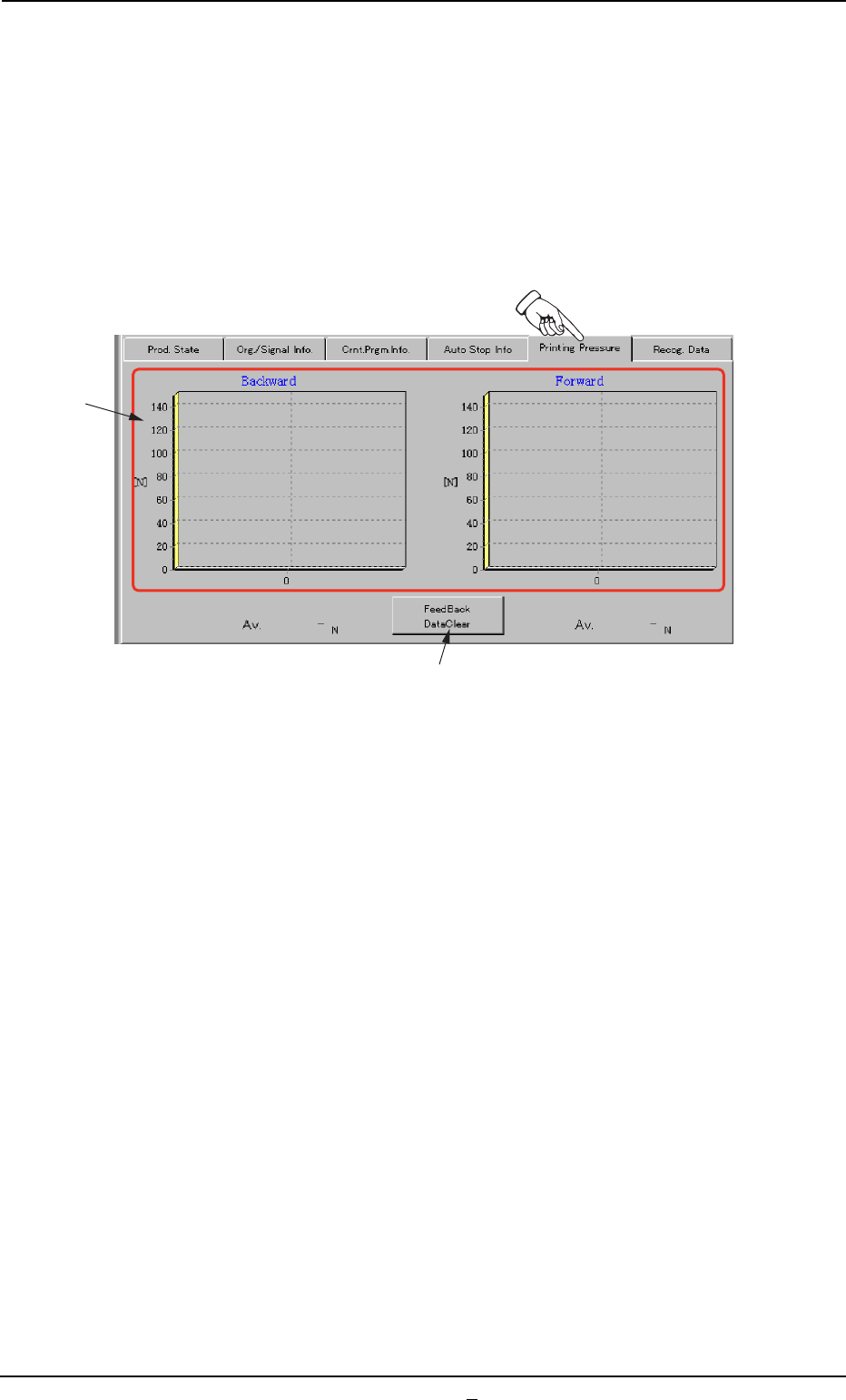
Charted and displayed are the changes in printing pressure during print-
ing for each squeegee.
• Sheet Layout
When the [Printing Pressure] tab is pressed at the "AUTO OPERA-
TION" window (submenu), the following tab sheet opens.
Fig. 2E8 "Printing Pressure" Tab Sheet
• Sheet Composition
*1 Printing Pressure Charts
Charted and displayed are the changes in printing pressure during
printing for each squeegee.
Backward : The line in the chart displays fluctuations in the print-
ing pressure caused while the squeegees are mov-
ing backward.
Forward : The line in the chart displays fluctuations in the print-
ing pressure caused while the squeegees are mov-
ing forward.
2.5 "Printing Pressure" Tab
0211-005 Chapter 2 5-13 Tg0582-PM-D1
*1
*2