1OM-1086-002.pdf - 第331页
021 1-005 Chapter 2 6 - 73 Tg0582-PM-D1
7.2.4 Camera Monitor
When the "Screen Recog. Test" tab sheet becomes active, a recogni-
tion area appears on the camera monitor.
When the setting of the recognition area is changed, the display
area also changes.
Fig. 2F59
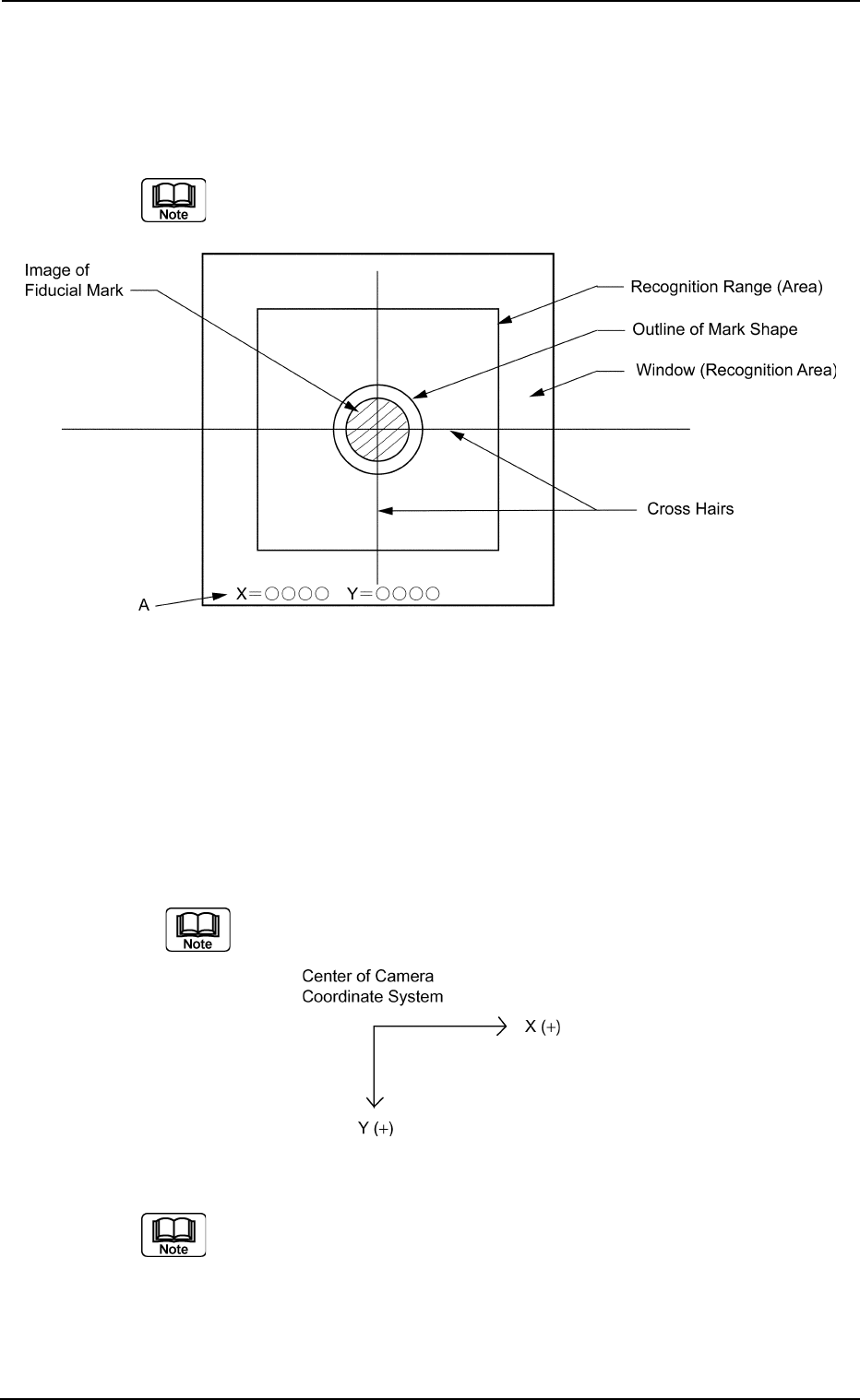
• When the recognition is made normally, the camera moves, the im-
age of the screen recognition mark moves to the camera center, and
the outline of the mark shape and the cross hairs appear in the win-
dow (recognition area).
The positional deviation (X and Y) of the screen recognition mark
from the camera center is displayed in the "A"-marked area of the
window.
The displayed positional deviation shows the deviation de-
tected before testing.
Fig. 2F60
The point of the cross hairs intersection is the camera center.
• When the results of the recognition is "NG (No Good)", the outline of
the mark shape and the cross hairs do not appear and an error mes-
sage (recognition error) is issued on the touch screen.
7.2
"
Screen Recog. Test
"
Tab
0211-005 Chapter 2 6-72 Tg0582-PM-D1

0211-005 Chapter 2 6-73 Tg0582-PM-D1

Section 7
Accompanying Material
0211-005 Chapter 2 7-1 Tg0582-PM-D1