00198505-01_SM_SIPLACE_SmartFeeder_EN.pdf - 第186页
9 Repairs to SmartFeeder 12 mm X / 16 mm X 9.4 EDIF 186 Service Manual SIPLACE SmartFeeder 4 - 104 mm X 11/2017 9.4.1 Removing the EDIF ► Remove the left side cover (see 9.3.1 "Removing the Left Side Cover" [ }…
9 Repairs to SmartFeeder 12 mm X / 16 mm X
9.4 EDIF
Service Manual SIPLACE SmartFeeder 4 - 104 mm X 11/2017 185
9.3.4 Fitting the Right Side Cover
► Carefully place the feeder module with the left-
hand side down on a stable, level and clean sur-
face.
► Fix the screws as shown in the diagram. Begin
with the inner screws and work towards the out-
side.
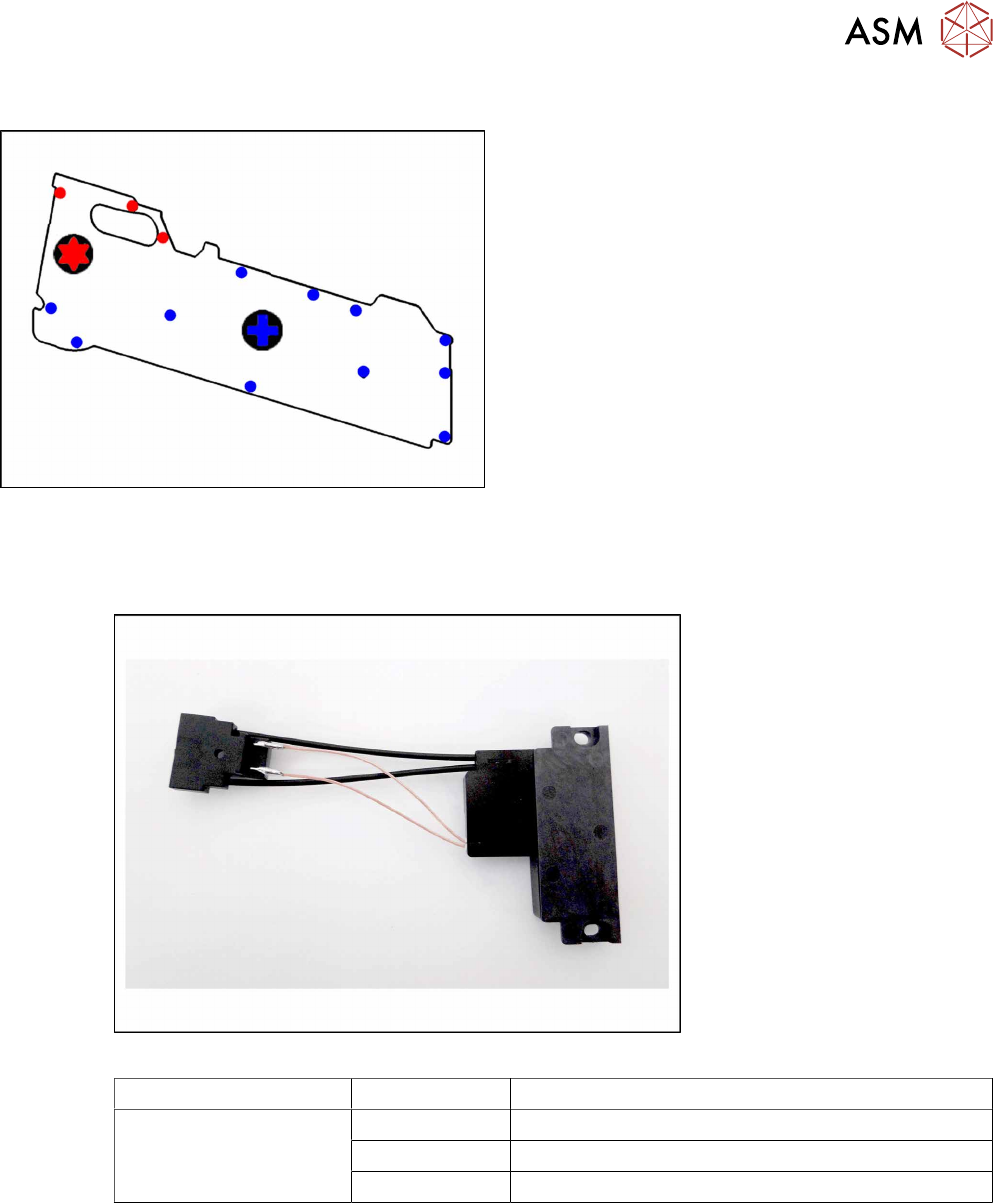
The 3 red dots point to the screws for which you need
a TORX screwdriver with a torque of 0.6Nm.
The blue dots point to the screws for which you need a
Phillips screwdriver with a torque of 0.6Nm.
9.4 EDIF
Required spare part
Fig.65: EDIF secondary assembly
Feeder module Item no. Designation
SmartFeeder 12mm X
SmartFeeder 16mm X
03125222-xx EDIF secondary assembly X Smart
03012683-xx Pressure spring D-027
03068667-xx Collar screw ø4x4.5 M3 /X2x8
Required tools
●
Flat-bladed screwdriver 0.6Nm
●
Phillips screwdriver 0.6Nm
●
Phillips screwdriver 0.2Nm
●
TORX screwdriver 0.6Nm, size T8
9 Repairs to SmartFeeder 12 mm X / 16 mm X
9.4 EDIF
186 Service Manual SIPLACE SmartFeeder 4 - 104 mm X 11/2017
9.4.1 Removing the EDIF
► Remove the left side cover (see 9.3.1 "Removing
the Left Side Cover" [}184].
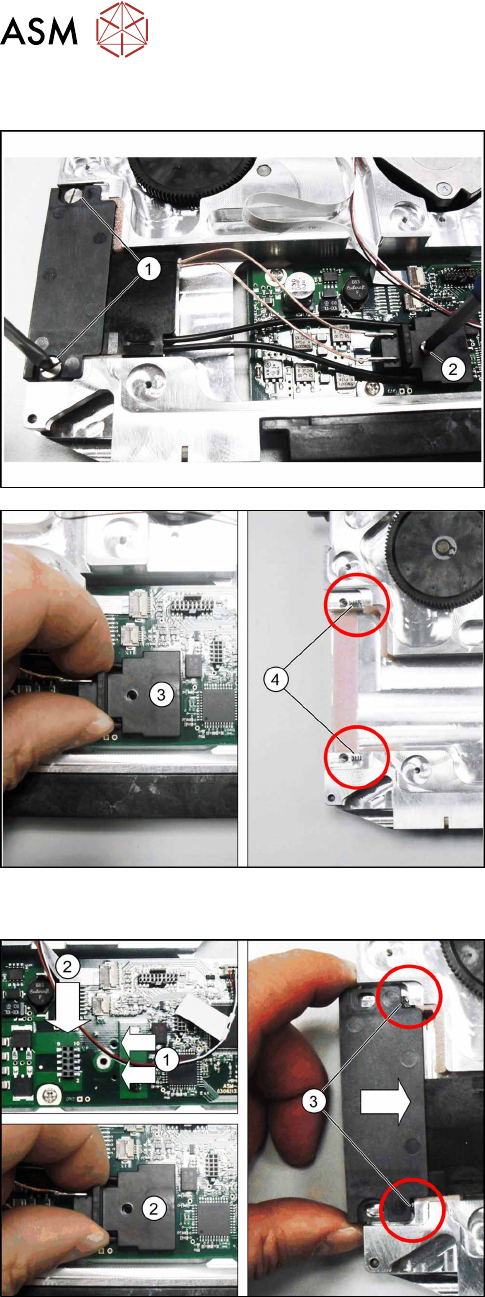
► Loosen the two screws on the EDIF.(1)
► Loosen the screw on the connector.(2)
► Carefully pull the connector upwards and out.(3)
► Remove the EDIF.
Note:
Make sure that the two springs(4) are not lost.
9.4.2 Fitting the EDIF
► Position the EDIF connector. To do this, insert
the two centering pins on the underside of the
connector in the holes provided on the board.(1)
► Press the EDIF connector onto the marked con-
nection.(2)
► Push the EDIF into the recess at the front of the
feeder module.
Note:
Make sure that the two springs(3) are behind the
EDIF, point straight ahead to the EDIF and are not dis-
torted when inserted.
Replace any bent springs.
9 Repairs to SmartFeeder 12 mm X / 16 mm X
9.5 Pickup window
Service Manual SIPLACE SmartFeeder 4 - 104 mm X 11/2017 187
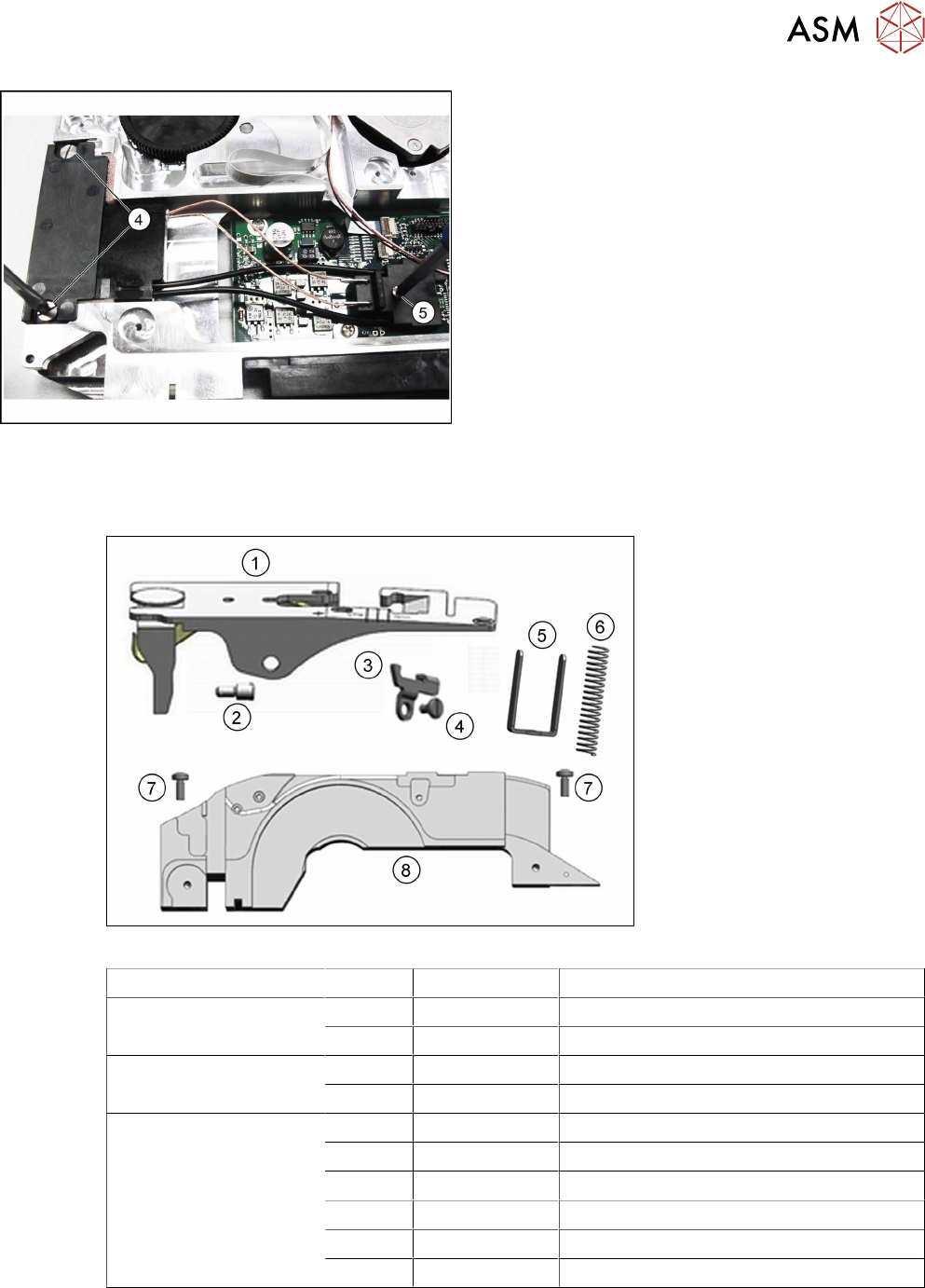
► Screw the EDIF into place using the two marked
screws(4) with 0.6Nm.
► Make sure that the EDIF springs back when
slight pressure is applied from the front.
If the EDIF does not spring back, loosen the
screws(4) and make sure that the two springs(3)
are aligned towards the front and are not bent.
► Screw the EDIF connector into place with
0.2Nm.(5)
► Fasten the left side cover (see 9.3.2 "Fitting the
Left Side Cover" [}184]).
9.5 Pickup window
Required spare part
Fig.66: Pickup window
Feeder module Position Item no. Designation
SmartFeeder 12mm X 1 03083995-xx Pickup window with lock X12 V2 assembly
8 03083996-xx Tape duct, front X12 V2
SmartFeeder 16mm X 1 03082789-xx Pickup window with lock X16 V2 assembly
8 03082041-xx Tape duct, front X16 N
SmartFeeder 12mm X
SmartFeeder 16mm X
2 03082321-xx Threaded axis pickup window X12/X16 V2
3 03053708-xx Rocker lever /X2x8
4 03077823-xx Collar screw /X2x8
5 03082323- Pressure bracket X12/X16 V2
6 03091961-xx Pressure spring 1.1x9.0x74.0mm
7 03010209-xx ISO 7045 - M2.5 x 6-A2-50-H
Required tools
●
Flat-bladed screwdriver size 1, 0.35Nm
●
Phillips screwdriver 0.6Nm
●
Tweezers