00197723-12_UG_SE3.11_EN.pdf - 第104页
5 Using the SMA SMA Guide SIPLACE Explorer Edition 11/2020 EN from 3.11 (R20-2) 104 5.1 1.1 How to define a t arget value Select the OEE Analysis website. Click on the Set T a rget s button in the Set T arget s colum…
SMA Guide SIPLACE Explorer 5 Using the SMA
from 3.11 (R20-2) Edition 11/2020 EN
103
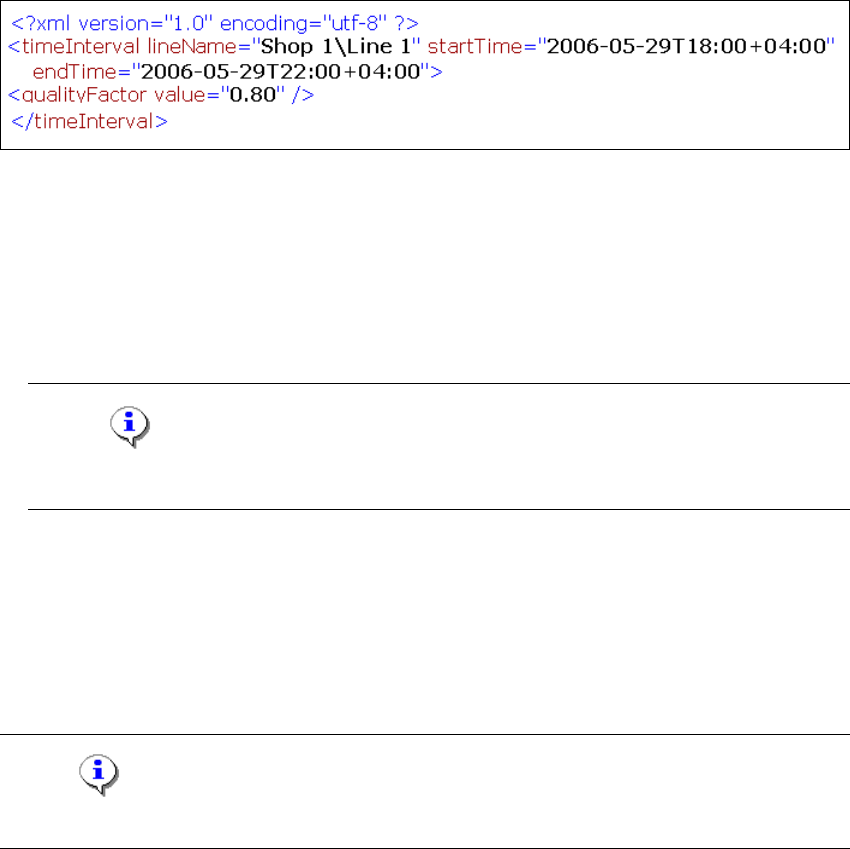
5.10.2 How to import a quality factor from an xml file
A quality factor can be imported to SIPLACE Explorer from an xml file. 5
Destination folder of the xml file:
<SIPLACE Explorer root>\OEE, e.g. C:\SIPLACE Explorer\OEE 5
Naming convention for the xml file:
<LineName>_<dateBegin>_<dateEnd>.xml, e.g. Line_1_06052819_06052820.xml 5
Contents of the xml file:
5
Fig. 5 - 11 Set quality factor
– Line name
– Begin of the evaluation period
– End of the evaluation period
– Quality factor
Note
You can find an xml file for example on the product CD in the ...\Documentation folder. 5
5.11 Defining Target Value
On the OEE Analysis page target values can be defined for each machine in the production line
or for the entire production line. 5
NOTE
You need "admin" user privileges to define target values. 5
5 Using the SMA SMA Guide SIPLACE Explorer
Edition 11/2020 EN from 3.11 (R20-2)
104
5.11.1 How to define a target value
Select the OEE Analysis website.
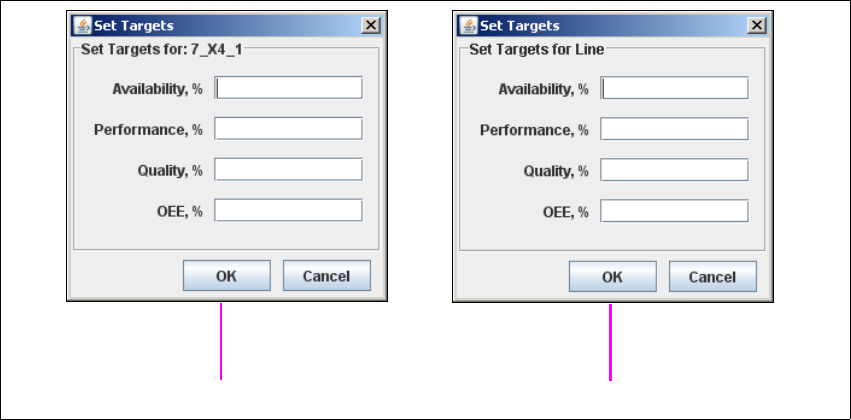
Click on the Set Targets button in the Set Targets column of the line for the required machine.
The Set Targets dialog box will open.
5
Fig. 5 - 12 Set target value
Enter the following target values which are to be reached during the specified evaluation
period:
– Target value for availability
– Target value for performance
– Target value for quality
– Target value for OEE
Check your entries and confirm with OK.
These target values will be shown as a line in the diagram on this page.
Machine 5
Line 5
SMA Guide SIPLACE Explorer 5 Using the SMA
from 3.11 (R20-2) Edition 11/2020 EN
105
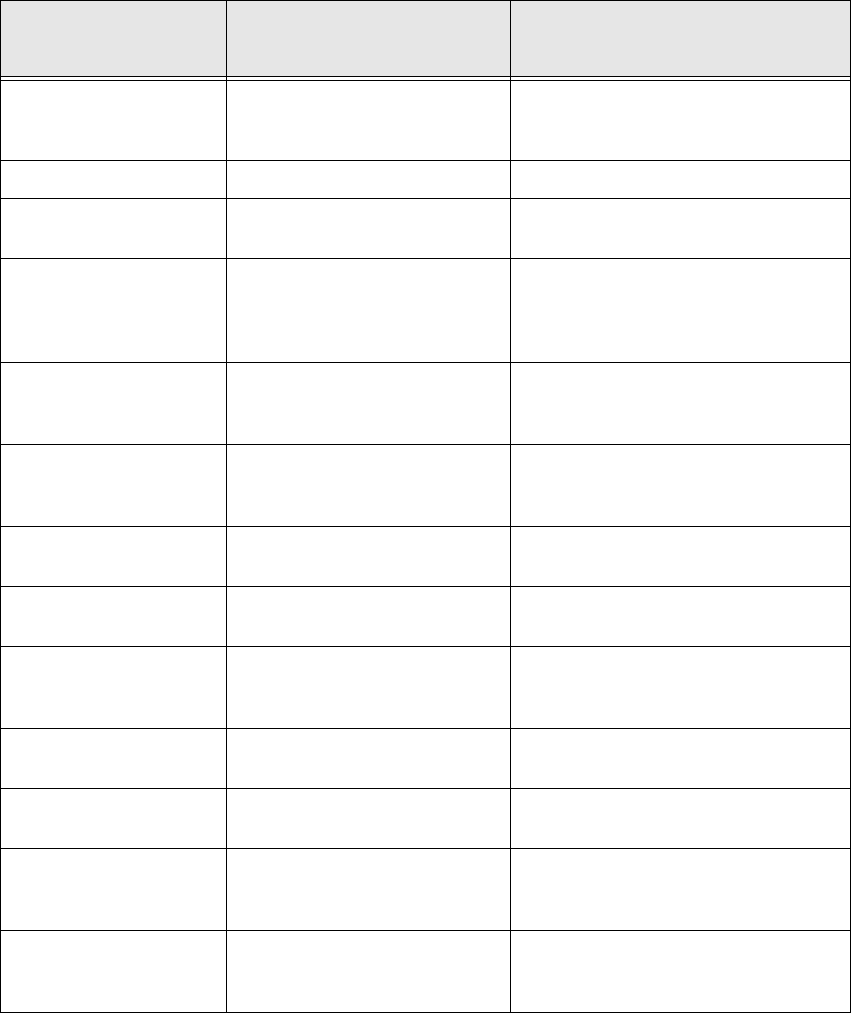
5.12 Calculating the Reject Rate
5
Component category Description
Column name of the OIS
database table CompDetail
Consumed Count of every pickup retries:
Every feeder transport, without
manual feeder transports
sAccessTotal
Placed Placed components sPlacedComponents
Wasted Sum of pickup retries minus sum
of placed components
sAccessTotal - sPlacedComponents
Pickup Error Pickup (Absence after pickup)
without error, that are already
considered by TrackEmpty and
sPickupRetries
sAbsenceAfterPick
<not displayed
separately, see the Other
category>
Succeeding pickup errors
causing a Track Empty error (the
track will be deactivated)
sTrackEmpty
<not displayed
separately, see the Other
category>
N succeeding pickup errors at
the same track that cause no
TrackEmpty error
sPickupRetries
Ident error Ident errors caused by machine
handling errors
sIdentError
Rejected Sum of pickup errors and ident
errors
sAbsenceAfterPick + sIdentError
Material defect Coplan or material errors
detected by the vision system
causing component rejects
sComponentMaterialDefect
Absence before
Placement
Component is not on the head
nozzle before placement
sComponentAbsenceBeforePlacing
Presence after
Placement
Component is on the head
nozzle after placement
sComponentPresentAfterPlacing
Treatment Error Components that have been
rejected during the process step
of dipping or gluing
sTreatmentError
Placement Process Error Sum of the last three categories sComponentAbsenceBeforePlacing +
sComponentPresentAfterPlacing +
sTreatmentError
Tab. 5 - 1 Calculating the reject rate