00197723-12_UG_SE3.11_EN.pdf - 第39页
SMA Guide SIPLACE Explorer 4 Functions Overview from 3.11 (R20-2) Edition 11/2020 EN 3 9 –L i n e T a k t Scheduled t akt time for each recipe. – Average T akt T ime The aver age takt time v alues for ea ch recipe a re s…
4 Functions Overview SMA Guide SIPLACE Explorer
Edition 11/2020 EN from 3.11 (R20-2)
38
– Aborted
The count of not completed, aborted boards since the beginning of the current recipe.
– Average Takt Time
The average takt time values for each recipe are shown.
– Production History - Tabular View:
Provides a historical listing of Production Jobs/Recipes for each machine within the production
line for the specified interval. 4
– Bottleneck Indication
A symbol will appear in this column next to the machine with the largest average processing
time, for the duration of the recipe.
– Machine
Name of the machine. Dual lane machines will appear in the list twice.
– Conveyor
Number of the of the conveyor lane. Conveyor1-Right/Conveyor2-Left (When viewed from
Input)
– Job/Recipe
Recipe Name
–Board
Product or Board within recipe.
–Side
Shows the board side completed.
–Setup
Setup within Recipe.
–Start Time
The date and time at which the recipe was changed for the particular lane/machine. Defined
as the time when the first board of the new recipe was completed.
–End Time
The Time at which the recipe was concluded (Changed).
– Duration
The time which was needed for producing the recipe.
– Completed
The count of completed boards for the recipe.
– Aborted
The count of aborted boards for the recipe.
–Lot Size
The count of boards for the Recipe.
SMA Guide SIPLACE Explorer 4 Functions Overview
from 3.11 (R20-2) Edition 11/2020 EN
39
–Line Takt
Scheduled takt time for each recipe.
– Average Takt Time
The average takt time values for each recipe are shown.
The following procedures can be performed on this page and are described in this SMA
User Guide:
“Specifying Line Takt” on page 98
“Specifying Lot Size” on page 100
“How to Specify the Generation of Line Reports” on page 90
“How to Sort Tables” on page 96
“How to Enable Legends” on page 96
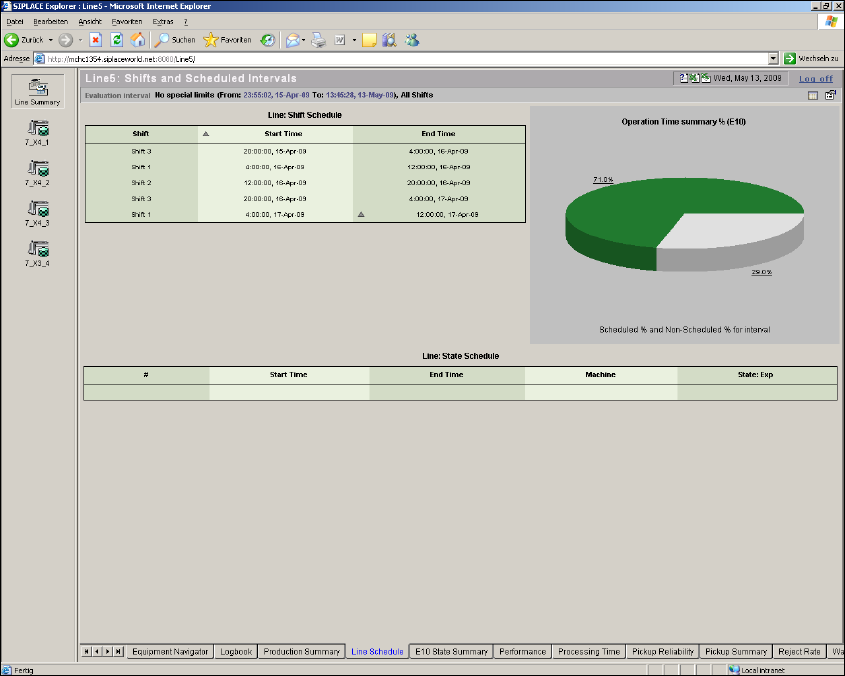
4.1.4 Line Schedule
From this page it is possible to view scheduled shifts and scheduled states (Scheduled Downtime/
Engineering) for the line/machine for the specific time interval of interest for the line. Additionally
a summary chart to show the Operations Time Percentage (E10) is also included. 4
4 Functions Overview SMA Guide SIPLACE Explorer
Edition 11/2020 EN from 3.11 (R20-2)
40
4
Fig. 4 - 5 Line schedule
– Line: Shift Schedule
Displays the shifts that occurred within the evaluation interval. The shift name as well as the
scheduled start and end time and date are listed. Scheduling of shifts is accomplished within
the Calendar. For further information please refer to SIPLACE Explorer Getting Started.
– Operation Time Summary
A summary of the Operational Time (Scheduled)/Nonscheduled time for the evaluation
interval. Nonscheduled time is considered when no shift has been scheduled. Shifts are
defined by the calendar. For further information please refer to SIPLACE Explorer Getting
Started.