00197723-12_UG_SE3.11_EN.pdf - 第60页
4 Functions Overview SMA Guide SIPLACE Explorer Edition 11/2020 EN from 3.11 (R20-2) 60 4 Fig. 4 - 14 OEE analysis This page contains a t able and a bar chart with legends, in whi ch the OLE/OEE values are sum- marized: …
SMA Guide SIPLACE Explorer 4 Functions Overview
from 3.11 (R20-2) Edition 11/2020 EN
59
If the calculated result > 100%, SIPLACE Explorer shows only 100%. This happens, if the line
takt value was specified unrealistically high. 4
–Quality
Quality factor: this value can be defined in SIPLACE Explorer or can be imported from an xml
file. 4
–OEE
OEE = Availability x Performance x Quality factor 4
If the calculated result > 90%, you should check the line takt value. 4
The following procedures can be performed on this page and are described in this SMA
User Guide:
“How to define a quality factor in SIPLACE Explorer” on page 102
“How to import a quality factor from an xml file” on page 103
“How to Specify the Generation of Line Reports” on page 90
“How to Sort Tables” on page 96
“How to Enable Legends” on page 96
4.1.13 OEE Analysis
This page shows a summary of the OEE values. 4
These values can be used to generate an analysis about operation efficiency on an equipment
level. You can also manually define target values. 4
– Overall Equipment Efficiency (OEE)
This value shows the efficiency on an equipment level
4 Functions Overview SMA Guide SIPLACE Explorer
Edition 11/2020 EN from 3.11 (R20-2)
60
4
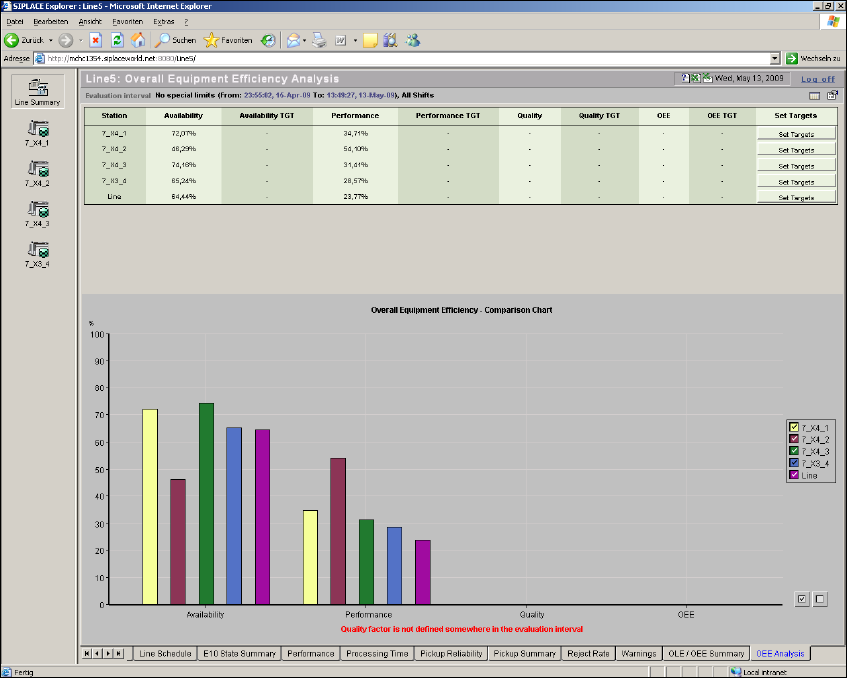
Fig. 4 - 14 OEE analysis
This page contains a table and a bar chart with legends, in which the OLE/OEE values are sum-
marized: 4
–Table
This table shows the following values as percentages for each machine in the production line,
during the evaluation period: 4
– Actual and target values for availability
– Actual and target values for performance
– Actual and target values for quality
– Actual and target values for OEE

SMA Guide SIPLACE Explorer 4 Functions Overview
from 3.11 (R20-2) Edition 11/2020 EN
61
– Overall Equipment Efficiency - Comparison Chart
This chart maps the values shown in the table. It shows a percentage value for each machine
in the production line, during the evaluation period:
– Actual value for availability
– Actual value for performance
– Actual value for quality
– Actual value for OEE
– The target value is shown as a line in the diagram.
The following procedures can be performed on this page and are described in this SMA
User Guide:
“Defining Target Value” on page 103
“How to Specify the Generation of Line Reports” on page 90
“How to Sort Tables” on page 96
“How to Enable Legends” on page 96
4.2 Example Machine Data: SIPLACE X4
The following pages show the example of a "7_X4_3" from this production line. 4
4.2.1 State Pages
4.2.1.1 E10 State Summary
This page gives you a 24 hour view and an overview of the current state for the selected machine
in this evaluation period. 4
NOTE
There is a special OIS status module realized in SIPLACE OIS. This OIS status module is shown
in the SIPLACE Explorer status module which matches the SEMI E10 status module. This may
lead to deviations in the states and status times shown between OIS and SIPLACE Explorer. A
direct comparison is therefore not possible. For further details, please refer to the Software
Version Description SIPLACE Explorer. See also “Relationship Between E10 State Summary and
Performance” on page 26. 4