00197723-12_UG_SE3.11_EN.pdf - 第24页
3 Getting Started with the SMA SMA Guide SIPLACE Explorer Edition 11/2020 EN from 3.11 (R20-2) 24 (5) E10 Legend/Sub state Drilldown/Summary View The definition of the machine st ates may als o include defined s ub state…

SMA Guide SIPLACE Explorer 3 Getting Started with the SMA
from 3.11 (R20-2) Edition 11/2020 EN
23
Timeline components: 3
– Line 1 (Top Bar):
Illustrates the actual state for the machine. Start and End of the time in state define the
length of the bar. It is possible to click on each segment of the time line, and view the
selected State/Sub state, as well as starting/finish times. The color assignment is according
to the legend below (SEMI E10). Unknown and Future times are also shown. Unknown time
could include where there was no connection - or the system was not powered on. Future
time is where the state assignment is yet to be made. 3
– Line 2 (Middle Bar):
Illustrates the Scheduled States as defined within the calendar, such as Scheduled
Downtime (Preventative Maintenance) or Engineering. 3
– Line 3 (Bottom Bar):
Illustrates the scheduled shifts, also defined within the Calendar. If no shift is scheduled,
Non-Scheduled time is presumed. 3
– Logbook Entries:
If a logbook entry has been made in relation to specific time interval, an additional "Flag"
will appear above the actual states, as well as with the Starting/Ending point, and a Numeric
entry. 3
– OLE/OEE:
Shows the OLE/OEE values for the evaluation period currently selected on this page. The
OEE value is displayed for the selected machine. 3
NOTE
The actual machine state will override the scheduled state if the machine is productive. States
other than productive will be assigned according the Calendar (Scheduled time). 3
3 Getting Started with the SMA SMA Guide SIPLACE Explorer
Edition 11/2020 EN from 3.11 (R20-2)
24
(5) E10 Legend/Sub state Drilldown/Summary View
The definition of the machine states may also include defined sub states. Sub states are not
defined within SEMI E10. 3
As an example, E10 defines idle, but does not define "Starved" or "Blocked". If a sub state has
been defined for an E10 state, the legend will appear as a Hyperlink, with the possibility to drill
down into the sub states. Further refinement (additional sub states) in some cases is also
possible, in the case of Unscheduled Downtime, "Interrupted" and "Fault" are refined to detail
causes, such as "Cover Open". When a sub state has been selected - the Timeline View as
well as the Pie Chart summary will update to show the breakdown of the sub state. States other
than the sub state under study will be shown in black. 3
As an example, if Standby is under study, if the machine were productive during this interval,
the legend would display this time as black (Other). Started and Blocked would be illustrated
on the timeline and in the Pie chart. The legend and color assignment updates according to
the selected sub state. To return to the parent sub state or to the E10 State view - select the
Hyperlink above the legend. 3
– E10 States Breakdown Pie Chart
The Pie chart updates according to the interval in view. The chart will also change
dependant on the selection of sub states to illustrate the components of the selected state.
The legend illustrates the total duration of each state/sub state as well as the percentage of
the time interval in view. 3
(6) E10 Availability and Summary of Time
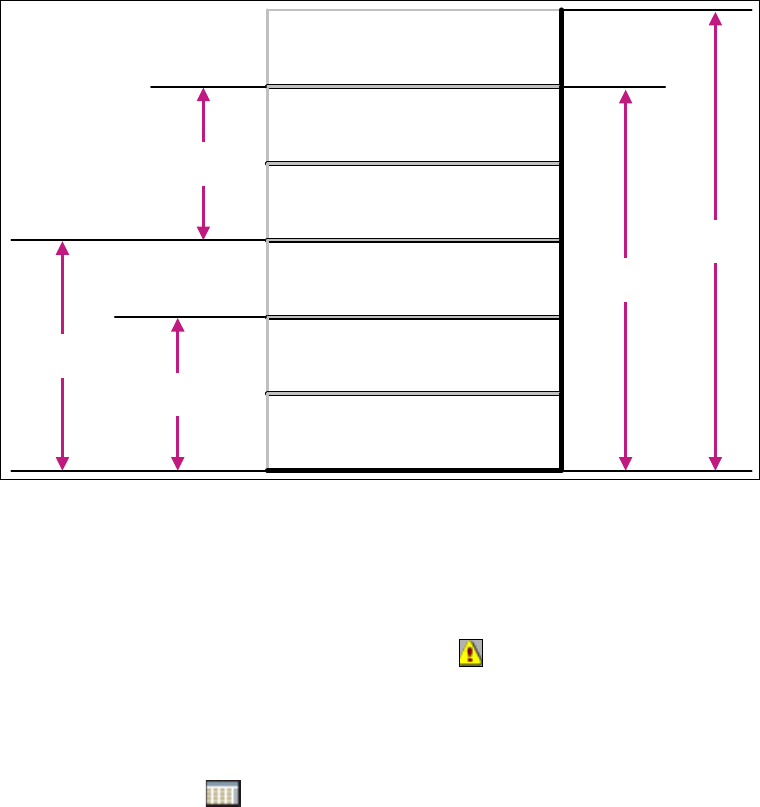
SEMI E10 defines several "State Stacks" or relationships of several states. They are
summarized within the bar chart, which updates according to the interval in view. The total of
the time, as well as the percentage, for the interval in view is displayed. 3
Brief Explanation of Categories: 3
– Downtime:
The sum of Scheduled and Unscheduled Downtime.
– Manufacturing Time:
The sum of Productive and Standby. The equipment is ready (Idle) or is producing. No
technical blocking factor. Engineering Time is not included.
–Uptime:
The equipment is available for use for either manufacturing or engineering. No technical
blocking factors are present.
– Operations Time:
The production line is staffed, for planned activity, whether the system is operational or not.
The Factory/Line is scheduled for activity. Unknown time is not included.
SMA Guide SIPLACE Explorer 3 Getting Started with the SMA
from 3.11 (R20-2) Edition 11/2020 EN
25
– Total Time:
Non-Scheduled and Operational Time. Unknown time is not included.
– Operational Uptime %:
The percentage of time that the equipment is technically available for engineering or
manufacturing use during the scheduled (Operations) time.
3
Fig. 3 - 10 State Stack
(7) Tabs
Use the tab to select the pages you wish to edit.
– Further functionalities
– An incorrect configuration has been detected . This icon will only appear on the pages
at line level.
Click on the icon on the relevant page, to open the Warnings page. For a detailed
description of this page, please see Section “Warnings” on page 54.
– Set time interval
Use the calendar to set the time interval.
Use the calendar to set the period in which you want the analysis to be active.
Click on icon on the relevant page, to open the factory calendar.
Select the time interval for each page for which data should be shown.
Operations
Time
NON-SCHEDULED TIME
UNSCHEDULED
DOWNTIME
SCHEDULED
DOWNTIME
ENGINEERING TIME
STANDBY TIME
PRODUCTIVE TIME
Total
Time
Manufacturing
Time
Equipment
Uptime
Equipment
Downtime