00197723-12_UG_SE3.11_EN.pdf - 第66页
4 Functions Overview SMA Guide SIPLACE Explorer Edition 11/2020 EN from 3.11 (R20-2) 66 – Access T otal by T rack A listing of consumption (accesse s) listed by Feeder Location a s well as total coun t is shown on the la…
SMA Guide SIPLACE Explorer 4 Functions Overview
from 3.11 (R20-2) Edition 11/2020 EN
65
This page gives you a pareto chart with the causes of unscheduled downtime: The downtime is
shown separately for the following two evaluations: 4
– By Duration:
Shows the time needed to remove the source of downtime.
– By event:
Shows the events which caused the downtime.
Both evaluations are shown for the selected machine and for the active evaluation period. 4
4.2.2 Pickup Summary
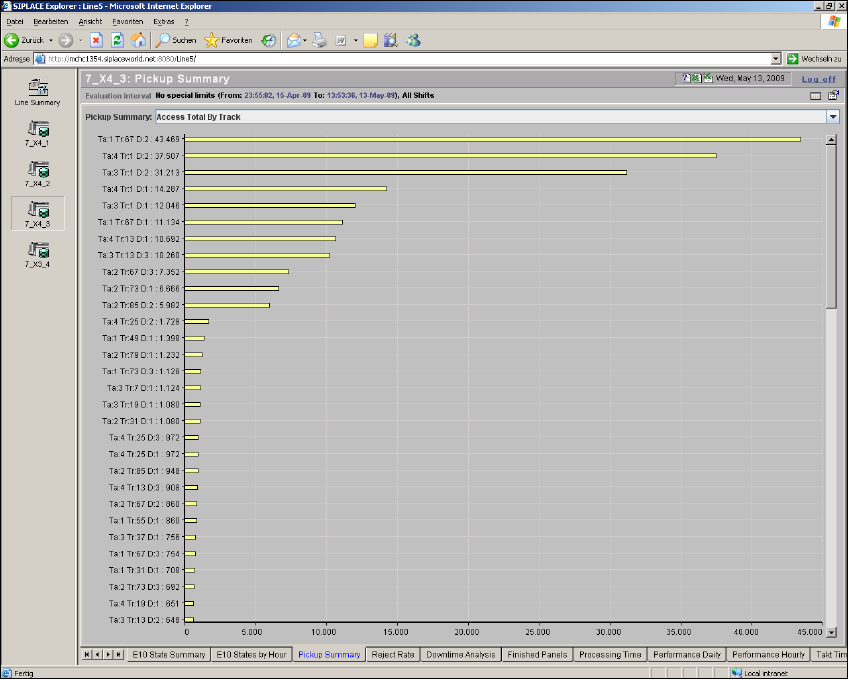
From this page it is possible to view Consumption (Access Totals) as well as errors, by multiple
category Pareto view for the evaluation interval. Selection of category views is by drop down se-
lection. 4
4
Fig. 4 - 18 Topic: 7_X4_3 - pickup summary
4 Functions Overview SMA Guide SIPLACE Explorer
Edition 11/2020 EN from 3.11 (R20-2)
66
– Access Total by Track
A listing of consumption (accesses) listed by Feeder Location as well as total count is shown
on the label. 4
Abbreviations: 4
– Ta: Table
– Tr: Track
– D: Division
–L: Level
–T: Tower
Where Ta: 1 Tr: 49 D:2 relates a feeder location 1-49-2 4
– Pickup Errors by Track
A listing of Pickup Errors listed by Feeder Location as well as total count is shown on the label.4
Abbreviations: 4
– Ta: Table
– Tr: Track
– D: Division
–L: Level
–T: Tower
– Access Total by Component
A listing of consumption (accesses) listed by Component Name as well as total count is shown
on the label. 4
– Pickup Errors by Component
A listing of Pickup Errors listed by Component Name as well as total count is shown on the
label. 4
– Access Total by Feeder Type
A listing of consumption (accesses) listed by Feeder Type as well as total count is shown on
the label. 4
– Pickup Errors by Feeder Type
A listing of Pickup Errors listed by Feeder Type as well as total count is shown on the label. 4
– Access Total by Component Shape
A listing of consumption (accesses) listed by Component Shape as well as total count is shown
on the label. 4
SMA Guide SIPLACE Explorer 4 Functions Overview
from 3.11 (R20-2) Edition 11/2020 EN
67
– Pickup Errors by Component Shape
A listing of Pickup Errors listed by Component Shape as well as total count is shown on the
label. 4
NOTE
If data is recorded in the machine status "stand-alone", this data will not be taken into account in
the pareto diagrams for the criteria "Component", "Feeder module type" and "Component
shape". 4
The following procedures can be performed on this page and are described in this SMA
User Guide:
“How to Sort Tables” on page 96
“How to Enable Legends” on page 96
4.2.2.1 Finished Panels
From this page it is possible to view completed boards for the particular machine on an hourly ba-
sis, for the evaluation interval. Additionally it is possible to view the Average, Minimum and Max-
imum build time encountered during each hour within the evaluation interval. This page gives you
three views: 4
– Finished Panels by Hour - Bar Chart
– Build Time by Hour - Bar Chart
– Product Summary - Tabular View