00197723-12_UG_SE3.11_EN.pdf - 第30页
4 Functions Overview SMA Guide SIPLACE Explorer Edition 11/2020 EN from 3.11 (R20-2) 30 4.1 T opic Line Summary 4.1.1 Equipment Navigator The Equipment Na vigator c onsists of two pages. 4 – St ate Analysi s This pa ge s…

SMA Guide SIPLACE Explorer 4 Functions Overview
from 3.11 (R20-2) Edition 11/2020 EN
29
4 Functions Overview
The following pages are included in SIPLACE Explorer and are described in this chapter: 4
– “Topic Line Summary” on page 30
– “Equipment Navigator” on page 30
– “Logbook” on page 33
– “Production Summary” on page 34
– “Line Schedule” on page 39
– “E10 State Summary” on page 42
– “Performance” on page 44
– “Processing Time” on page 47
– “Pickup Reliability” on page 48
– “Pickup Summary” on page 51
– “Reject Rate” on page 53
– “Warnings” on page 54
– “OLE / OEE Summary” on page 56
– “OEE Analysis” on page 59
– “Example Machine Data: SIPLACE X4” on page 61
– “State Pages” on page 61
– “E10 State Summary” on page 61
– “E10 State by the Hour” on page 63
– “Downtime Analysis” on page 64
– “Pickup Summary” on page 65
– “Finished Panels” on page 67
– “Processing Time” on page 70
– “Performance Daily” on page 73
– “Performance Hourly” on page 76
– “Reject Rate” on page 79
– “Takt Time” on page 87
4 Functions Overview SMA Guide SIPLACE Explorer
Edition 11/2020 EN from 3.11 (R20-2)
30
4.1 Topic Line Summary
4.1.1 Equipment Navigator
The Equipment Navigator consists of two pages. 4
– State Analysis
This page shows the current machine status and historical data. 4
– Logbook
In this page it is possible to enter logbook entries for the production line or individual machines.4
4.1.1.1 Equipment Navigator - State Analysis
4
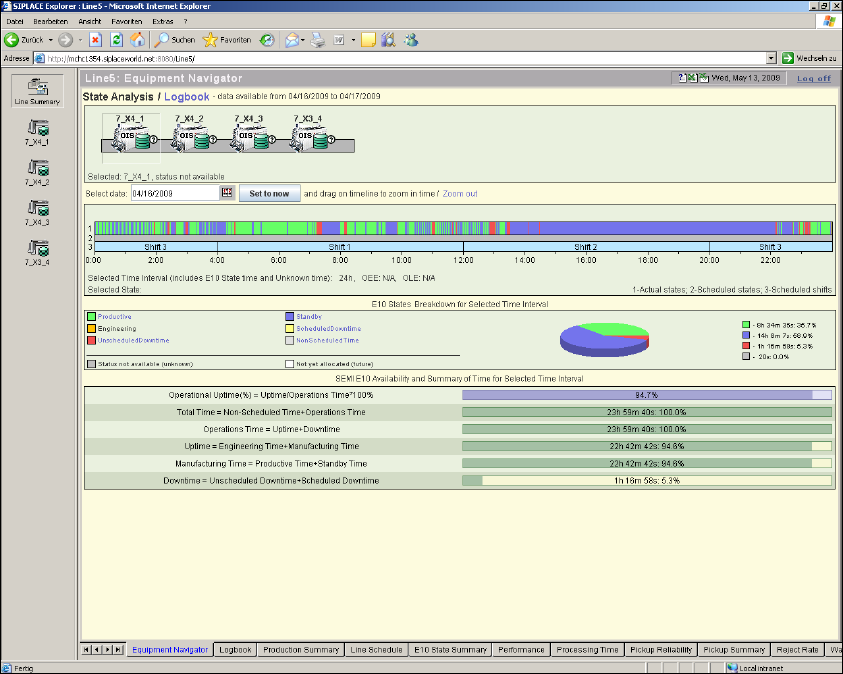
Fig. 4 - 1 Equipment navigator - state analysis
SMA Guide SIPLACE Explorer 4 Functions Overview
from 3.11 (R20-2) Edition 11/2020 EN
31
This page gives you a 24 hour view and an overview of the current state for the selected machine
in the production line. 4
– Overview of the current state for the machines in the production line.
– Colored status indicator/state text on each machine icon.
– Arrangement of the machines in the production line.
– Date selector allows you to view other days or the current day.
– Select any machine to show its details.
– Timeline chart for the current selected day (see Fig. 6 - 20):
(1) shows the actual states of the selected machine
(2) shows the scheduled states of the selected machine
(3) shows the scheduled (defined) shifts
– Click on the timeline and drag to zoom into the selected time period.
–A
legend displays the time period at the bottom of the screen.
– When a machine is selected, color-coded states are displayed for the selected machine.
– The states of the selected machine can be clicked on to show the corresponding substates.
– A drill down to substates is available if the text is displayed in blue – a hyperlink.
– A pie chart summarizes the percentage of time in each selected state, for the chosen day.
The following procedure can be performed on this page and is described in this SMA User
Guide:
“How to Specify the Generation of Line Reports” on page 90