00197723-12_UG_SE3.11_EN.pdf - 第57页
SMA Guide SIPLACE Explorer 4 Functions Overview from 3.11 (R20-2) Edition 11/2020 EN 5 7 4 Fig. 4 - 13 OLE / OEE summary This p age contains two b ar chart s with legends, in which the OLE/OEE values are summarized: 4 – …
4 Functions Overview SMA Guide SIPLACE Explorer
Edition 11/2020 EN from 3.11 (R20-2)
56
The following procedures can be performed on this page and are described in this SMA
User Guide:
“How to Specify the Generation of Line Reports” on page 90
“How to Sort Tables” on page 96
“How to Enable Legends” on page 96
4.1.12 OLE / OEE Summary
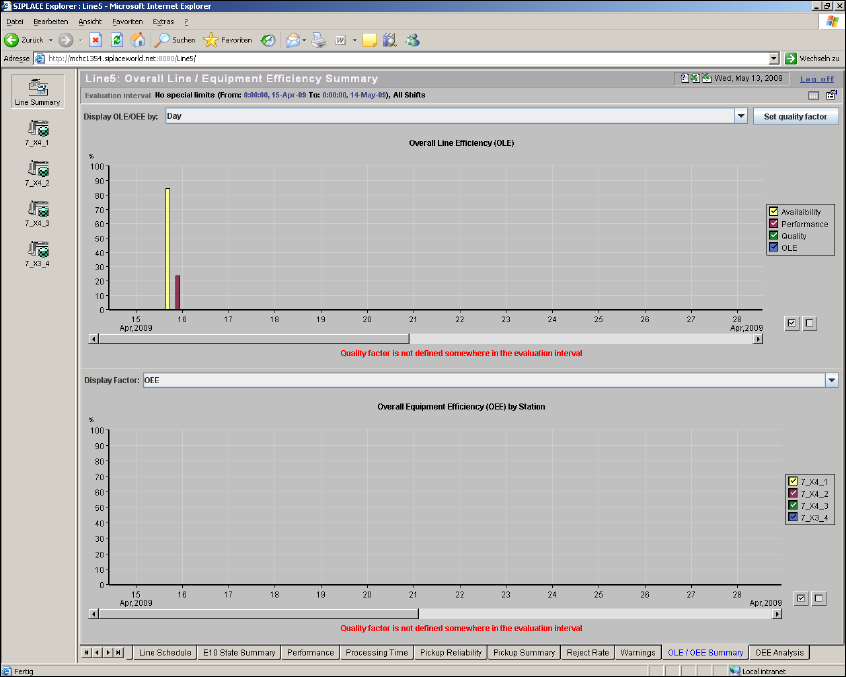
This page shows a summary of the OLE/OEE values. 4
It is possible to analyze the efficiency of a production line with the OLE/OEE values. You can also
manually define a quality factor. 4
– Overall Equipment Efficiency (OEE)
This value determines the efficiency on an equipment level e.g. a SIPLACE station
– Overall Line Efficiency (OLE)
This value determines the efficiency on a line level
OEE is an all-inclusive measurement of semiconductor equipment and manufacturing productiv-
ity. OEE approaches the problem of equipment manufacturing complexity with a methodology to
deduce and implement permanent productivity improvement. Initially, these corrective action
methods are best applied to bottleneck equipment that constrain the entire factory’s productivity. 4
SMA Guide SIPLACE Explorer 4 Functions Overview
from 3.11 (R20-2) Edition 11/2020 EN
57
4
Fig. 4 - 13 OLE / OEE summary
This page contains two bar charts with legends, in which the OLE/OEE values are summarized:4
– Display OLE/OEE
– Display of achieved availability during the evaluation period
– Display of achieved performance during the evaluation period
– Display of achieved quality during the evaluation period
– Display of OLE during the evaluation period
This diagram can be shown by hours, days or weeks. 4
– Display Factor
Percentage display of OEE value for each machine in the line, during the evaluation period
This diagram can be shown by OEE, availability or performance. 4

4 Functions Overview SMA Guide SIPLACE Explorer
Edition 11/2020 EN from 3.11 (R20-2)
58
The OLE/OEE values are also shown on further SMA pages: 4
– Machine Navigator
Shows the OLE/OEE values for the evaluation period currently selected on this page. The OEE
value is displayed for the selected machine.
– Factory Website - Overview Tab
Shows the OLE value for the current day.
NOTE
The following restrictions apply, if no boards are placed at the last station in the production line:
Overall Line Efficiency (OLE) diagram: Values for OLE, performance and availability will not be
shown correctly.
Overall Equipment Efficiency (OEE) by Station diagram: station data is not shown correctly for
stations which do not place boards. 4
Calculating OLE/OEE
– Availability
Availability = (Total Time - Downtime) / Total Time 4
Total time is defined as follows: 4
– Total Time= ALL - UNKNOWN
– Downtime = UNSCHEDULED DOWNTIME + SCHEDULED DOWNTIME
These values are SIPLACE Explorer results measured for the machines in the production line.4
– Performance
Performance = Rate Efficiency x Operational Efficiency 4
Performance is defined with Operational Efficiency and Rate Efficiency. 4
– Operational Efficiency
Operational Efficiency = Productive / Operational Uptime 4
Operational Efficiency is defined as follows: 4
– Productive = PRODUKTIVE
– Operational Uptime = PRODUKTIVE + STANDBY
– Rate Efficiency
Rate Efficiency = Sum (Line Takt) / Sum (Actual Line Takt) 4
These values are SIPLACE Explorer results measured for the machines in the production
line. 4