00197723-12_UG_SE3.11_EN.pdf - 第40页
4 Functions Overview SMA Guide SIPLACE Explorer Edition 11/2020 EN from 3.11 (R20-2) 40 4 Fig. 4 - 5 Line schedule – Line: Shift Schedule Displays the sh ifts that occurr ed within the evaluation interva l. The shift nam…
SMA Guide SIPLACE Explorer 4 Functions Overview
from 3.11 (R20-2) Edition 11/2020 EN
39
–Line Takt
Scheduled takt time for each recipe.
– Average Takt Time
The average takt time values for each recipe are shown.
The following procedures can be performed on this page and are described in this SMA
User Guide:
“Specifying Line Takt” on page 98
“Specifying Lot Size” on page 100
“How to Specify the Generation of Line Reports” on page 90
“How to Sort Tables” on page 96
“How to Enable Legends” on page 96
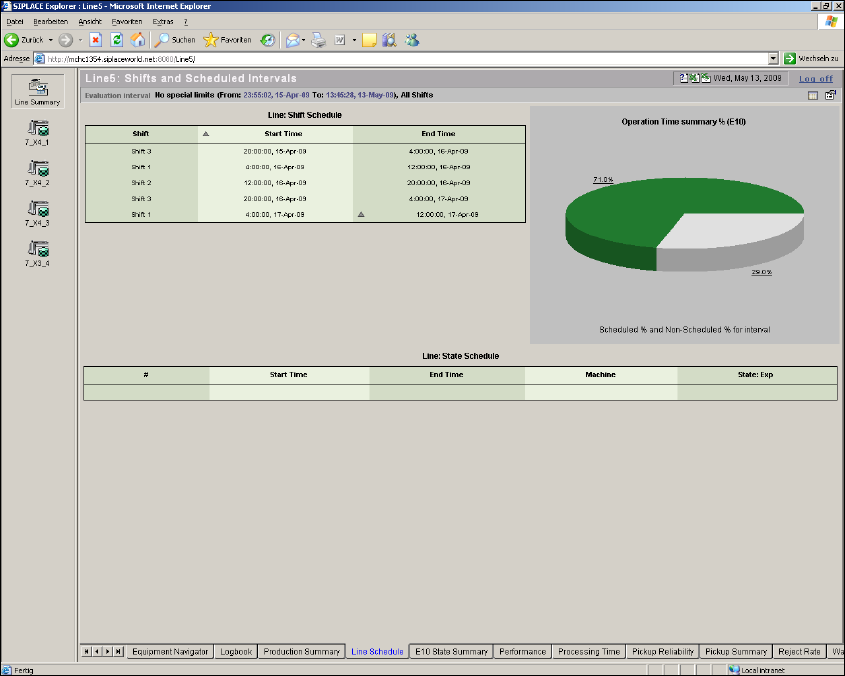
4.1.4 Line Schedule
From this page it is possible to view scheduled shifts and scheduled states (Scheduled Downtime/
Engineering) for the line/machine for the specific time interval of interest for the line. Additionally
a summary chart to show the Operations Time Percentage (E10) is also included. 4
4 Functions Overview SMA Guide SIPLACE Explorer
Edition 11/2020 EN from 3.11 (R20-2)
40
4
Fig. 4 - 5 Line schedule
– Line: Shift Schedule
Displays the shifts that occurred within the evaluation interval. The shift name as well as the
scheduled start and end time and date are listed. Scheduling of shifts is accomplished within
the Calendar. For further information please refer to SIPLACE Explorer Getting Started.
– Operation Time Summary
A summary of the Operational Time (Scheduled)/Nonscheduled time for the evaluation
interval. Nonscheduled time is considered when no shift has been scheduled. Shifts are
defined by the calendar. For further information please refer to SIPLACE Explorer Getting
Started.
SMA Guide SIPLACE Explorer 4 Functions Overview
from 3.11 (R20-2) Edition 11/2020 EN
41
– Line: State Schedule
A summary of scheduled times within the evaluation interval. Scheduled states are defined
within the Calendar. For further information please refer to SIPLACE Explorer Getting Started.
A scheduled state can be for the entire line or for a particular machine.
–#
Entry Number
–Start Time
Start Date and Time for the scheduled interval.
– End Time
End Date and Time for the scheduled interval.
– Machine
"All" if the scheduled state relates to all machines within the line, otherwise the name of the
particular machine.
–State
Category of Scheduled State (Either Engineering or Scheduled Downtime).
The following procedures can be performed on this page and are described in this SMA
User Guide:
“How to Specify the Generation of Line Reports” on page 90
“How to Sort Tables” on page 96
“How to Enable Legends” on page 96