00197723-12_UG_SE3.11_EN.pdf - 第17页
SMA Guide SIPLACE Explorer 3 Getting Started with the SMA from 3.11 (R20-2) Edition 11/2020 EN 1 7 3.1.4.1 Factory W ebsite - Configuration T ab - Line/St ation 3 Fig. 3 - 5 Factory W ebsite - Configuration T ab - Line/S…
3 Getting Started with the SMA SMA Guide SIPLACE Explorer
Edition 11/2020 EN from 3.11 (R20-2)
16
3.1.4 Factory Website - Configuration Tab
This page shows configuration changes for all production lines, that were newly configured in
SIPLACE Explorer or imported from OIS. 3
If stations or placement heads are set in SIPLACE Pro to the "PCB bypass" mode, this is shown
as well on this page. 3
The factory website Configuration Changes has the following tabs: 3
– Line/Station (page 17)
This page shows a table with the following changes: 3
– Addition or removal of a station
– Addition or removal of a production line
– Bypassed Station (page 18)
This page shows a table with details of the station which was set to the "PCB bypass" mode.3
– Gantry (page 19)
This page shows a table with the following changes: 3
– Addition or removal of a gantry of a SIPLACE SX
– Bypassed Head (page 20)
This page shows a table with details of the placement head which was set to the "PCB bypass"
mode. 3
Icons 3
– Calendar
Click here to open the calendar function and set a period for data display.
–Views
Click here to update the table with the component consumption data.
– MS Excel download
Click here to download the table on this page as an Excel file.
SMA Guide SIPLACE Explorer 3 Getting Started with the SMA
from 3.11 (R20-2) Edition 11/2020 EN
17
3.1.4.1 Factory Website - Configuration Tab - Line/Station
3
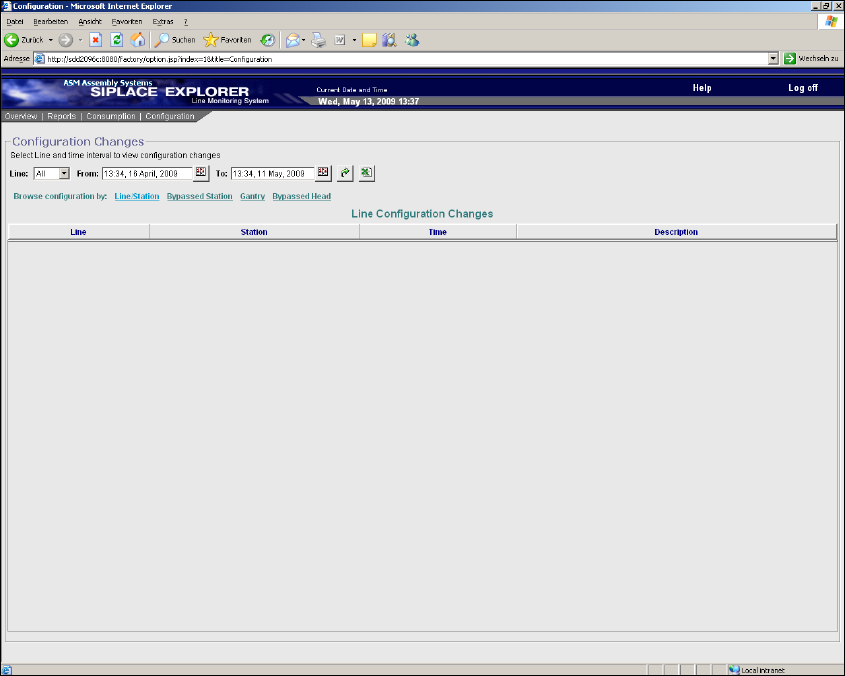
Fig. 3 - 5 Factory Website - Configuration Tab - Line/Station
Table 3
Line
Production line name which has been added or removed or from which a station has been
added or removed.
Station
Station name which was added or removed. 3
If a production line has been added or removed, this column shows "-". 3
Time
Date and time of addition or removal of a production line / station.
Description
Shows if a production line / station has been added or removed.
3 Getting Started with the SMA SMA Guide SIPLACE Explorer
Edition 11/2020 EN from 3.11 (R20-2)
18
3.1.4.2 Factory Website - Configuration Tab - Bypassed Station
3
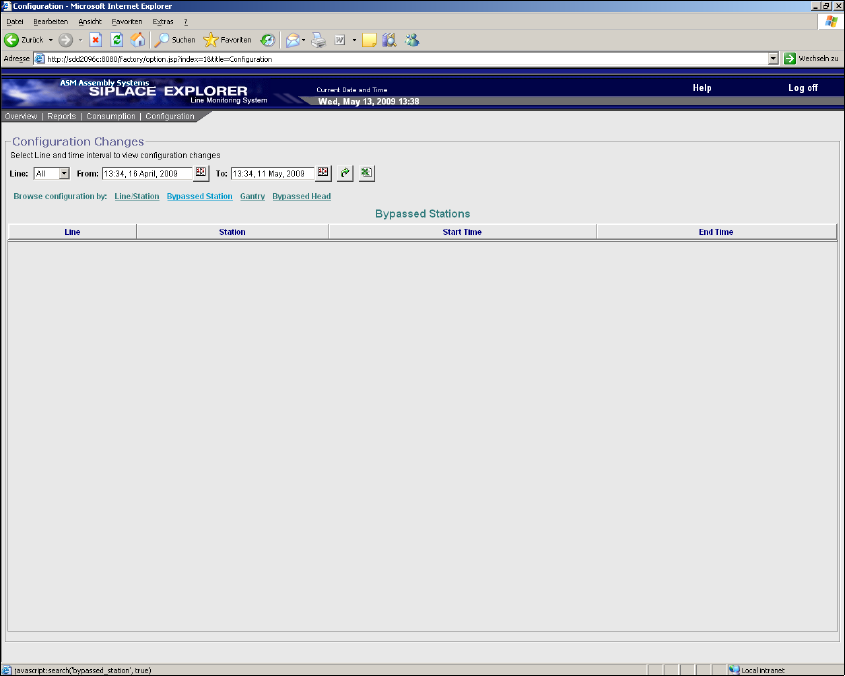
Fig. 3 - 6 Factory Website - Configuration Tab - Bypassed Station
Table 3
Line
Production line name from which a station has been set to the "PCB bypass" mode.
Station
Station name which has been set to the "PCB bypass" mode.
Start Time
Start date and time of the "PCB bypass" mode.
End Time
End date and time of the "PCB bypass" mode.