00197723-12_UG_SE3.11_EN.pdf - 第16页
3 Getting Started with the SMA SMA Guide SIPLACE Explorer Edition 11/2020 EN from 3.11 (R20-2) 16 3.1.4 Factory Website - Configuration T ab This page show s configurat ion changes for all production lines, that were new…
SMA Guide SIPLACE Explorer 3 Getting Started with the SMA
from 3.11 (R20-2) Edition 11/2020 EN
15
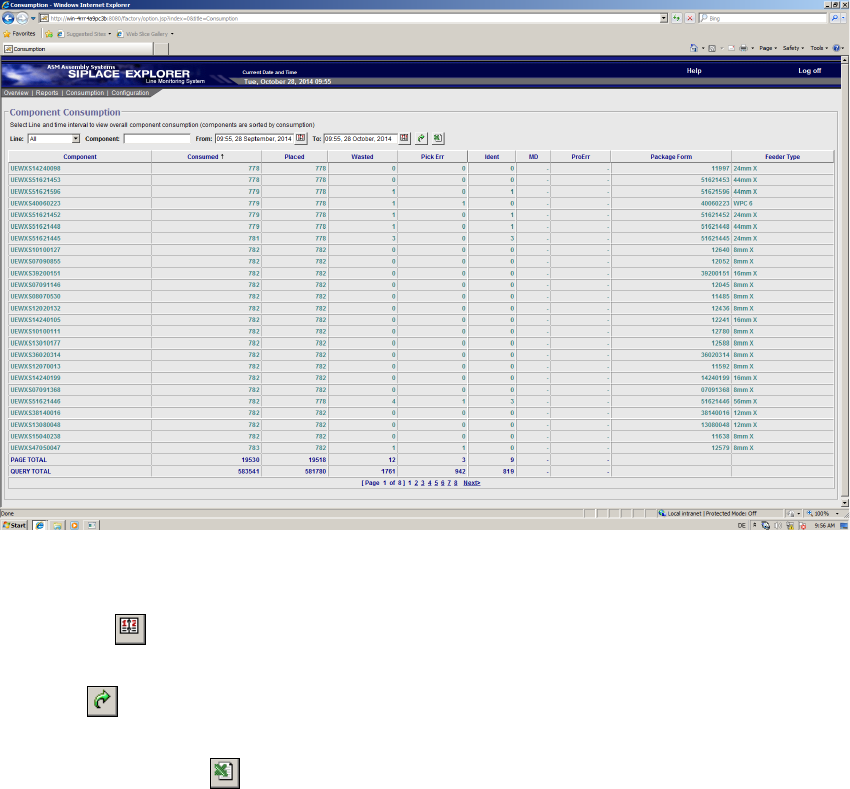
3.1.3 Factory Website - Consumption Tab
The following functions are available on this page: 3
– View component consumption data for all lines or specific lines
– Filter component consumption data to locate a certain component
– View component consumption data for a certain period
– Export component consumption data as MS Excel file
3
Fig. 3 - 4 Factory website - consumption
Icons 3
– Calendar
Click here to open the calendar function and set a period for data display.
– Views
Click here to update the table with the component consumption data.
– MS Excel download
Click here to download the table on this page as an Excel file.
3 Getting Started with the SMA SMA Guide SIPLACE Explorer
Edition 11/2020 EN from 3.11 (R20-2)
16
3.1.4 Factory Website - Configuration Tab
This page shows configuration changes for all production lines, that were newly configured in
SIPLACE Explorer or imported from OIS. 3
If stations or placement heads are set in SIPLACE Pro to the "PCB bypass" mode, this is shown
as well on this page. 3
The factory website Configuration Changes has the following tabs: 3
– Line/Station (page 17)
This page shows a table with the following changes: 3
– Addition or removal of a station
– Addition or removal of a production line
– Bypassed Station (page 18)
This page shows a table with details of the station which was set to the "PCB bypass" mode.3
– Gantry (page 19)
This page shows a table with the following changes: 3
– Addition or removal of a gantry of a SIPLACE SX
– Bypassed Head (page 20)
This page shows a table with details of the placement head which was set to the "PCB bypass"
mode. 3
Icons 3
– Calendar
Click here to open the calendar function and set a period for data display.
–Views
Click here to update the table with the component consumption data.
– MS Excel download
Click here to download the table on this page as an Excel file.
SMA Guide SIPLACE Explorer 3 Getting Started with the SMA
from 3.11 (R20-2) Edition 11/2020 EN
17
3.1.4.1 Factory Website - Configuration Tab - Line/Station
3
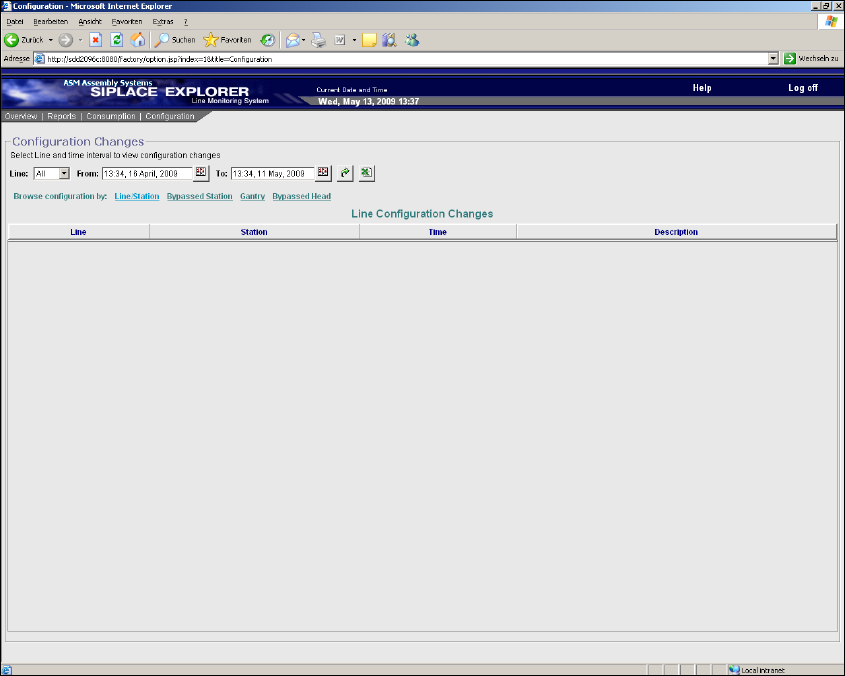
Fig. 3 - 5 Factory Website - Configuration Tab - Line/Station
Table 3
Line
Production line name which has been added or removed or from which a station has been
added or removed.
Station
Station name which was added or removed. 3
If a production line has been added or removed, this column shows "-". 3
Time
Date and time of addition or removal of a production line / station.
Description
Shows if a production line / station has been added or removed.