00197723-12_UG_SE3.11_EN.pdf - 第26页
3 Getting Started with the SMA SMA Guide SIPLACE Explorer Edition 11/2020 EN from 3.11 (R20-2) 26 – Set the report para meters Set the report p arameters for document generation. Click on the icon on the relevant pag…
SMA Guide SIPLACE Explorer 3 Getting Started with the SMA
from 3.11 (R20-2) Edition 11/2020 EN
25
– Total Time:
Non-Scheduled and Operational Time. Unknown time is not included.
– Operational Uptime %:
The percentage of time that the equipment is technically available for engineering or
manufacturing use during the scheduled (Operations) time.
3
Fig. 3 - 10 State Stack
(7) Tabs
Use the tab to select the pages you wish to edit.
– Further functionalities
– An incorrect configuration has been detected . This icon will only appear on the pages
at line level.
Click on the icon on the relevant page, to open the Warnings page. For a detailed
description of this page, please see Section “Warnings” on page 54.
– Set time interval
Use the calendar to set the time interval.
Use the calendar to set the period in which you want the analysis to be active.
Click on icon on the relevant page, to open the factory calendar.
Select the time interval for each page for which data should be shown.
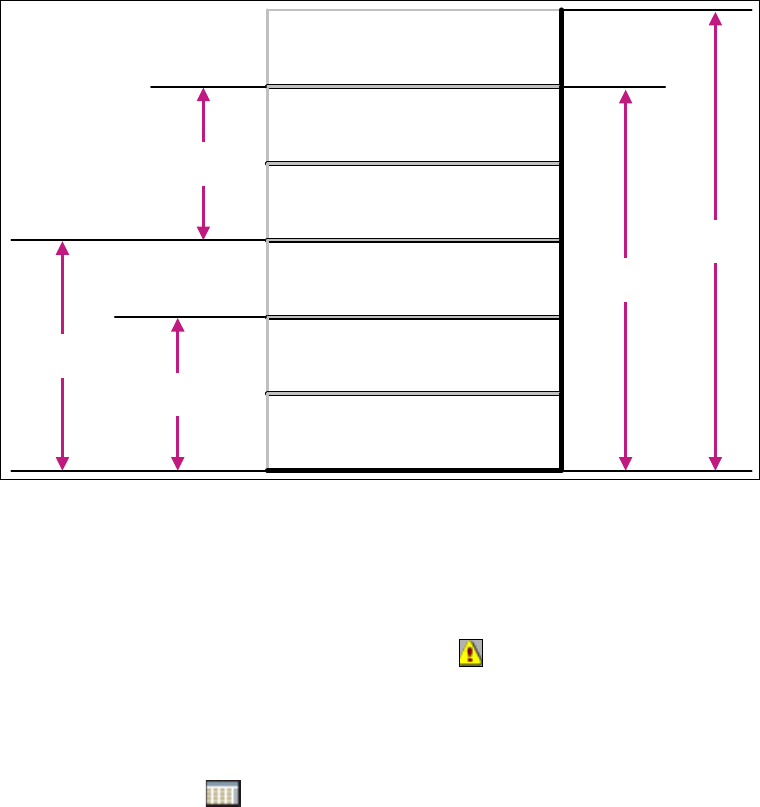
Operations
Time
NON-SCHEDULED TIME
UNSCHEDULED
DOWNTIME
SCHEDULED
DOWNTIME
ENGINEERING TIME
STANDBY TIME
PRODUCTIVE TIME
Total
Time
Manufacturing
Time
Equipment
Uptime
Equipment
Downtime

3 Getting Started with the SMA SMA Guide SIPLACE Explorer
Edition 11/2020 EN from 3.11 (R20-2)
26
– Set the report parameters
Set the report parameters for document generation.
Click on the icon on the relevant page, to open the Report parameters dialog box.
Specify the parameters, time and recipe for the report.
3.2.1 Relationship Between E10 State Summary and Performance
– E10 State Summary page
The E10 State Summary page shows a stacked bar chart providing the E10 State summary
for each machine within the line, as well as the Overall E10 State summary for the complete
line, for the selected duration. 3
The state "Unknown" occurs for example, when the network connection between the SIPLACE
Explorer runtime computer and the OIS DB computer has been interrupted. 3
As soon as the network connection has been restored, the state Unknown is replaced by the
real states based on the post-processed OIS data. 3
Availability = Availability1 + Availability2 3
– Performance page
The Performance page shows an overall summary of production line, for the evaluation
interval. Summary data for several Additionally "Shares of Time" as a Machine or Line
summary is provided. 3
The data provided on this page is MaDaMas data and does not show the E10 status module.
Use the displayed information to compare a Line Computer Unix production line with a
SIPLACE Explorer production line. 3
3
There is one important difference between the provided data of the E10 State Summary page and
the Performance page: 3
If only one processing area is processing and the other one is "Waiting" or "Blocked", the following
will be shown: 3
– E10 State Summary page
E10 state is "Productive" for 100%. 3
– Performance page
Only 50% are in state "Running" and the other 50% are in state "Waiting" or "Blocked", see
“Machines with one processing area” on page 27. 3
3
SMA Guide SIPLACE Explorer 3 Getting Started with the SMA
from 3.11 (R20-2) Edition 11/2020 EN
27
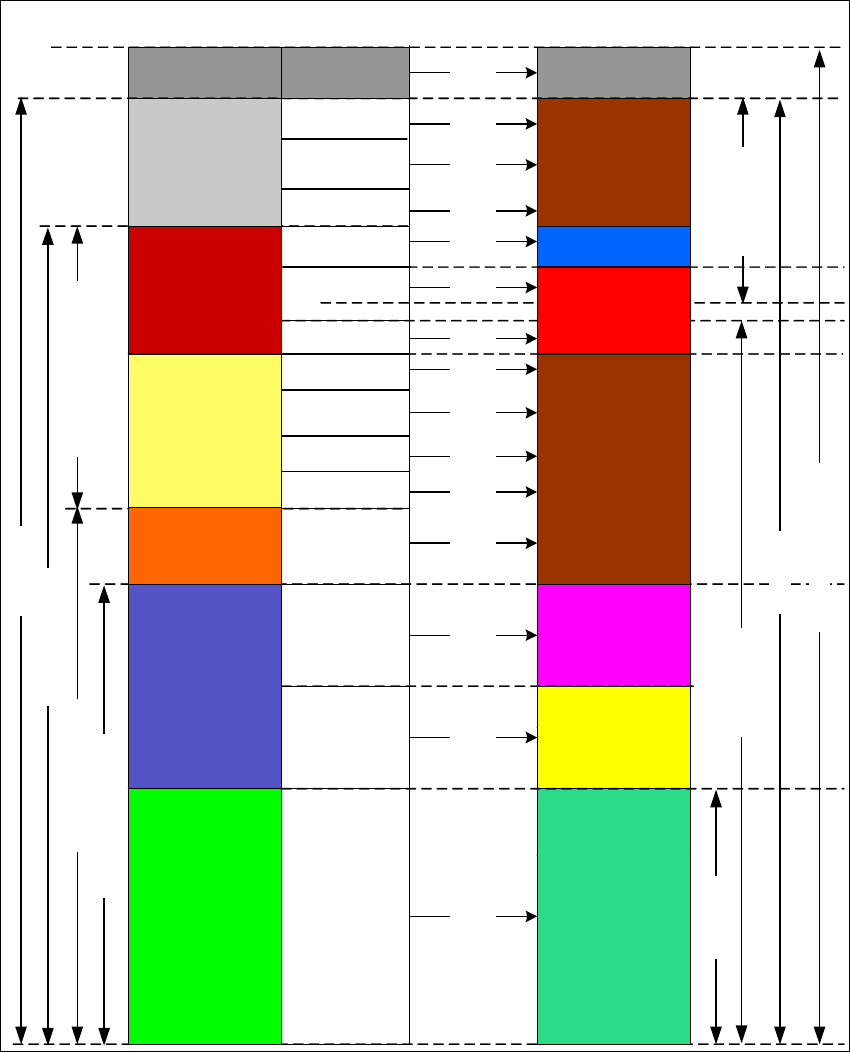
The following figures provide the difference between the E10 states with sub states at machines
with one or two processing areas: 3
3
Fig. 3 - 11 Machines with one processing area
E10 states with substates Performance shares
100 %
Productive
Time
Running
Waiting
Blocked
Unknown
Maintenance
Setup
Other
Interrupted
Fault
Power Down
Power Down
Other
Holiday or
Pause
Interrupted
Unknown
100 %
100 %
100 %
Other
Other
100 %
100 %
100 %
100 %
100 %
100 %
100 %
100 %
Machine Error
Fault
Total Calendar Time
Allocation
Utilization
Availablility 1
Availablility 2
Manufacturing Time
Equipment Uptime Equipment Downtime
Operations Time
Total Time
Standby
Time
Engineering
Time
Scheduled
Downtime
Unscheduled
Downtime
Non-Scheduled
Time
Processing
Default
100 %
100 %
Blocked
Starved
Bypass
100 %