00197723-12_UG_SE3.11_EN.pdf - 第70页
4 Functions Overview SMA Guide SIPLACE Explorer Edition 11/2020 EN from 3.11 (R20-2) 70 4.2.2.2 Processing T ime From this page it is possible to view process ing time by b oard for the particular machine, for the evalua…
SMA Guide SIPLACE Explorer 4 Functions Overview
from 3.11 (R20-2) Edition 11/2020 EN
69
Explanation of Table: 4
For each Recipe within the evaluation interval: 4
–Job/Recipe
The name of the recipe that was processed by the machine. 4
– Board
The completed count of boards for the recipe, within the evaluation interval. 4
– Minimum
The minimum build time observed for the recipe, within the evaluation interval. 4
–Maximum
The maximum build time observed for the recipe, within the evaluation interval. 4
–Average
The average build time observed for the recipe, within the evaluation interval. 4
– Bar Chart Segments
Holding the mouse over a segment of the bar chart will display in a tool tip the value of the
segment. 4
– Scaling Zoom In/Out
By clicking and dragging - it is possible to zoom the scale of the bar chart for viewing of smaller
values. This is especially useful if a large value is displayed elsewhere on the chart and you
wish to view a smaller value. Double clicking near the top of the chart will return the Zoom
Factor to the original. 4
The following procedures can be performed on this page and are described in this SMA
User Guide:
“How to Sort Tables” on page 96
“How to Enable Legends” on page 96
4 Functions Overview SMA Guide SIPLACE Explorer
Edition 11/2020 EN from 3.11 (R20-2)
70
4.2.2.2 Processing Time
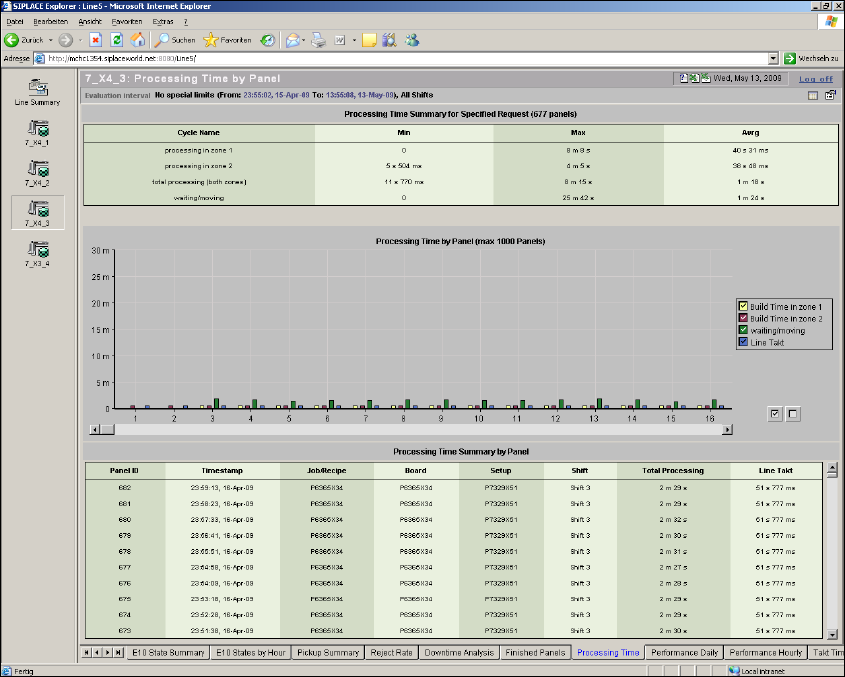
From this page it is possible to view processing time by board for the particular machine, for the
evaluation interval. A Processing Time Summary table for the evaluation interval is also included.4
This page contains three views: 4
– Processing Time Summary for Specified Request - Tabular View
– Processing Time by Panel - Bar Chart
– Processing Time Summary by Panel - Tabular View
4
Fig. 4 - 20 Topic: 7_X4_3 - processing time
SMA Guide SIPLACE Explorer 4 Functions Overview
from 3.11 (R20-2) Edition 11/2020 EN
71
– Processing Time Summary for Specified Request (# Boards - Tabular View)
A summary view for the processing times encountered during the evaluation interval is
displayed within this table. It is possible that more than one recipe may be displayed,
dependant on the evaluation settings. The total number of boards considered within the
evaluation is displayed in the title bar of the table. For multiple processing zone machines, such
as the HS60, the processing time for each zone is displayed. 4
Explanation of Table: 4
For all boards within the evaluation interval: 4
– Cycle Name:
The processing time considered (Total, Processing in Zone N). 4
– Minimum:
The minimum processing time observed within the evaluation interval. 4
–Maximum:
The maximum processing time observed within the evaluation interval. 4
– Average:
The average processing time observed within the evaluation interval. 4
– Processing Time by Panel (Bar Chart)
Displays Processing time for each board, up to a maximum of 1000 boards for the evaluation
interval. If more than 1000 boards are selected for the evaluation interval, only the first 1000
will be displayed on the chart. The evaluation interval must be adjusted if you wish to view
boards towards the end of an interval, if greater than 1000. It is possible that more than one
recipe may be displayed within the chart, dependant on evaluation settings. The build time by
Zone, as well as waiting/Moving time is displayed on this chart. Selection/De-selection and
Zooming are supported. 4
– Processing Time Summary by Panel (Tabular View)
A listing of each board with additional details, processed within the evaluation interval. Recipe
name, Time of Completion, Shift and Processing Time are included. Maximum Display is for
1000 boards. The evaluation interval must be adjusted if you wish to view boards towards the
end of an interval, if greater than 1000. It is possible that more than one recipe may be
displayed within the chart, dependant on evaluation settings. 4