00197723-12_UG_SE3.11_EN.pdf - 第46页
4 Functions Overview SMA Guide SIPLACE Explorer Edition 11/2020 EN from 3.11 (R20-2) 46 – MTBA [hrs:min: sec/Count]: "Mean T ime Between Assistance" Th e va lue of MTBA, and the count of Faults for the evaluati…
SMA Guide SIPLACE Explorer 4 Functions Overview
from 3.11 (R20-2) Edition 11/2020 EN
45
– Waiting:
Waiting for PCB in input or center conveyor, waiting on data supply. 4
– Interrupted:
Contains all shutdown causes that resulted from operator intervention (For SIPLACE
Placement systems this includes Emergency Stop, Cover Open, Stop Button Pressed, Step
Mode, Key Switch, Single Functions, Vision Menus). 4
–Fault:
Contains all shutdown causes that resulted from malfunctions within the machine (For
SIPLACE Placement systems this includes Track Error, Fiducial Error, Barcode Error,
Transport Error, Air Supply and General Machine Errors). 4
–Other:
Scheduled Downtime, Non-Scheduled Time. 4
– Unknown:
System was powered off or disconnected. 4
– System Diagram
A tabular summary view of key data for the production line by machine for the evaluation
interval.
Explanation of Table: 4
– Bar chart:
For each operational State of a station (Running, Waiting, Blocked, Interrupted, Failed,
Other, Unknown) a colored bar is displayed indicating the percentage of time allocated for
each Share of Time. Percentage of each share of time is also displayed. 4
– Total Time:
The duration of the interval currently under evaluation. The sum of the "Shares of Time",
"Unknown" and "Other" time. 4
– Availability %:
Availability of the station (See Definition of Availability %). 4
– Utilization %:
Percentage of time, within the evaluation interval, where the machine is performing its
intended function. Equivalent to % Running. 4
– Performance [cph]:
Components Per Hour (See Definition of cph). 4
4 Functions Overview SMA Guide SIPLACE Explorer
Edition 11/2020 EN from 3.11 (R20-2)
46
– MTBA [hrs:min:sec/Count]:
"Mean Time Between Assistance" The value of MTBA, and the count of Faults for the
evaluation interval (See Definition of MTBA). 4
– MTTR [hrs:min:sec/Count]:
"Mean Time To Repair", The value of MTTR and the count of repairs for the evaluation
interval (See Definition of MTTR). 4
– PCB Count [pieces]:
Number of PCBs that have passed through the station during the evaluation interval. It is
possible that more than one recipe is involved for the duration under evaluation. 4
– Component Sum [pieces]:
Number of components that have been consumed by the Placement station during the
evaluation interval. If the machine is other than a placement system a Zero (0) value is
displayed (See Definition of Component Sum). 4
– Placed Component Sum:
Number of components that have been placed by the Placement station during the
evaluation interval. 4
–Wasted
Number of components that have not been used by the Placement station during the
evaluation interval. 4
– Shares of Time - Machine
–Bar chart:
For each operational State of a station (Running, Waiting, Blocked, Interrupted, Failed,
Other, Unknown) a colored bar is displayed indicating the sum of time allocated for each
Share of Time. Selection/De-selection of the displayed state is supported. 4
– Shares of Time - Line
– This chart provides the Shares of Time, for the Overall Line for the Evaluation Interval.
– The Calculation for the Shares of Time for the entire line is based on the summation of ALL
time of EVERY connected machine within the line, by Shares of Time. Percentage of each
State for the summed time of the line is displayed.
– Example:
If the last Hour is in view for a 4 machine line, with Machine 1 (A Printer) in Waiting for 50
Minutes and the last machine in Waiting for 10 minutes, the chart would display 25%
Waiting, in addition to the other Shares of Time. 4
SMA Guide SIPLACE Explorer 4 Functions Overview
from 3.11 (R20-2) Edition 11/2020 EN
47
The following procedures can be performed on this page and are described in this SMA
User Guide:
“How to Specify the Generation of Line Reports” on page 90
“How to Sort Tables” on page 96
“How to Enable Legends” on page 96
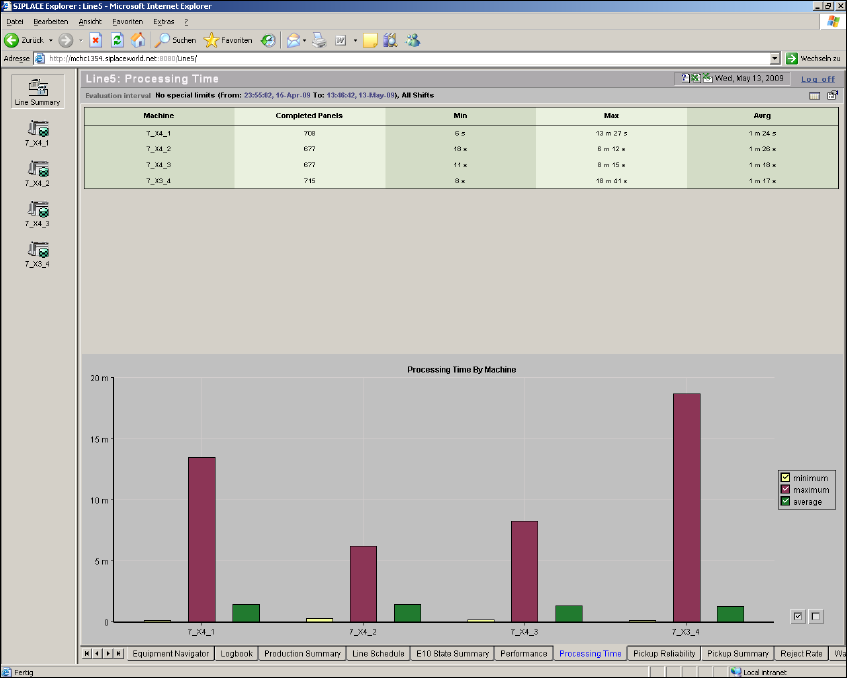
4.1.7 Processing Time
This page shows you a summary of processed boards. 4
From this page an overview of the Total Processing time, by machine, for the evaluation interval
is provided. This page displays real results. 4
This page contains the summary as tabular view and as bar chart: 4
– table with a summary of basic throughput data, by machine
– bar chart and legend summarizing basic throughput data, by machine
4
Fig. 4 - 8 Processing time