00197723-12_UG_SE3.11_EN.pdf - 第35页
SMA Guide SIPLACE Explorer 4 Functions Overview from 3.11 (R20-2) Edition 11/2020 EN 3 5 This pag e conta ins three t ables: 4 – Lot progress Shows the progress of the b oards already produced f or that rec i pe for th e…
4 Functions Overview SMA Guide SIPLACE Explorer
Edition 11/2020 EN from 3.11 (R20-2)
34
– any comment by the user
It is possible to sort the table in either ascending or descending order, of any column by a
double click on the top of the table in the corresponding column header. An arrow will be
displayed to show the "Sort By" column, as well as the sort order. 4
– Occurrences by Reason (Pareto):
A Pareto chart is displayed that shows in descending order: 4
– machine
– reason code
– number of occurrences of this reason within the logbook.
This is a useful chart to determine the most common reason entry. 4
– Duration by Reason (Pareto):
A Pareto chart is displayed that shows in descending order: 4
– machine
– reason code
– total duration related to this reason within the logbook.
In the case of line disruptions - this data is useful to identify utilization improvements that may
not otherwise be obvious without the user observations. 4
The following procedures can be performed on this page and are described in this SMA
User Guide:
“How to Specify the Generation of Line Reports” on page 90
“How to Sort Tables” on page 96
“How to Enable Legends” on page 96
4.1.3 Production Summary
This page shows the recipe currently being processed by the machine in operation. 4
You will be shown detailed information about what the machine is producing e.g. when the pro-
duction started and when it will finish. You also be told about production volumes. 4
Both current and historical data are available/can be shown. 4
SMA Guide SIPLACE Explorer 4 Functions Overview
from 3.11 (R20-2) Edition 11/2020 EN
35
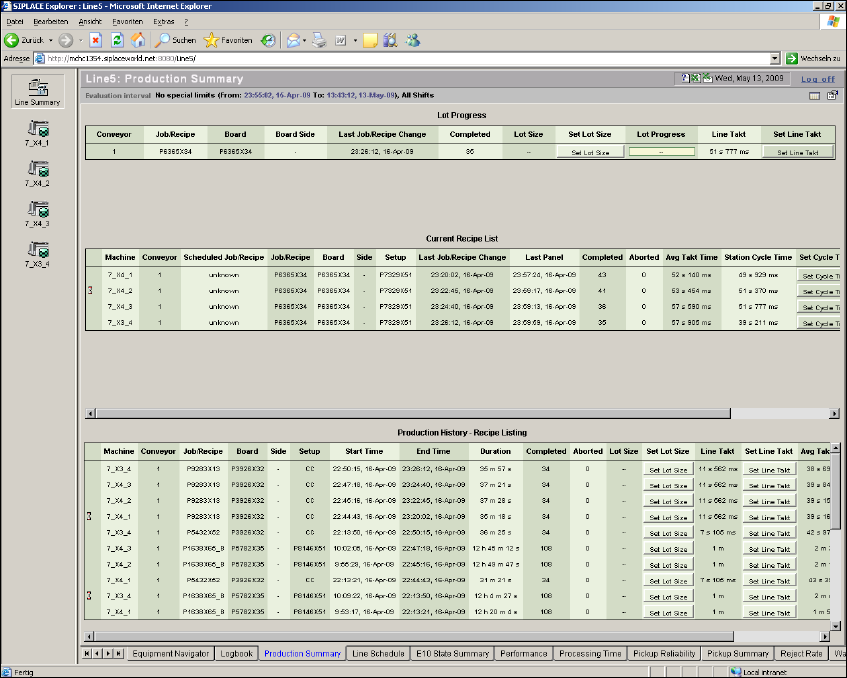
This page contains three tables: 4
– Lot progress
Shows the progress of the boards already produced for that recipe for the production line.
The total number of boards in the recipe can be set in the Set Lot Size column.
The line Takt can be set in the Set Line Takt column.
As default these values will be taken of SIPLACE Pro, they can be changed if required. 4
– Current Recipe List
Shows details about the boards to be currently produced for each station of the production line.
– Production history - Recipe Listing
Production history - recipe lists - report diagram.
4
Fig. 4 - 4 Production summary
4 Functions Overview SMA Guide SIPLACE Explorer
Edition 11/2020 EN from 3.11 (R20-2)
36
–Lot Progress
– Conveyor
Number of the of the conveyor lane. Conveyor1-Right/Conveyor2-Left (When viewed from
Input)
– Job/Recipe
Active Recipe that is currently executing.
–Board
Shows the name of the board.
–Board Side
Shows the board side completed.
– Last Job/Recipe Change
The date and time at which the recipe was changed for the particular lane/machine. This is
the time at which the first board of the new recipe has been completed. At this time, unless
an additional recipe has been scheduled, the scheduled and current recipes will be
synchronized.
– Completed
The count of completed boards since the beginning of the current recipe.
–Lot Size
Number of boards in a recipe. This value will be taken from SIPLACE Pro and can be
changed if required.
– Set Lot Size
This value will be taken from SIPLACE Pro and can be changed if required.
– Lot Progress
Shows the progress of the boards already produced for that recipe.
– Line Takt
Maximum cycle value for all machines of a particular production line, in one recipe. This
value will be taken from SIPLACE Pro and can be changed if required. This value will be
used for calculating the OEE values.
– Set Line Takt
This value will be taken from SIPLACE Pro and can be changed if required.