00197723-12_UG_SE3.11_EN.pdf - 第97页
SMA Guide SIPLACE Explorer 5 Using the SMA from 3.11 (R20-2) Edition 11/2020 EN 9 7 5 Fig. 5 - 6 MS-Excel-Export The Excel file shows dat a of the Pickup Reliabil ity website. Y ou can save this file or just c lose t…

5 Using the SMA SMA Guide SIPLACE Explorer
Edition 11/2020 EN from 3.11 (R20-2)
96
5.3 How to Sort Tables
Open the required line website and select any page.
The table can be sorted by any column (descending or ascending order). Simply click on the
header line of the required column.
An arrow in the column header indicates by which column the contents have been sorted.
5.4 How to Enable Legends
Open the required line website and select any page.
It is possible to select/deselect the states that are illustrated in the bar chart. 5
De-selection of State will result in redraw of the chart without the State. This is useful if only a
one or a combination of States is desired in the view. As an example - it is possible to display
only "Scheduled Down & Unscheduled Down" within a chart. States can be selected
individually in any combination.
Select/Deselect All:
the buttons below the chart allow a one click selection for All/None. 5
5.5 How to Export the Data Shown as an MS Excel File
Open the required line website and select any page.
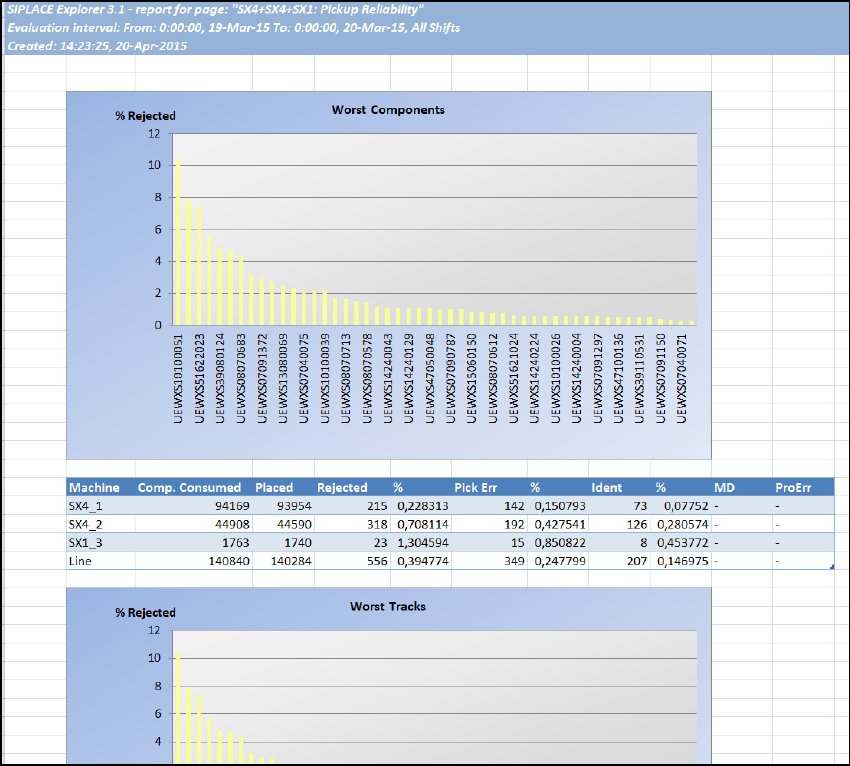
Click on the icon. Another Internet Explorer window will open, in which the generated MS
Excel file will be shown:
SMA Guide SIPLACE Explorer 5 Using the SMA
from 3.11 (R20-2) Edition 11/2020 EN
97
5
Fig. 5 - 6 MS-Excel-Export
The Excel file shows data of the Pickup Reliability website.
You can save this file or just close the window to return to the previous view.
5.6 Making Logbook Entries
The logbook provides a method to enter notes and causes related to line disruptions or events of
interest. Logbook entries consist of a reason, a start/end time, as well as additional detail notes.
The entry can be in relation to the entire line or a specific machine. Entry is possible via the web
browser if the user has defined rights to allow an entry. 5
5 Using the SMA SMA Guide SIPLACE Explorer
Edition 11/2020 EN from 3.11 (R20-2)
98
NOTE
You can use this function as an electronic log book, in order for users to enter comments about
long machine downtimes.
Experience has shown that it is practical to enter comments about machine downtimes which are
longer than 2 minutes.
You should regularly analyze the contents of the log book. It contents can often help you to
eliminate some of the causes of machine downtime. 5
5.6.1 How to Make a Logbook Entry
Select the Equipment Navigator - State Analysis website.
Select the date and machine of interest. Click on the hyperlink Logbook. The screen changes
to the Logbook Entry screen.
Zoom into the interval of interest on the time line. To allow the entry of the start/end times - you
may either select the state of interest, followed by the Add Entry the start/end times are filled
by the selection of this state. You may also enter the start/end times manually.
The reason for the entry can be selected from the reason dropdown. The list of reasons can
be fully customized for your line/factory.
After selection of a reason, you may enter additional comments up to 256 characters.
Click on Apply and the logbook entry is added to the timeline. It is possible to update/delete
entries that the logged in user has made. Entries are visible in the timeline view within the
Equipment Navigator.
5.7 Specifying Line Takt
The line Takt (maximum cycle value for all machines of a particular production line, in one recipe)
can be entered here. If dual conveyor mode is being used and if two different recipes are being
processed on the two lanes, a separate line Takt can be specified for each lane. The line Takt en-
tered here will be shown on the page ”Processing Time”. If no line Takt is entered, the value taken
from SIPLACE Pro will be displayed on this page and on the page "Processing Time". 5
The Takt time is the period between the completion of two boards i.e. the time from completion of
"board 1" production to the completion of "board 2". 5
This period is calculated as follows:
Takt time = time of completion of board 2 - time of completion of board 1 5
To see a diagram of the Takt time at an equipment level, refer to the "Takt Time" page. 5