00197723-12_UG_SE3.11_EN.pdf - 第58页
4 Functions Overview SMA Guide SIPLACE Explorer Edition 11/2020 EN from 3.11 (R20-2) 58 The OLE/OEE values are also shown on further SMA pages: 4 – Machine Navigator Shows the OLE/OEE values for the evaluation perio d cu…
SMA Guide SIPLACE Explorer 4 Functions Overview
from 3.11 (R20-2) Edition 11/2020 EN
57
4
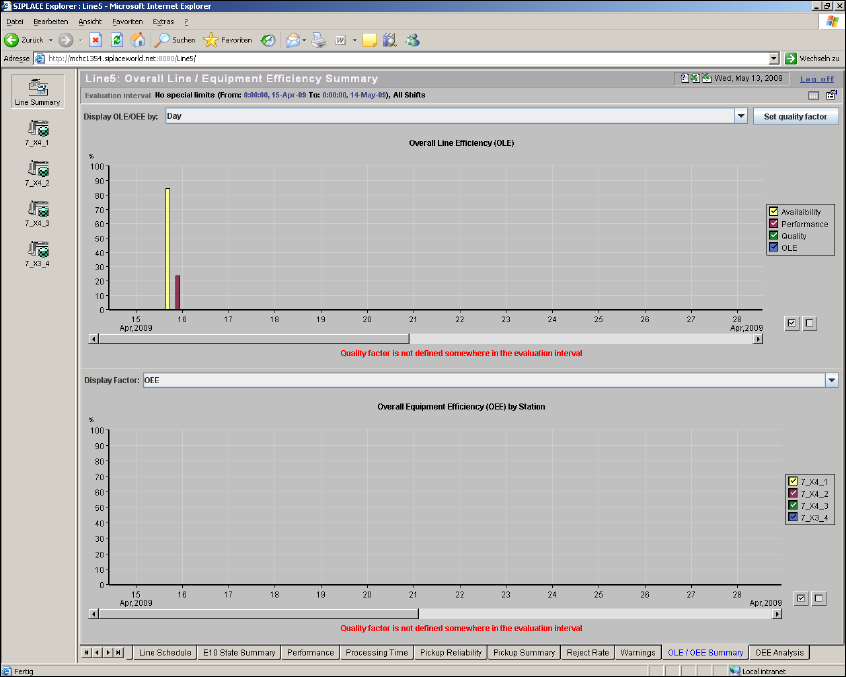
Fig. 4 - 13 OLE / OEE summary
This page contains two bar charts with legends, in which the OLE/OEE values are summarized:4
– Display OLE/OEE
– Display of achieved availability during the evaluation period
– Display of achieved performance during the evaluation period
– Display of achieved quality during the evaluation period
– Display of OLE during the evaluation period
This diagram can be shown by hours, days or weeks. 4
– Display Factor
Percentage display of OEE value for each machine in the line, during the evaluation period
This diagram can be shown by OEE, availability or performance. 4

4 Functions Overview SMA Guide SIPLACE Explorer
Edition 11/2020 EN from 3.11 (R20-2)
58
The OLE/OEE values are also shown on further SMA pages: 4
– Machine Navigator
Shows the OLE/OEE values for the evaluation period currently selected on this page. The OEE
value is displayed for the selected machine.
– Factory Website - Overview Tab
Shows the OLE value for the current day.
NOTE
The following restrictions apply, if no boards are placed at the last station in the production line:
Overall Line Efficiency (OLE) diagram: Values for OLE, performance and availability will not be
shown correctly.
Overall Equipment Efficiency (OEE) by Station diagram: station data is not shown correctly for
stations which do not place boards. 4
Calculating OLE/OEE
– Availability
Availability = (Total Time - Downtime) / Total Time 4
Total time is defined as follows: 4
– Total Time= ALL - UNKNOWN
– Downtime = UNSCHEDULED DOWNTIME + SCHEDULED DOWNTIME
These values are SIPLACE Explorer results measured for the machines in the production line.4
– Performance
Performance = Rate Efficiency x Operational Efficiency 4
Performance is defined with Operational Efficiency and Rate Efficiency. 4
– Operational Efficiency
Operational Efficiency = Productive / Operational Uptime 4
Operational Efficiency is defined as follows: 4
– Productive = PRODUKTIVE
– Operational Uptime = PRODUKTIVE + STANDBY
– Rate Efficiency
Rate Efficiency = Sum (Line Takt) / Sum (Actual Line Takt) 4
These values are SIPLACE Explorer results measured for the machines in the production
line. 4
SMA Guide SIPLACE Explorer 4 Functions Overview
from 3.11 (R20-2) Edition 11/2020 EN
59
If the calculated result > 100%, SIPLACE Explorer shows only 100%. This happens, if the line
takt value was specified unrealistically high. 4
–Quality
Quality factor: this value can be defined in SIPLACE Explorer or can be imported from an xml
file. 4
–OEE
OEE = Availability x Performance x Quality factor 4
If the calculated result > 90%, you should check the line takt value. 4
The following procedures can be performed on this page and are described in this SMA
User Guide:
“How to define a quality factor in SIPLACE Explorer” on page 102
“How to import a quality factor from an xml file” on page 103
“How to Specify the Generation of Line Reports” on page 90
“How to Sort Tables” on page 96
“How to Enable Legends” on page 96
4.1.13 OEE Analysis
This page shows a summary of the OEE values. 4
These values can be used to generate an analysis about operation efficiency on an equipment
level. You can also manually define target values. 4
– Overall Equipment Efficiency (OEE)
This value shows the efficiency on an equipment level