00197723-12_UG_SE3.11_EN.pdf - 第48页
4 Functions Overview SMA Guide SIPLACE Explorer Edition 11/2020 EN from 3.11 (R20-2) 48 – Processing Ti me, T abular V iew – Machine: Name of the machine. 4 – Completed Panels: The count of completed bo ards processed by…
SMA Guide SIPLACE Explorer 4 Functions Overview
from 3.11 (R20-2) Edition 11/2020 EN
47
The following procedures can be performed on this page and are described in this SMA
User Guide:
“How to Specify the Generation of Line Reports” on page 90
“How to Sort Tables” on page 96
“How to Enable Legends” on page 96
4.1.7 Processing Time
This page shows you a summary of processed boards. 4
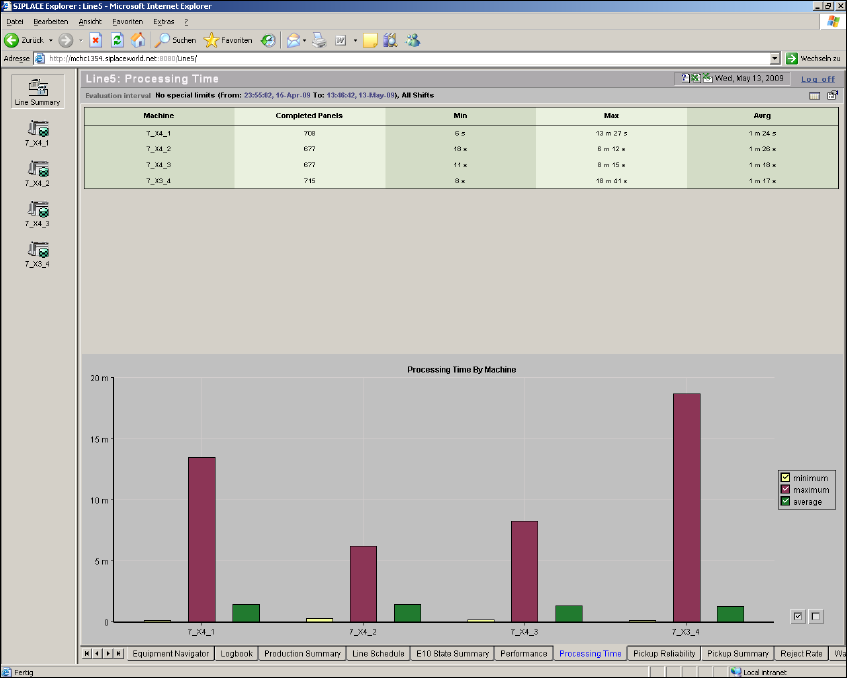
From this page an overview of the Total Processing time, by machine, for the evaluation interval
is provided. This page displays real results. 4
This page contains the summary as tabular view and as bar chart: 4
– table with a summary of basic throughput data, by machine
– bar chart and legend summarizing basic throughput data, by machine
4
Fig. 4 - 8 Processing time
4 Functions Overview SMA Guide SIPLACE Explorer
Edition 11/2020 EN from 3.11 (R20-2)
48
– Processing Time, Tabular View
– Machine:
Name of the machine. 4
– Completed Panels:
The count of completed boards processed by each machine for the duration of the
evaluation interval. More than one recipe may be considered. 4
– Minimum:
The Minimum Processing Time observed for the boards processed within the evaluation
interval. If the evaluation interval contains more than one recipe, all recipes may be
considered. We recommend to set the evaluation interval with only one recipe. 4
–Maximum:
The Maximum Processing Time observed for the boards processed within the evaluation
interval. If the evaluation interval contains more than one recipe, all recipes may be
considered. We recommend to set the evaluation interval with only one recipe. 4
– Average:
The Average Processing Time for the boards processed within the evaluation interval. More
than one recipe may be considered. 4
– Processing Time By Machine - Bar Chart View
A Bar Chart View showing, by machine, Average, Maximum, and Minimum processing time for
the evaluation (See Tabular View). 4
The following procedures can be performed on this page and are described in this SMA
User Guide:
“How to Specify the Generation of Line Reports” on page 90
“How to Sort Tables” on page 96
“How to Enable Legends” on page 96
4.1.8 Pickup Reliability
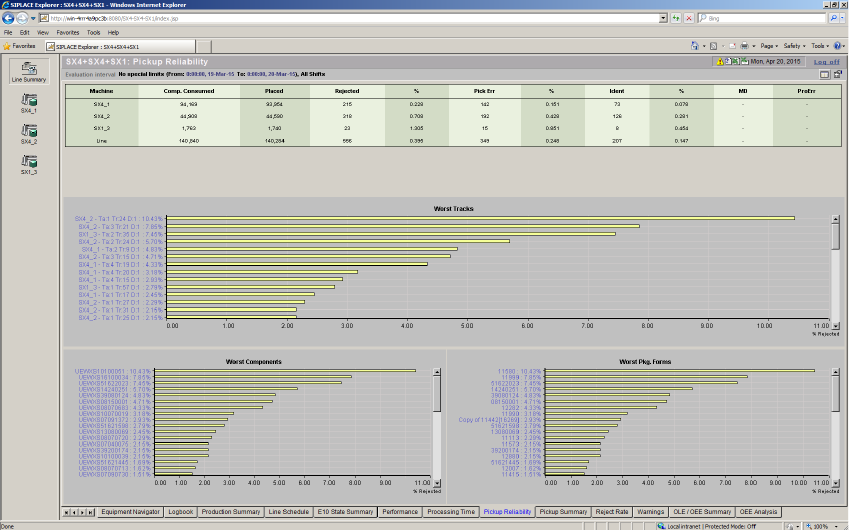
A report page that provides an overview of the pick & place process quality. This page contains
an overview table with pickup reliability details and three other diagrams: 4
– Summary with pickup reliability details
– Summary of tracks with the most pickup errors
– Summary of components with the most pickup errors
– Summary of package forms with the most pickup errors
SMA Guide SIPLACE Explorer 4 Functions Overview
from 3.11 (R20-2) Edition 11/2020 EN
49
The data for each track, component or package forms shown can also be displayed in more detail.4
4
Fig. 4 - 9 Pickup reliability
– Consumption/Rejects - Tabular View
Key summary data related to consumption and reject rates for the line and machines for the
evaluation interval. 4
An explanation of each column: 4
– Machine:
The name of the Placement System. An entry for the line is also included which is the sum
of all placement systems within the line. 4
– Components Consumed:
The total components consumed during the evaluation interval (See definition of
component sum). 4
– Placed:
The components placed during the evaluation interval. 4
–Rejects:
The sum of rejected components that occurred within the evaluation interval (See definition
of Reject Total). 4