00197723-12_UG_SE3.11_EN.pdf - 第36页
4 Functions Overview SMA Guide SIPLACE Explorer Edition 11/2020 EN from 3.11 (R20-2) 36 –L o t P r o g r e s s – Conveyo r Number of the of the conveyor lane. Conveyor1-Rig ht/Conveyor 2-L eft (When viewed from Input) – …
SMA Guide SIPLACE Explorer 4 Functions Overview
from 3.11 (R20-2) Edition 11/2020 EN
35
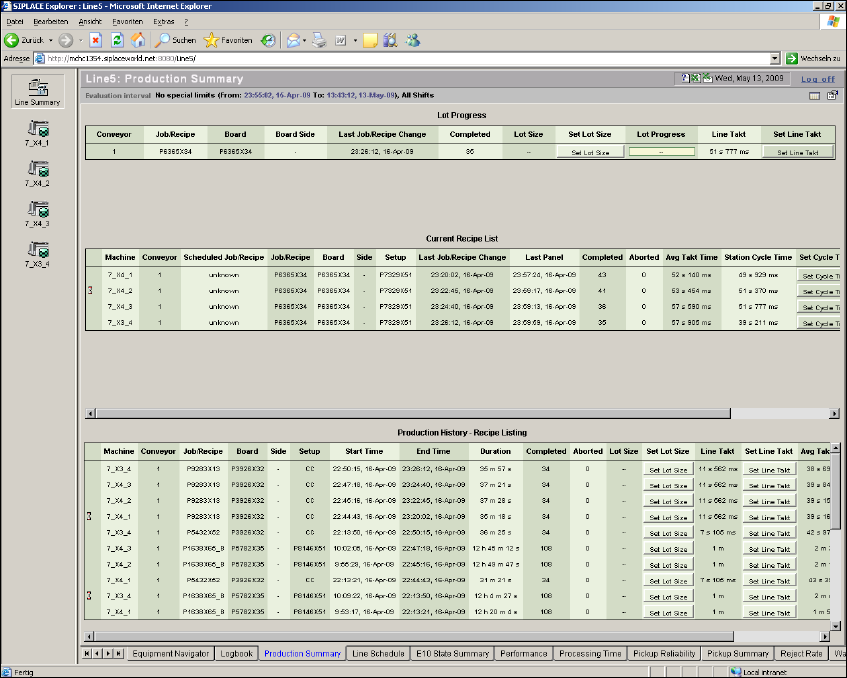
This page contains three tables: 4
– Lot progress
Shows the progress of the boards already produced for that recipe for the production line.
The total number of boards in the recipe can be set in the Set Lot Size column.
The line Takt can be set in the Set Line Takt column.
As default these values will be taken of SIPLACE Pro, they can be changed if required. 4
– Current Recipe List
Shows details about the boards to be currently produced for each station of the production line.
– Production history - Recipe Listing
Production history - recipe lists - report diagram.
4
Fig. 4 - 4 Production summary
4 Functions Overview SMA Guide SIPLACE Explorer
Edition 11/2020 EN from 3.11 (R20-2)
36
–Lot Progress
– Conveyor
Number of the of the conveyor lane. Conveyor1-Right/Conveyor2-Left (When viewed from
Input)
– Job/Recipe
Active Recipe that is currently executing.
–Board
Shows the name of the board.
–Board Side
Shows the board side completed.
– Last Job/Recipe Change
The date and time at which the recipe was changed for the particular lane/machine. This is
the time at which the first board of the new recipe has been completed. At this time, unless
an additional recipe has been scheduled, the scheduled and current recipes will be
synchronized.
– Completed
The count of completed boards since the beginning of the current recipe.
–Lot Size
Number of boards in a recipe. This value will be taken from SIPLACE Pro and can be
changed if required.
– Set Lot Size
This value will be taken from SIPLACE Pro and can be changed if required.
– Lot Progress
Shows the progress of the boards already produced for that recipe.
– Line Takt
Maximum cycle value for all machines of a particular production line, in one recipe. This
value will be taken from SIPLACE Pro and can be changed if required. This value will be
used for calculating the OEE values.
– Set Line Takt
This value will be taken from SIPLACE Pro and can be changed if required.
SMA Guide SIPLACE Explorer 4 Functions Overview
from 3.11 (R20-2) Edition 11/2020 EN
37
– Current Recipe List - Tabular View:
Provides a listing of each machine within the production line, illustrating the current production
recipe. 4
– Bottleneck Indication
A symbol will appear in this column next to the machine with the largest average processing
time, since the recipe start time.
– Machine
Name of the machine. Dual lane machines will appear in the list twice.
– Conveyor
Number of the of the conveyor lane. Conveyor1-Right/Conveyor2-Left (When viewed from
Input)
– Scheduled Job/Recipe
Recipe which is queued from line control and which is active for the production line and the
station.
–Job/Recipe
Recipe for which a board already has been completed or aborted. Otherwise the previous
recipe name is shown.
– Board
Board name, if a board already has been completed or aborted.
Otherwise the board name of the previous recipe is shown.
–Side
Shows the board side completed.
– Setup
Setup Scheduled from Job Control.
– Last Job/Recipe Change
The date and time at which the recipe was changed for the particular lane/machine. This is
the time at which the first board of the new recipe has been completed. At this time, unless
an additional recipe has been scheduled, the scheduled and current recipes will be
synchronized.
– Last Panel
Completion time and date for the last board to complete at the machine.
– Completed
The count of completed boards since the beginning of the current recipe. If "0" is shown in
this column, this station has been set to the "PCB bypass" mode.