00197723-12_UG_SE3.11_EN.pdf - 第73页
SMA Guide SIPLACE Explorer 4 Functions Overview from 3.11 (R20-2) Edition 11/2020 EN 7 3 – T ot al Processing The Sum of all Processing T ime a nd Move/W ait T ime s for the equipment. 4 ProcessT_tot al = (Wait_MoveT + P…
4 Functions Overview SMA Guide SIPLACE Explorer
Edition 11/2020 EN from 3.11 (R20-2)
72
Explanation of Table: 4
For each Board within the evaluation interval: 4
– Panel ID:
The Number of the Board within the evaluation. 4
–Timestamp:
The completion time/date of the boards within the evaluation interval. 4
– Job/Recipe:
The recipe name for the board. 4
–Shift:
The shift scheduled when the board was processed. 4
– Total Processing Time:
Total Processing Time for the board. 4
– Processing Times definitions
The E10 definition for "Processing Time" includes the time from the equipment was loaded with
the work piece, to unload of the work piece, and includes all processing and wait times, while
the work piece is present within the equipment. It is possible to derive this time, for this purpose
as "Total Processing". However for most SMT users, of inline equipment, it is generally useful
to understand the times that the machine is actively processing. With a multiple zone machine,
it is of interest to understand the processing of each zone, as this possibility can afford the
possibility to further improve the optimization of a production line, and it's constituent
machines. 4
– Processing in zone "N"
Processing Time for the Zone is defined from the Start of Processing, to the End of Processing
for the Zone. Should an interruption occur during the Processing, it is also included. 4
ProcessT(ZoneN) = EndTime(ZoneN) - StartTime(ZoneN) 4
– Waiting/Moving
Waiting and Moving is the sum of time from when the board arrives to the input conveyor, to
when Processing is started, and the time from when processing is completed, to when the
board leaves the output conveyor. 4
Machines with one processing zone: 0 4
For multiple zone machines, the time from completion of a prior processing zone, to the time
processing begins in the next zone is also included. 4
Wait_MoveT = (StartTime(ZoneN+1) - EndTime(ZoneN)) 4

SMA Guide SIPLACE Explorer 4 Functions Overview
from 3.11 (R20-2) Edition 11/2020 EN
73
– Total Processing
The Sum of all Processing Time and Move/Wait Times for the equipment. 4
ProcessT_total = (Wait_MoveT + ProcessT(ZoneN) + ProcessT(ZoneN+1) ...) 4
– Bar Chart Segments
Holding the mouse over a segment of the bar chart will display in a tool tip the value of the
segment. 4
– Scaling Zoom In/Out
By clicking and dragging - it is possible to zoom the scale of the bar chart for viewing of smaller
values. This is especially useful if a large value is displayed elsewhere on the chart and you
wish to view a smaller value. Double clicking near the top of the chart will return the Zoom
Factor to the original. 4
The following procedures can be performed on this page and are described in this SMA
User Guide:
“How to Sort Tables” on page 96
“How to Enable Legends” on page 96
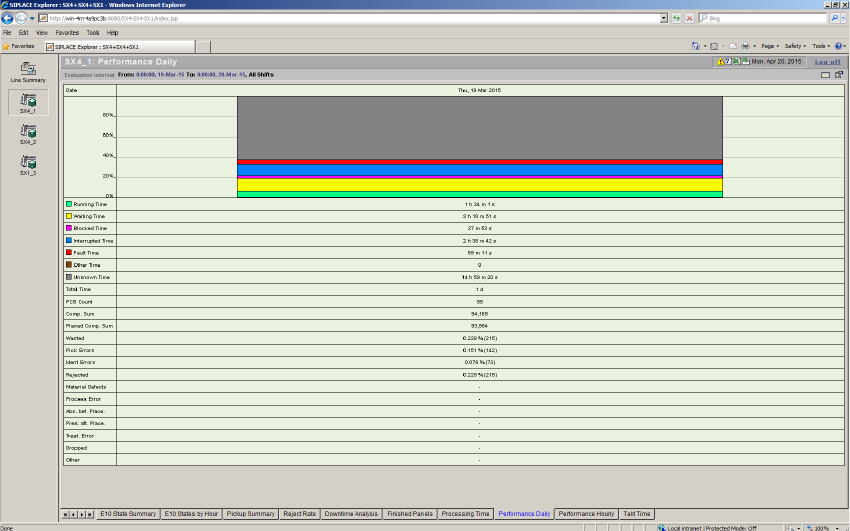
4.2.2.3 Performance Daily
The function of this page is similar to the "Line Performance" diagram providing key data for the
specific machine for the selected evaluation interval, on a daily basis. From this view, weekly or
monthly reports (By Day) can also be provided, according to the evaluation interval setting. 4
NOTE
The data provided on this page is MaDaMas data and does not show the E10 status module. Use
the displayed information to compare a Line Computer Unix production line with a SIPLACE
Explorer production line. 4
4 Functions Overview SMA Guide SIPLACE Explorer
Edition 11/2020 EN from 3.11 (R20-2)
74
4
Fig. 4 - 21 Topic: 7_X4_3 - performance daily
The following machine information will be provided: 4
– Daily performance
–Time
– Number of processed boards per day
4
Explanation of Table: 4
For each day within the evaluation interval: 4
– Bar chart:
For each operational State of a station (Running, Waiting, Blocked, Interrupted, Failed, Other,
Unknown) a colored bar is displayed indicating the percentage of time allocated for each Share
of Time for the Target Date. 4
– Running Time:
Sum of time for the target date in Running Share of Time. 4
– Waiting time:
Sum of time for the target date in Waiting Share of Time. 4
– Blocked Time:
Sum of time for the target date in Blocked Share of Time. 4