00197723-12_UG_SE3.11_EN.pdf - 第65页
SMA Guide SIPLACE Explorer 4 Functions Overview from 3.11 (R20-2) Edition 11/2020 EN 6 5 This pag e gives you a pareto ch art with the ca uses of unschedul ed downtime: The do wntime is shown separately for the following…
4 Functions Overview SMA Guide SIPLACE Explorer
Edition 11/2020 EN from 3.11 (R20-2)
64
– Bar Chart Segments
Holding the mouse over a segment of the bar chart will display in a tool tip the value of the
segment. 4
– Scaling Zoom In/Out
By clicking and dragging - it is possible to zoom the scale of the bar chart for viewing of smaller
values. This is especially useful if a large value is displayed elsewhere on the chart and you
wish to view a smaller value. Double clicking near the top of the chart will return the Zoom
Factor to the original. 4
The following procedure can be performed on this page and is described in this SMA User
Guide:
“How to Enable Legends” on page 96
4.2.1.3 Downtime Analysis
4
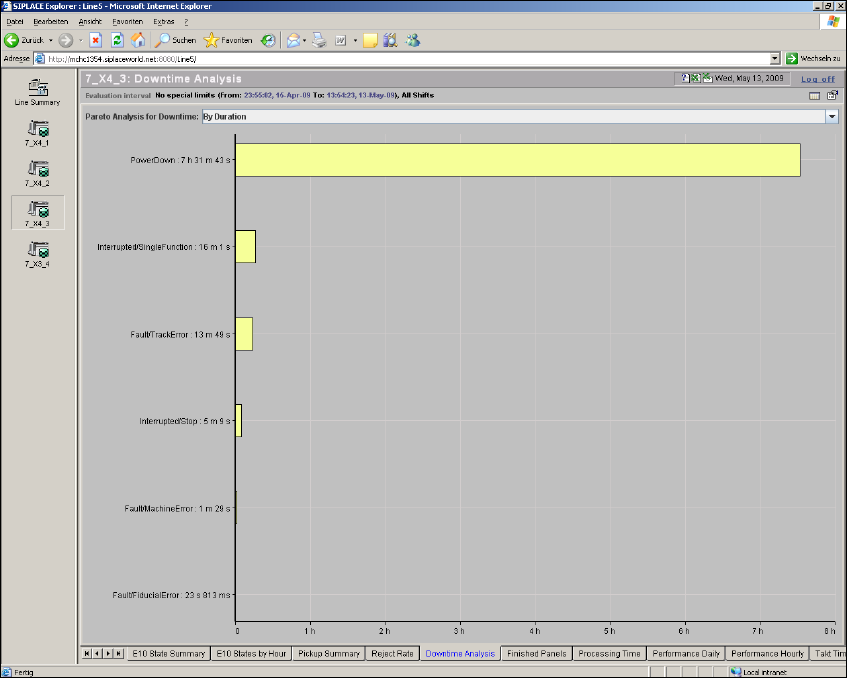
Fig. 4 - 17 Topic: 7_X4_3 - downtime analysis
SMA Guide SIPLACE Explorer 4 Functions Overview
from 3.11 (R20-2) Edition 11/2020 EN
65
This page gives you a pareto chart with the causes of unscheduled downtime: The downtime is
shown separately for the following two evaluations: 4
– By Duration:
Shows the time needed to remove the source of downtime.
– By event:
Shows the events which caused the downtime.
Both evaluations are shown for the selected machine and for the active evaluation period. 4
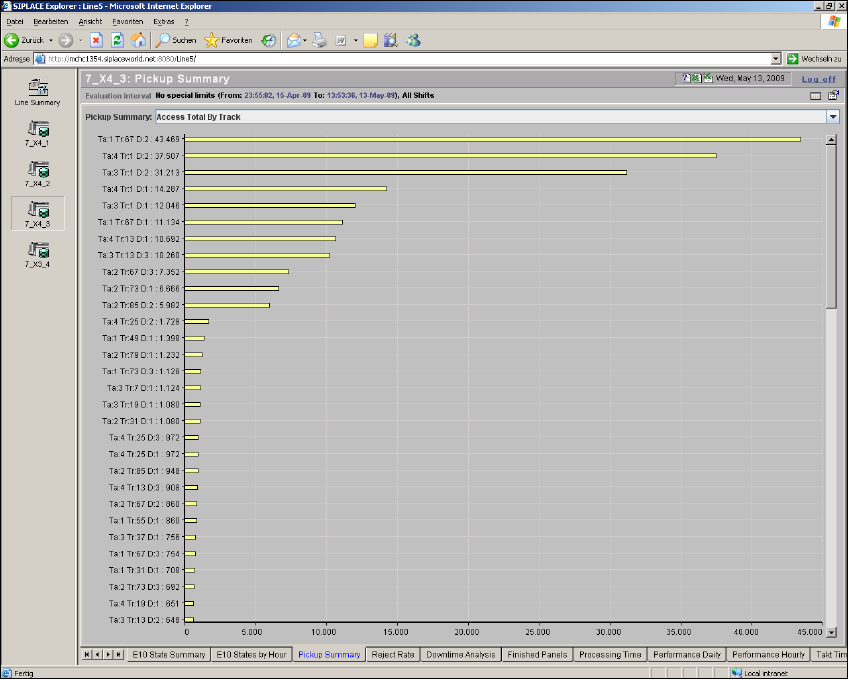
4.2.2 Pickup Summary
From this page it is possible to view Consumption (Access Totals) as well as errors, by multiple
category Pareto view for the evaluation interval. Selection of category views is by drop down se-
lection. 4
4
Fig. 4 - 18 Topic: 7_X4_3 - pickup summary
4 Functions Overview SMA Guide SIPLACE Explorer
Edition 11/2020 EN from 3.11 (R20-2)
66
– Access Total by Track
A listing of consumption (accesses) listed by Feeder Location as well as total count is shown
on the label. 4
Abbreviations: 4
– Ta: Table
– Tr: Track
– D: Division
–L: Level
–T: Tower
Where Ta: 1 Tr: 49 D:2 relates a feeder location 1-49-2 4
– Pickup Errors by Track
A listing of Pickup Errors listed by Feeder Location as well as total count is shown on the label.4
Abbreviations: 4
– Ta: Table
– Tr: Track
– D: Division
–L: Level
–T: Tower
– Access Total by Component
A listing of consumption (accesses) listed by Component Name as well as total count is shown
on the label. 4
– Pickup Errors by Component
A listing of Pickup Errors listed by Component Name as well as total count is shown on the
label. 4
– Access Total by Feeder Type
A listing of consumption (accesses) listed by Feeder Type as well as total count is shown on
the label. 4
– Pickup Errors by Feeder Type
A listing of Pickup Errors listed by Feeder Type as well as total count is shown on the label. 4
– Access Total by Component Shape
A listing of consumption (accesses) listed by Component Shape as well as total count is shown
on the label. 4