Service Manual SIPLACE SmartFeeder.pdf - 第106页
7 Repairs to SmartFeeder 8 mm X / Xi 7.4 EDIF 106 Service Manual SIPLACE SmartFeeder 4 - 8 mm X / Xi SIPLACE SmartFeeder 2 x 8 mm X / Xi 11/2020 7.4.1 Removing the EDIF ► Carefully place the feeder module with the left s…
7 Repairs to SmartFeeder 8 mm X / Xi
7.4 EDIF
Service Manual SIPLACE SmartFeeder 4 - 8 mm X / Xi SIPLACE SmartFeeder 2 x 8 mm X / Xi 11/2020 105
7.4 EDIF
Spare part required
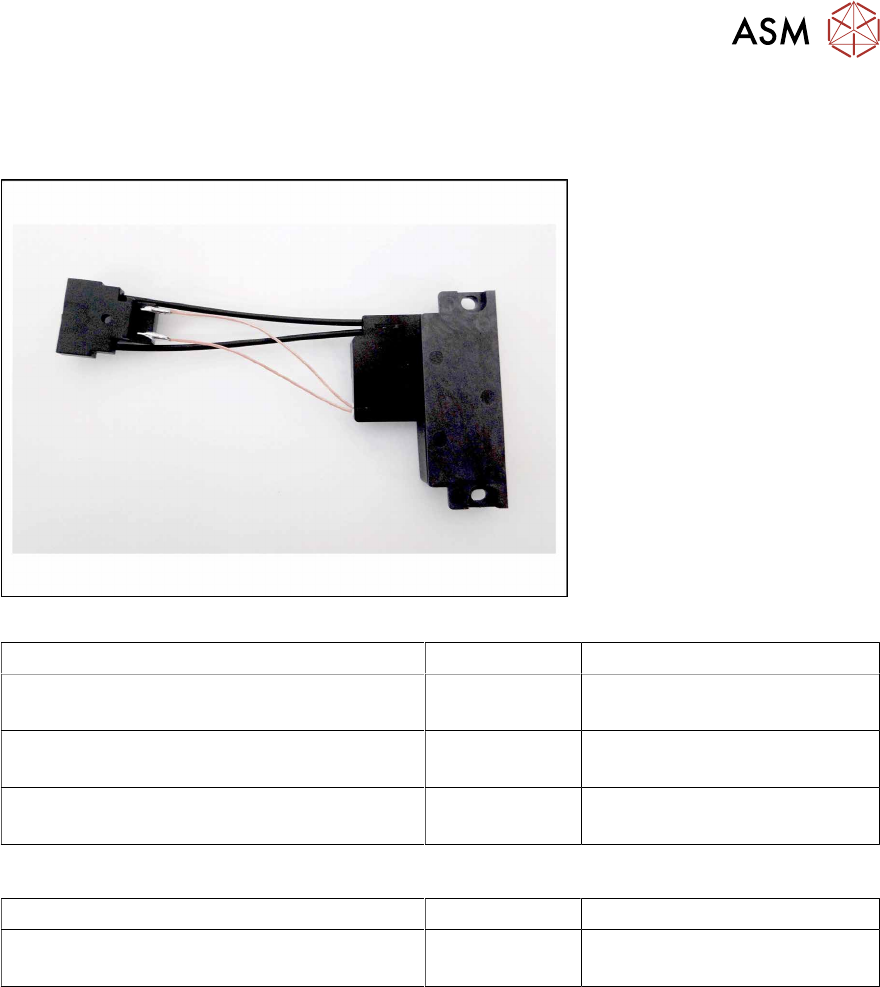
Fig.31: EDIF secondary assembly
Feeder module Item no. Designation
SmartFeeder 8mmX (V1) 00141370-01
SmartFeeder 8mm X Splice (V1) 00141390-01
03101192Sxx EDIF secondary assembly X8S-
mart
SmartFeeder 8mmX (V2) 00141370-02
SmartFeeder 8mm X Splice (V2) 00141390-02
03127518- EDIF secondary assembly X8S-
mart
SmartFeeder 8mm Xi 00141480-xx
SmartFeeder 8mm Xi Splice 00141500-xx
03127518-xx EDIF secondary assembly X8S-
mart
Other spare parts:
Feeder module Item no. Designation
All feeder modules mentioned in the above
table
03012683-xx
03050957-xx
Pressure spring D-027
Collar screw D4x3.15 M3
Tools required
●
Flat-bladed screwdriver 0.9Nm
●
Phillips screwdriver 0.9Nm
●
TORX screwdriver 0.6Nm, size T8
7 Repairs to SmartFeeder 8 mm X / Xi
7.4 EDIF
106 Service Manual SIPLACE SmartFeeder 4 - 8 mm X / Xi SIPLACE SmartFeeder 2 x 8 mm X / Xi 11/2020
7.4.1 Removing the EDIF
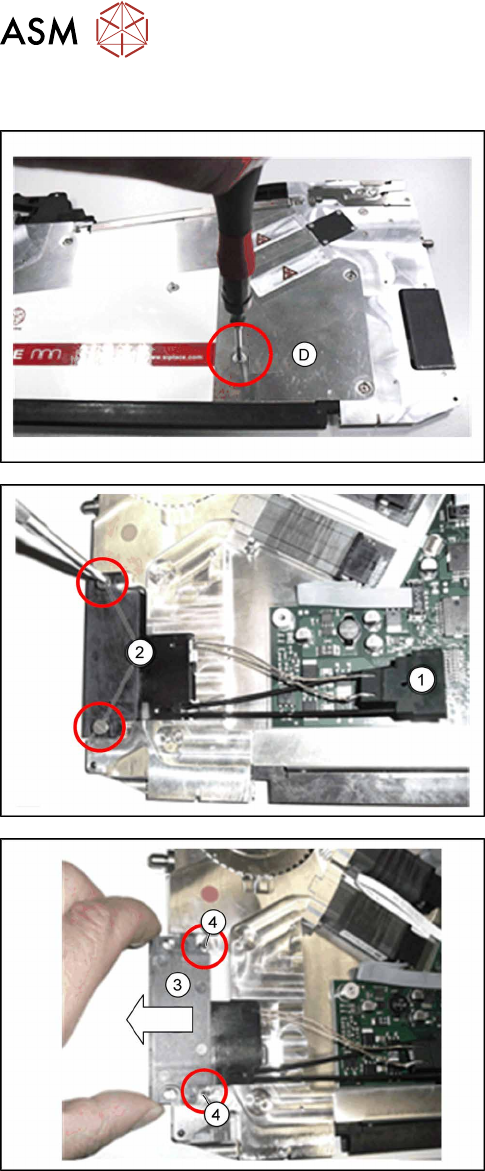
► Carefully place the feeder module with the left
side down on a stable, level and clean surface.
► On the right side plate, only remove screwD, in
order to release the EDIF connector in the feeder
module
► Remove the left side cover (see section 7.3.1
"Removing the Left Side Cover" [}102]).
► Pull the EDIF connector(1) straight up and off
the board.
► Loosen the two collar screws on the EDIF.(2)
► Remove the EDIF.(3)
► Remove the two pressure springs.(4)
7 Repairs to SmartFeeder 8 mm X / Xi
7.4 EDIF
Service Manual SIPLACE SmartFeeder 4 - 8 mm X / Xi SIPLACE SmartFeeder 2 x 8 mm X / Xi 11/2020 107
7.4.2 Fitting the EDIF
CAUTION
Damaging the EDIF connector
The EDIF connector is very sensitive to high torques. During assembly, always observe the
torque specifications, otherwise the EDIF connector could be damaged!
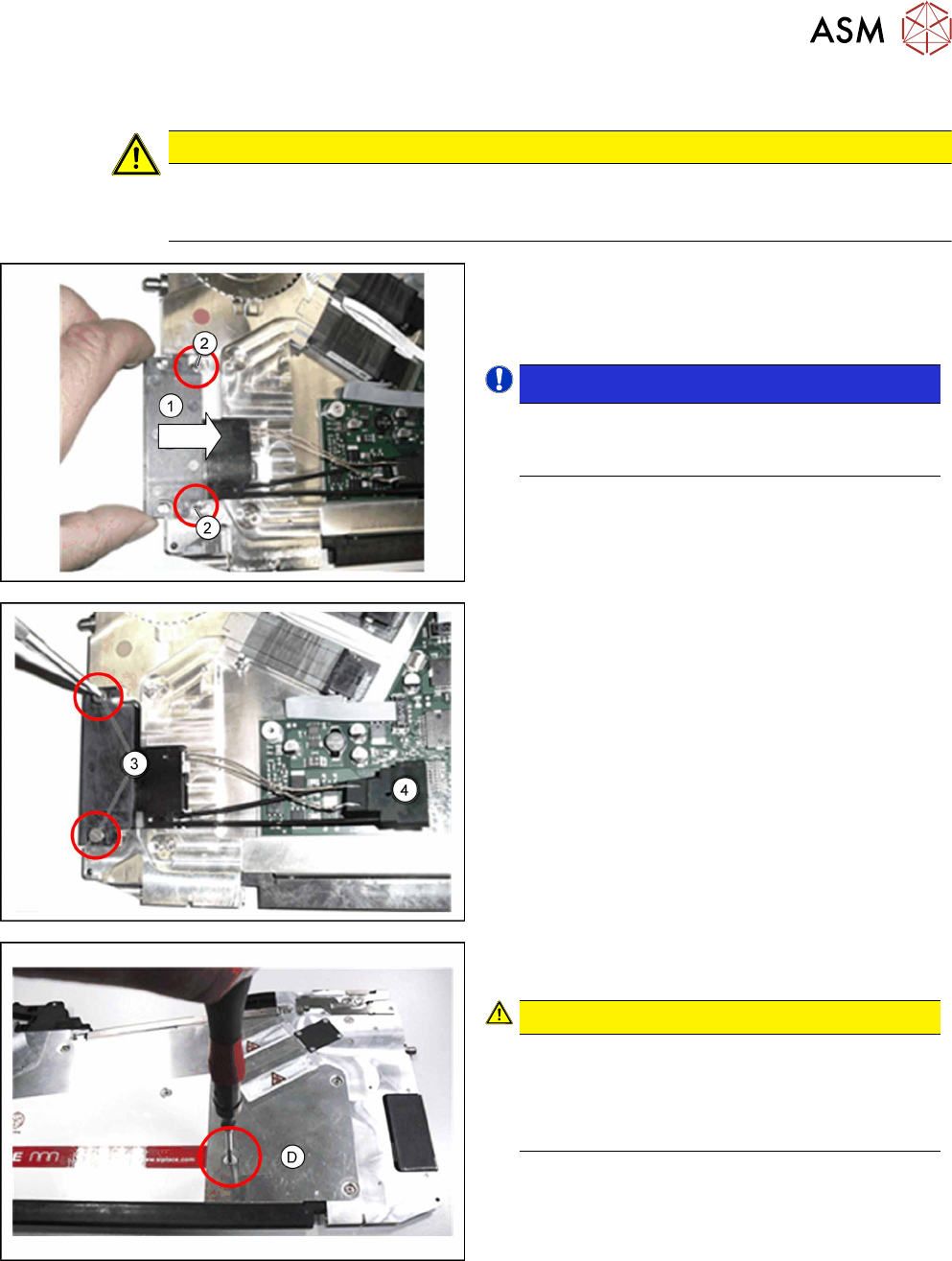
► Insert the two pressure springs(2) into the ducts
provided.
If the pressure springs are bent, these will need
to be replaced.
NOTICE!
During insertion, make sure that the two
pressure springs point forwards, to the EDIF
and are not distorted.
.
► Push the EDIF(1) into the recess at the front of
the feeder module.
► Screw the EDIF into place using the two marked
screws(3)
with 0.9Nm.
► Check whether the EDIF springs back to the front
if slight pressure is applied to it.
If the EDIF does not spring back, loosen the
screws(3)
and make sure that the two springs(see (2)
previous diagram) are aligned towards the front and
are not distorted.
► Plug the EDIF connector(4) onto the control
board.
► Fit the left side cover (see 7.3.2 "Fitting the left
side cover" [}102]).
► Fasten the screw D to the right-hand side cover.
Use a TORX screwdriver for this.
CAUTION!
The EDIF connector is very sensitive to high
torques. Tighten the screw no more than
hand-tight, otherwise the screw fixtures in-
side the feeder module could be damaged or
broken.
.