Service Manual SIPLACE SmartFeeder.pdf - 第117页
7 Repairs to SmartFeeder 8 mm X / Xi 7.6 Splice sensor Service Manual SIPLACE SmartFeeder 4 - 8 mm X / Xi SIPLACE SmartFeeder 2 x 8 mm X / Xi 11/2020 117 ► Insert the splice sensor (4) in place of the dummy, as shown. M…
7 Repairs to SmartFeeder 8 mm X / Xi
7.6 Splice sensor
116 Service Manual SIPLACE SmartFeeder 4 - 8 mm X / Xi SIPLACE SmartFeeder 2 x 8 mm X / Xi 11/2020
7.6.1 Replacing the Dummy with a Splice Sensor
► Place the feeder module in a stable, upright posi-
tion.
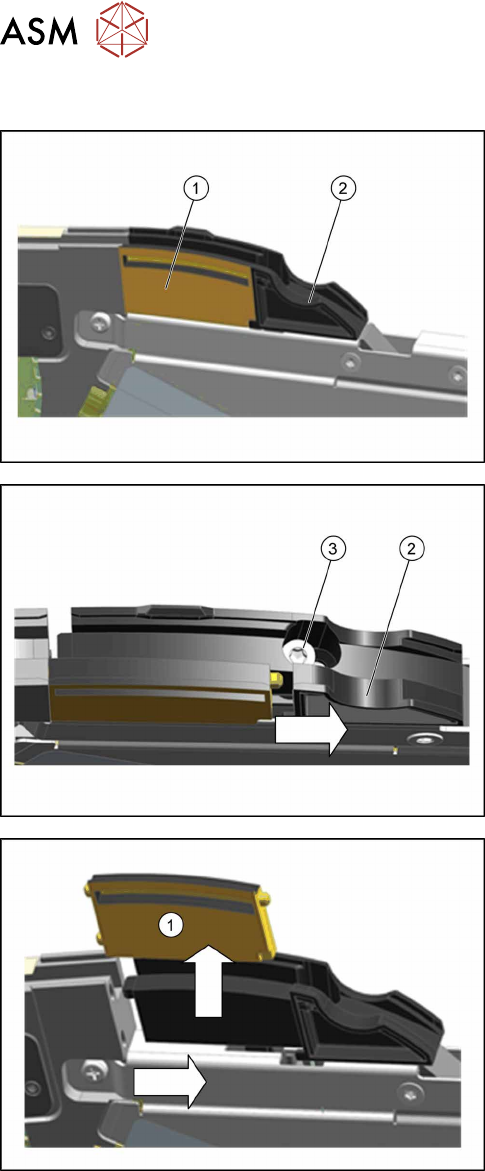
The dummy splice sensor(1) is located behind the
pickup window and is held by the "splice sensor filling
piece"(2)
.
► Remove the TORX screw(3), fastening the filler
piece(2)
.
► Move the filling piece in the direction of the arrow
until you reach the right-hand stop.
► Push the dummy splice sensor (1) next to the
filling piece until the two pins on the front of the
dummy is free.
► Pull the dummy up and out.
7 Repairs to SmartFeeder 8 mm X / Xi
7.6 Splice sensor
Service Manual SIPLACE SmartFeeder 4 - 8 mm X / Xi SIPLACE SmartFeeder 2 x 8 mm X / Xi 11/2020 117
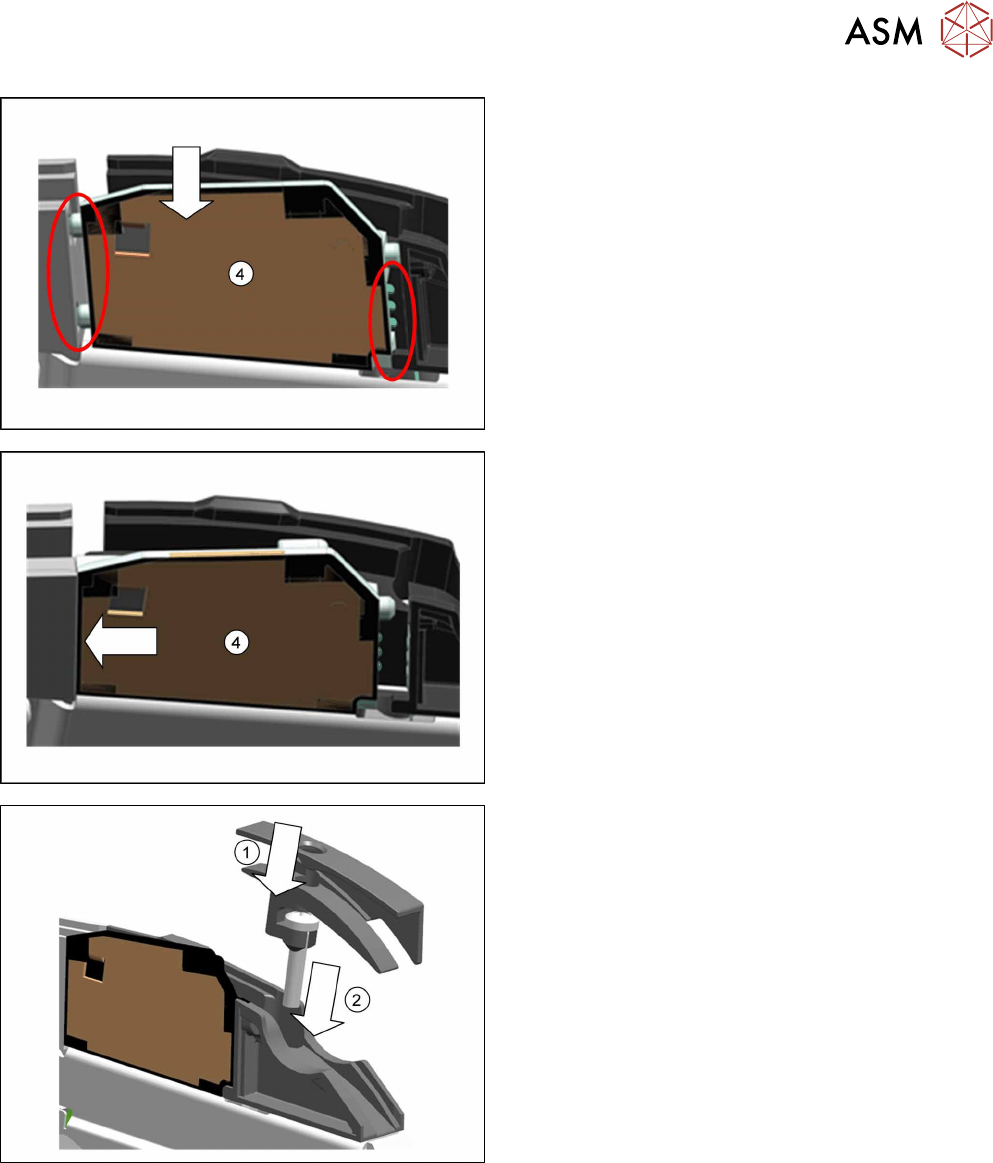
► Insert the splice sensor(4) in place of the
dummy, as shown.
Make sure that the 2 fixture pins point forwards
and the 3 contact pins point backwards.
► Push the splice sensor(4) forwards, in the direc-
tion of the arrow, as far as the stop.
► From above, insert the screw supplied "RF-
SN65-2.5 x 12-9.8" through the hole in the holder
on the insertion tunnel.(1)
► Fit the insertion tunnel onto the filler piece.(2)
7 Repairs to SmartFeeder 8 mm X / Xi
7.6 Splice sensor
118 Service Manual SIPLACE SmartFeeder 4 - 8 mm X / Xi SIPLACE SmartFeeder 2 x 8 mm X / Xi 11/2020
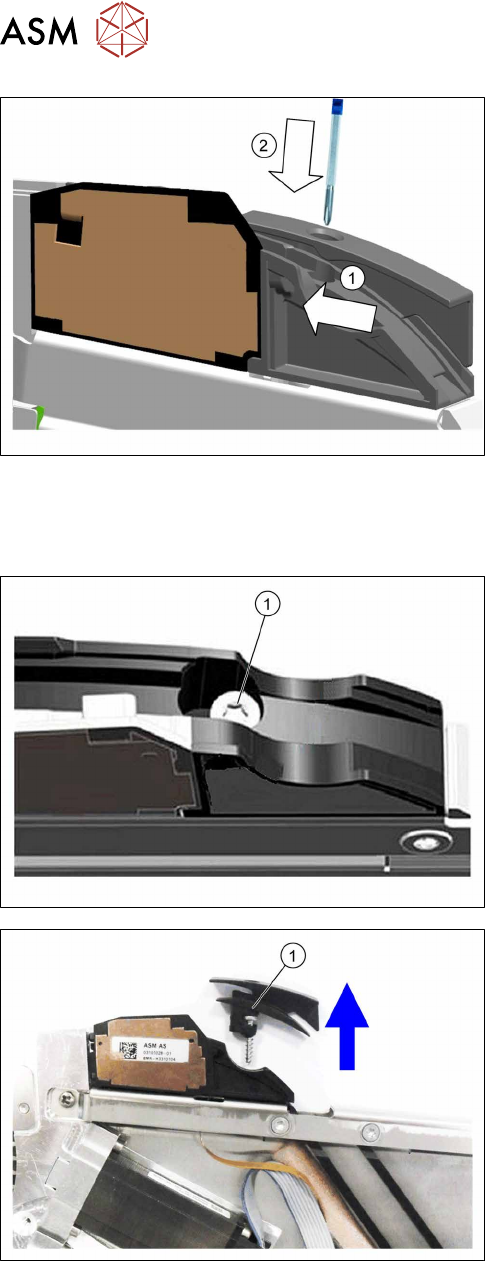
► Push the filler pieceand the insertion tunnel in
the direction of the arrow, towards the splice
sensor, as far as the stop.(1)
The splice sensor is automatically contacted by the
board on the filling piece and is then recognized by the
software.
► Fix the filler piece into place with the screw inser-
ted
and 0.6Nm.(2)
7.6.2 Replacing the splice sensor filling piece
7.6.2.1 Removing the splice sensor filling piece
► Remove the left side cover (see 7.3.1 "Removing
the Left Side Cover" [}102]).
► Place the feeder module in a stable, upright posi-
tion.
For feeder module without sensor insertion tunnel:
► Loosen and remove the TORX screw marked in
the diagram(1)
.
For feeder module with sensor insertion tunnel:
► Loosen the TORX screw.
► Lift the TORX screw and the sensor insertion tun-
nel(1)
up and out.