Service Manual SIPLACE SmartFeeder.pdf - 第120页
7 Repairs to SmartFeeder 8 mm X / Xi 7.6 Splice sensor 120 Service Manual SIPLACE SmartFeeder 4 - 8 mm X / Xi SIPLACE SmartFeeder 2 x 8 mm X / Xi 11/2020 7.6.2.2 Fitting the splice sensor filling piece ► Push the sensor …
7 Repairs to SmartFeeder 8 mm X / Xi
7.6 Splice sensor
Service Manual SIPLACE SmartFeeder 4 - 8 mm X / Xi SIPLACE SmartFeeder 2 x 8 mm X / Xi 11/2020 119
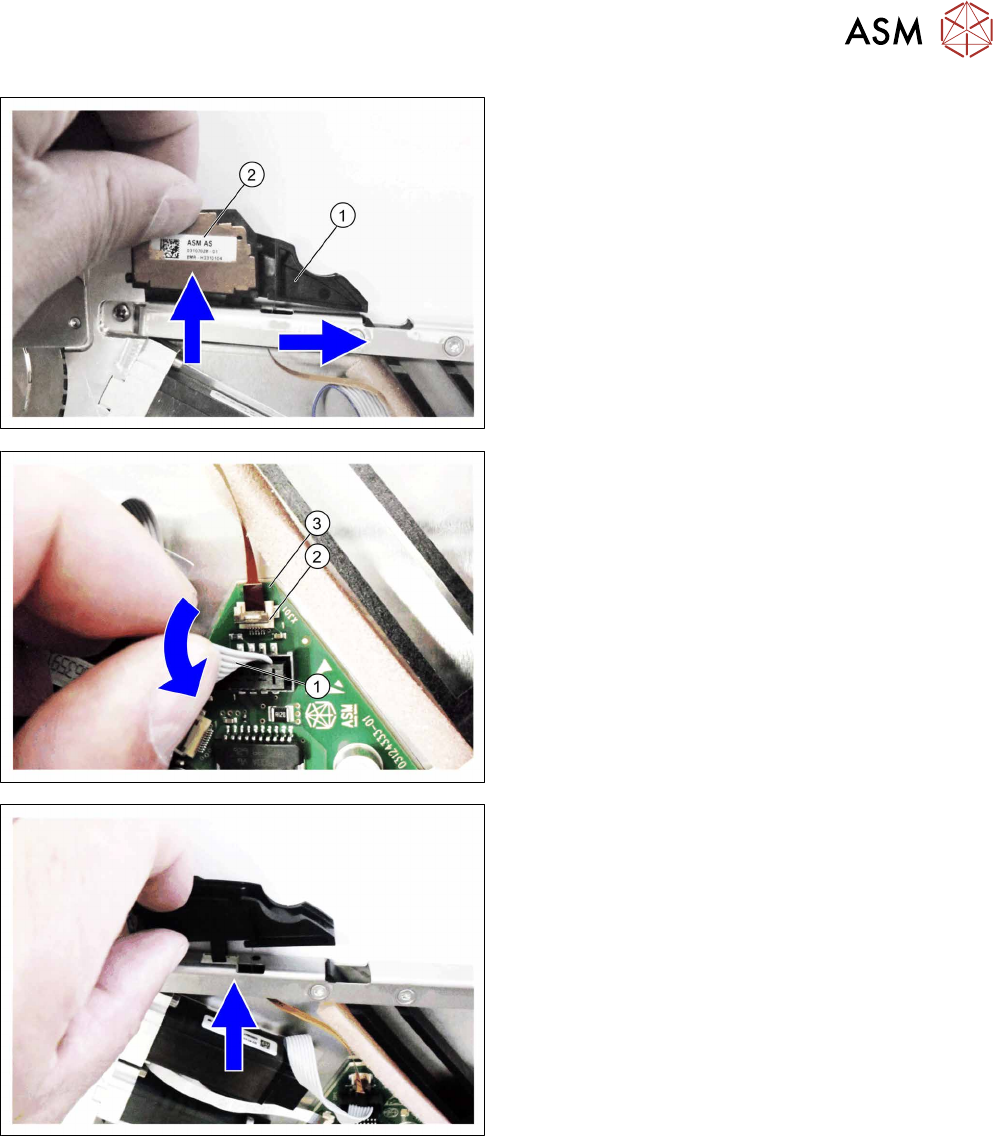
► Push the filling piece(1) to the side.
► Remove the splice sensor(2).
► Swing the motor cable(1) down so that you can
see the connection for the sensor cable(2)
.
► Open the connection on the sensor cable(2).
► Pull the sensor cable(3) out of the connection.
► Pull the filler piece and sensor able up and out of
the "top stiffener".
Make sure that the sensor cable remains undam-
aged during this.
7 Repairs to SmartFeeder 8 mm X / Xi
7.6 Splice sensor
120 Service Manual SIPLACE SmartFeeder 4 - 8 mm X / Xi SIPLACE SmartFeeder 2 x 8 mm X / Xi 11/2020
7.6.2.2 Fitting the splice sensor filling piece
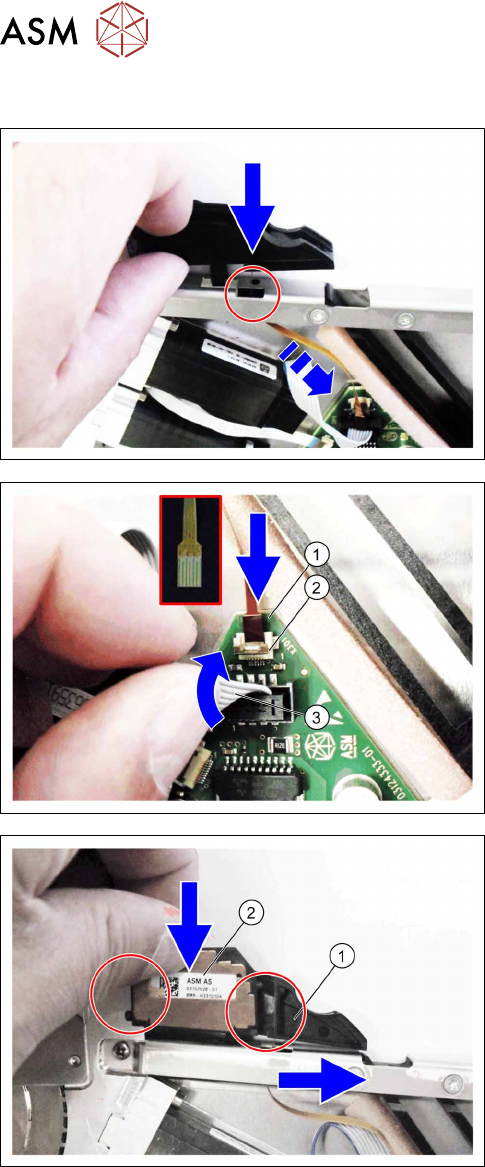
► Push the sensor cable through the recess in the
"top stiffener".
► Fit the filler piece into the recess in the "top
stiffener", as shown.
► Push the sensor cable(1) as far as the stop into
the connection shown in the diagram X301(2)
.
Make sure that the contacts are on the underside
of the cable and that the brown side of the cable
can be seen on the top.
► Lock the connection.
► Press the motor cable(3) carefully up again and
over the connection X301.
► Push the filling piece(1) to the right.
► Insert the splice sensor(2).
Make sure that the 2 fixing pins are pointing to
the left and the 3 contact pins are pointing to the
right, towards the filler piece, during the insertion.
7 Repairs to SmartFeeder 8 mm X / Xi
7.6 Splice sensor
Service Manual SIPLACE SmartFeeder 4 - 8 mm X / Xi SIPLACE SmartFeeder 2 x 8 mm X / Xi 11/2020 121
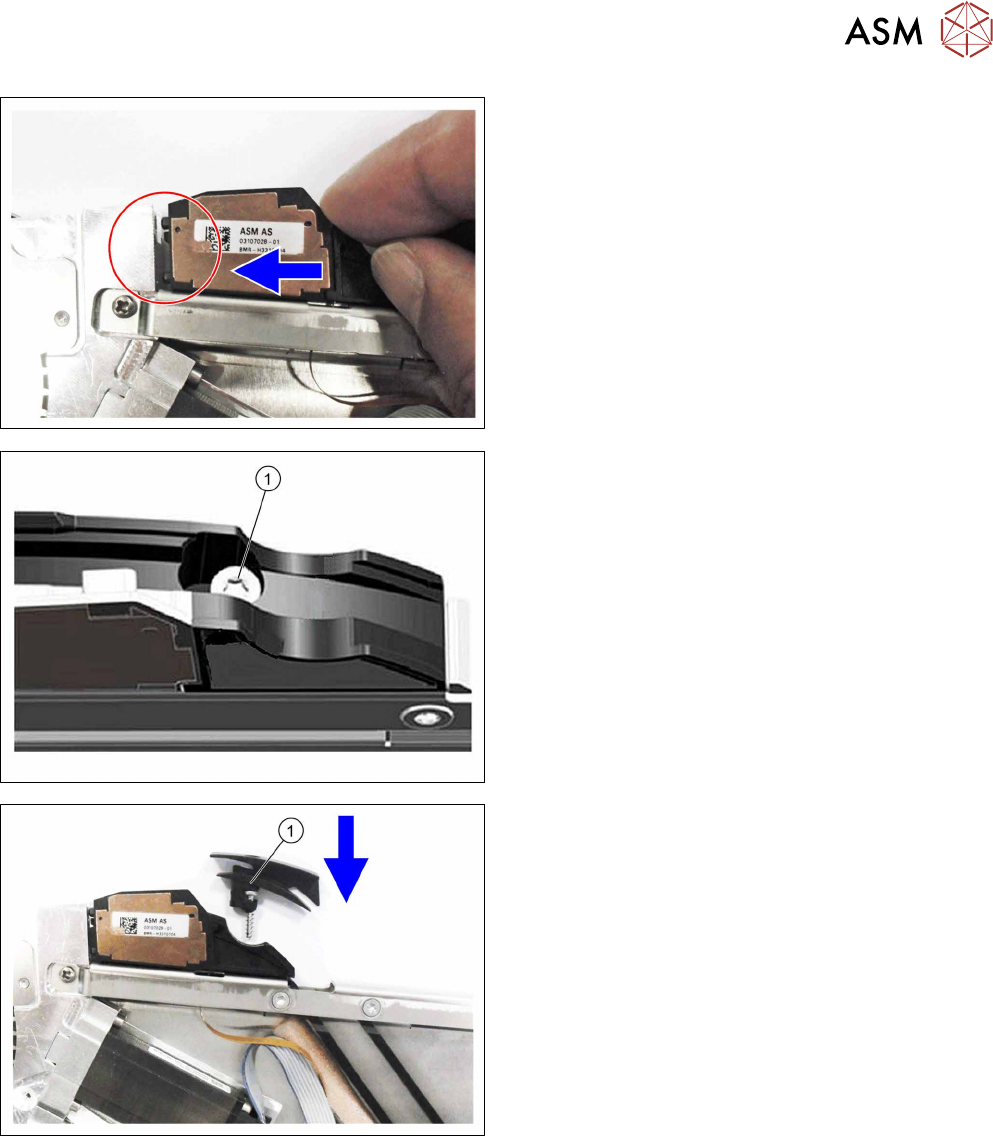
► Push the splice sensor together with the filler
piece in the direction of the arrow, as far as the
end stop on the left, so that the fixing pins of the
splice sensors are completely inserted into the
holes.
For feeder module without sensor insertion tunnel:
► Fix the filler piece with the TORK screw as
marked in the diagram RF-SN65-2.5x12(1)
.
► Fit the left side cover (see 7.3.2 "Fitting the left
side cover" [}102]).
For feeder module with sensor insertion tunnel:
► Insert the sensor insertion tunnel and the TORX
screw RF‑SN65‑2.5x12(1)
from above, as shown
in the diagram.
► Fasten the filler piece and the sensor insertion
tunnel with the TORX screw RF‑SN65‑2.5x12.
► Fit the left side cover (see 7.3.2 "Fitting the left
side cover" [}102]).