Service Manual SIPLACE SmartFeeder.pdf - 第94页
6 Repairs to SmartFeeder 4 mm X / Xi 6.17 Foil container 94 Service Manual SIPLACE SmartFeeder 4 - 8 mm X / Xi SIPLACE SmartFeeder 2 x 8 mm X / Xi 11/2020 ► Fasten the splice sensor filling piece with the TORX screw (RF-…
6 Repairs to SmartFeeder 4 mm X / Xi
6.17 Foil container
Service Manual SIPLACE SmartFeeder 4 - 8 mm X / Xi SIPLACE SmartFeeder 2 x 8 mm X / Xi 11/2020 93
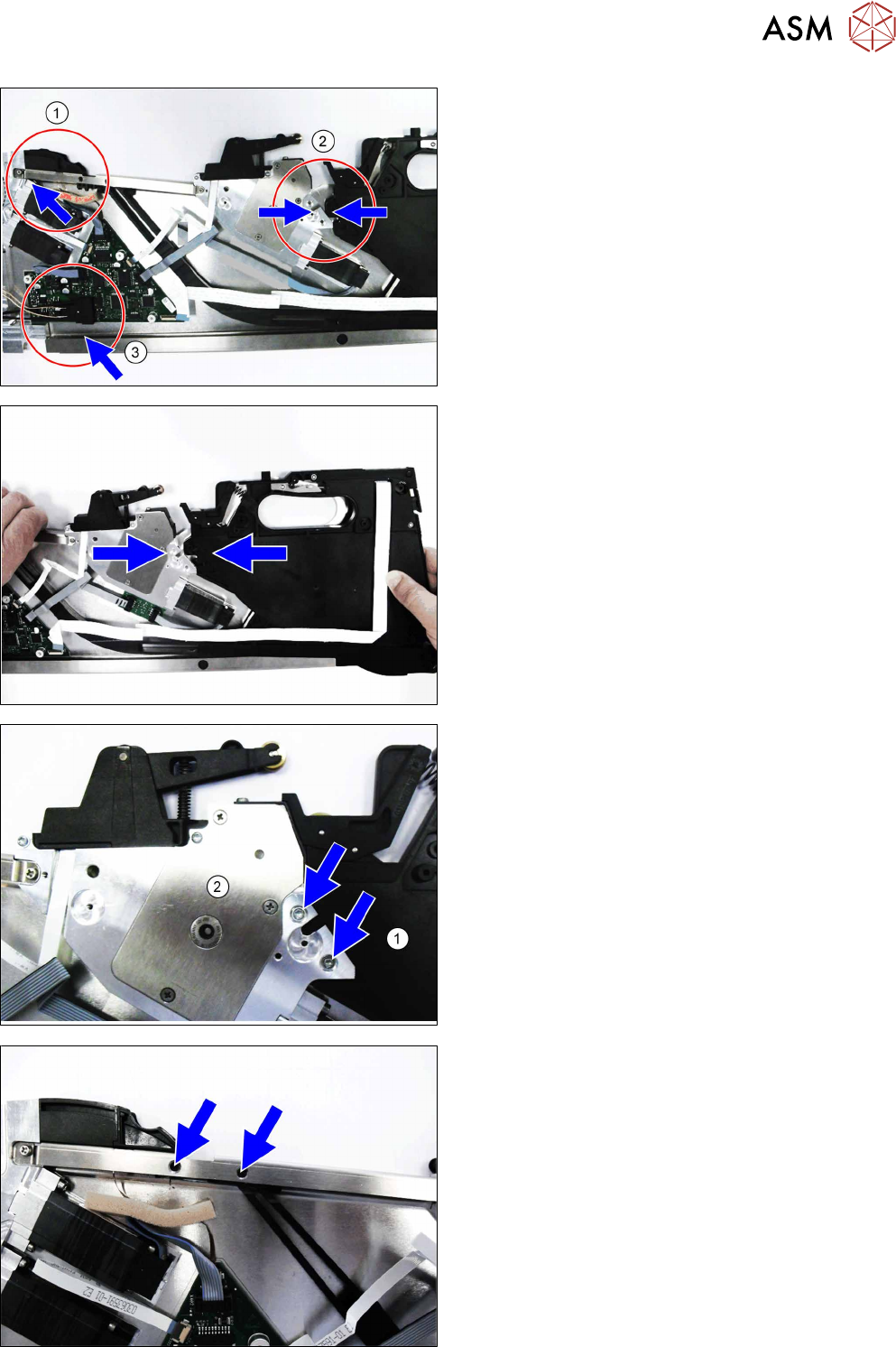
When inserting the foil box, pay attention to the
marked areas. Make sure that the drilled holes in the
foil stripping unit and the drilled holes in the foil box or
tape channel are above one another in each case.
► Guide the front part of the empty tape duct into
the top stiffener.(1)
► Push the foil box up to the foil stripping unit.(2)
► Push the bottom stiffener onto the drive unit.
► Use your left hand to slightly lift the foil stripping
unit at the top stiffener and push the foil box as
far as the end stop under the foil stripping unit.
► Make sure that the two drilled holes on the foil
box are exactly under the two drilled holes on the
foil stripping unit.
► Fasten the foil box to the foil stripping unit with
the two TORX screws (RF-SN75-2.5 x 6-9.8,
03033796-xx).
Use a TORX screwdriver, 0.6 Nm, size T8.
► Fasten the empty tape duct to the top stiffener
with the two TORX screws (RF-SN85-2.5 x
7.5-9.8, 03044543-xx).
Use a TORX screwdriver, 0.6 Nm, size T8.
6 Repairs to SmartFeeder 4 mm X / Xi
6.17 Foil container
94 Service Manual SIPLACE SmartFeeder 4 - 8 mm X / Xi SIPLACE SmartFeeder 2 x 8 mm X / Xi 11/2020
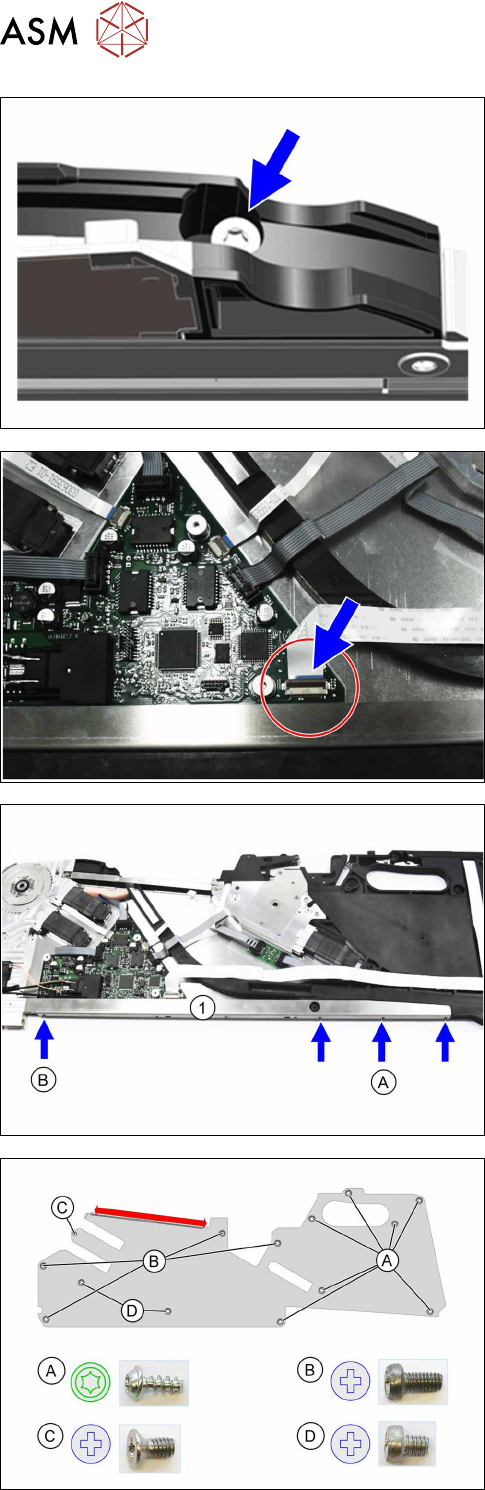
► Fasten the splice sensor filling piece with the
TORX screw (RF-SN85-2.5 x 7.5-9.8, 03044543-
xx).
Use a TORX screwdriver, 0.6 Nm, size T8.
► Insert the flat ribbon cable for the control panel
on the control board as far as the end stop into
connection X202.
Make sure that the contacts are on the underside
of the cable and that the blue side of the cable
can be seen on the top.
► Lock the connection.
► Fasten the bottom stiffener with the three screws
marked with A
(RF-SN75-2.5 x 6-9.8, 03033796-
xx).
Use a TORX screwdriver, 0.6 Nm, size T8.
► Fasten the screw marked with B (SN 213307-H-
M2.5 x 5-A2-70, 03071822-xx).
Use a Phillips screwdriver.
► Fasten the left side cover (see 6.3.2 "Fitting the
Left Side Cover" [}30]).
► Fasten the left side cover (see 6.3.2 "Fitting the
Left Side Cover" [}30]).
6 Repairs to SmartFeeder 4 mm X / Xi
6.17 Foil container
Service Manual SIPLACE SmartFeeder 4 - 8 mm X / Xi SIPLACE SmartFeeder 2 x 8 mm X / Xi 11/2020 95
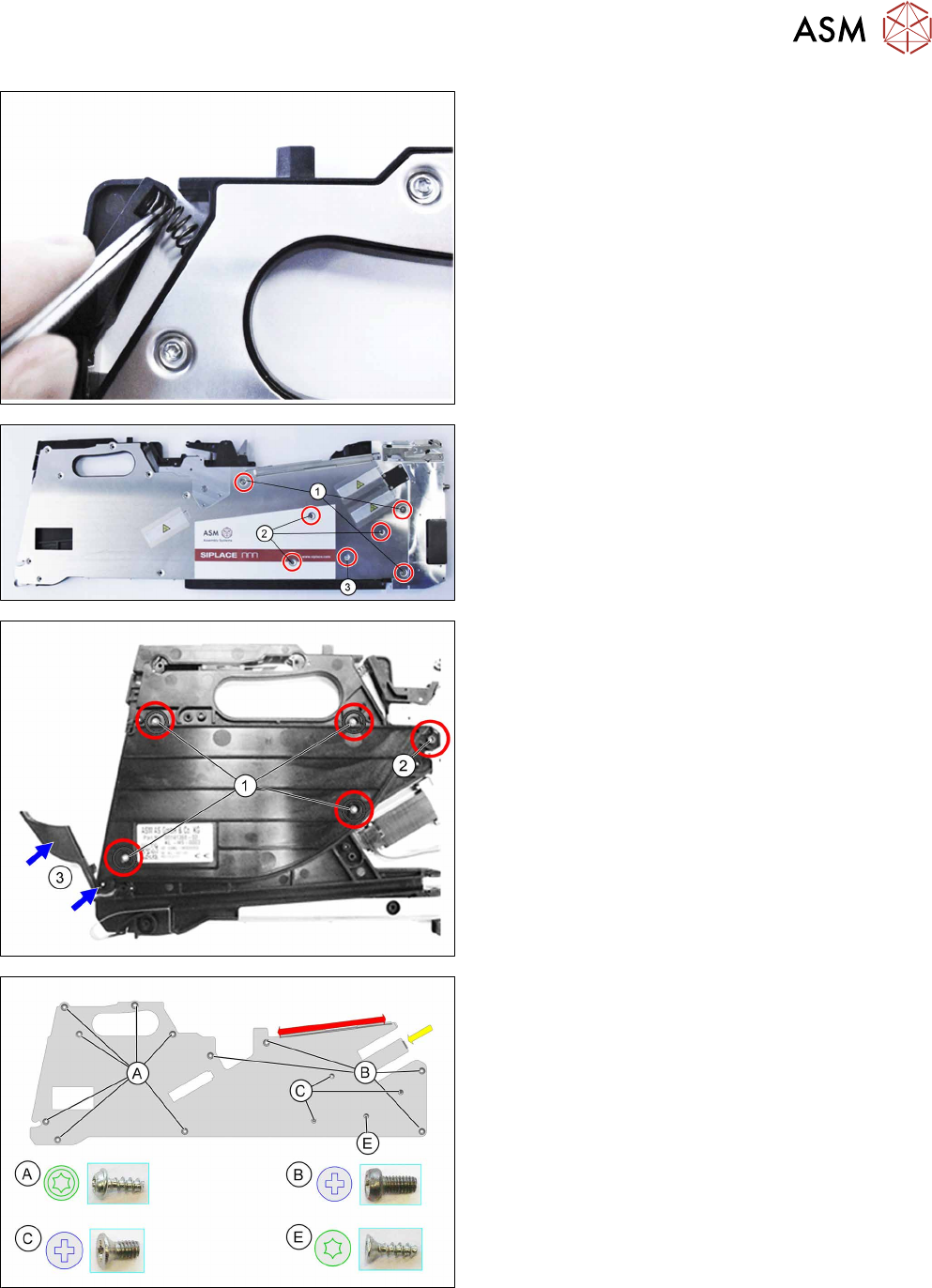
► Insert the pressure spring back into the rocker.
► Carefully place the feeder module with the left
side down on a stable, level and clean surface.
► Remove the screws marked in the diagram.
You need a Phillis screwdriver for the screws marked
(1)
and (2).
Use a size T8 TORX screwdriver for the screw at (3).
► Carefully place the feeder module with the left
side down on a stable, level and clean surface.
► Inserting the (new) insertion foil container.
► Fasten the insertion foil container with the 4
TORX screws marked in the diagram
(RF‑SN75‑2.5 x 6‑9.8, 03033796‑xx).(1)
Use a TORX screwdriver 0.6Nm, size T8 for this.
► Fasten the Phillips screw (ISO 7045 - M2.5 x 6-
A2-50-H, 03010209‑xx).(2)
► Insert the shaft in the position shown into the in-
sertion foil container, as far as the stop.(3)
► Push the flap onto the shaft.(3)
► Fit the right side cover (see6.3.4 "Fitting the Right
Side Cover" [}32]).
► Fasten the back slide guide (see 6.2.2 "Fitting the
Sliding Guide" [}28]).