Service Manual SIPLACE SmartFeeder.pdf - 第219页
8 Repairs to SmartFeeder 2x8 mm X / Xi 8.9 Foil rocker Service Manual SIPLACE SmartFeeder 4 - 8 mm X / Xi SIPLACE SmartFeeder 2 x 8 mm X / Xi 11/2020 219 8.9.1.1 Removing the Foil Rocker Cpl. ► Place the feeder on a stab…
8 Repairs to SmartFeeder 2x8 mm X / Xi
8.9 Foil rocker
218 Service Manual SIPLACE SmartFeeder 4 - 8 mm X / Xi SIPLACE SmartFeeder 2 x 8 mm X / Xi 11/2020
8.9 Foil rocker
8.9.1 Foil rocker assembly
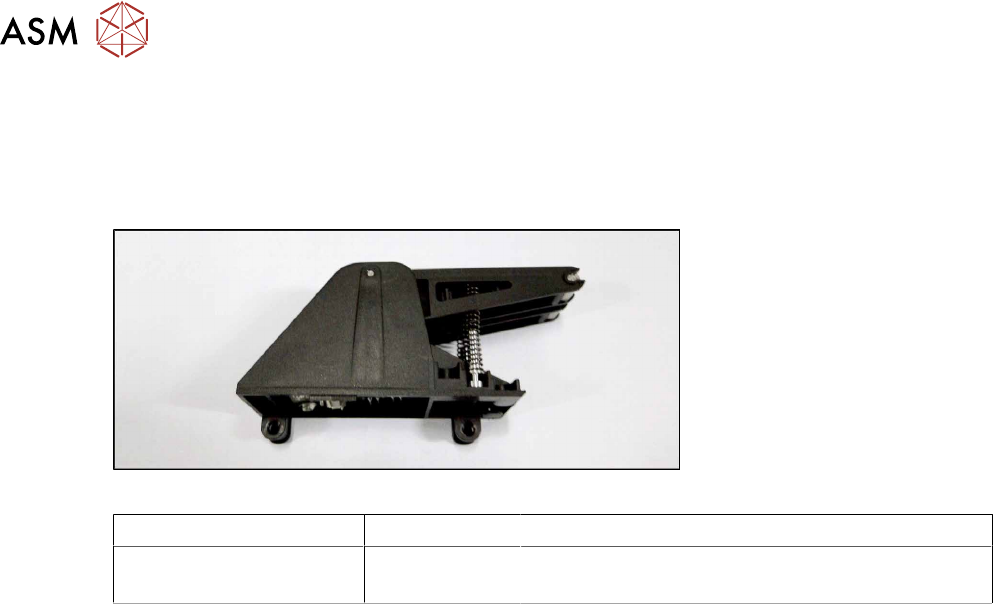
Spare part required
Fig.67: Foil rocker assembly
Feeder module Item no. Designation
SmartFeeder 2x8mmX
SmartFeeder 2x8 mm Xi
03066480-xx Foil rocker assembly /X2x8
Tools required
●
TORX screwdriver 0.6Nm, size T8
●
Small flat-bladed screwdriver
8 Repairs to SmartFeeder 2x8 mm X / Xi
8.9 Foil rocker
Service Manual SIPLACE SmartFeeder 4 - 8 mm X / Xi SIPLACE SmartFeeder 2 x 8 mm X / Xi 11/2020 219
8.9.1.1 Removing the Foil Rocker Cpl.
► Place the feeder on a stable, level and clean sur-
face.
► Remove the left and right side covers. (See 8.3.1
"Removing the Left Side Cover" [}174], 8.3.3
"Removing the Right Side Cover" [}175])
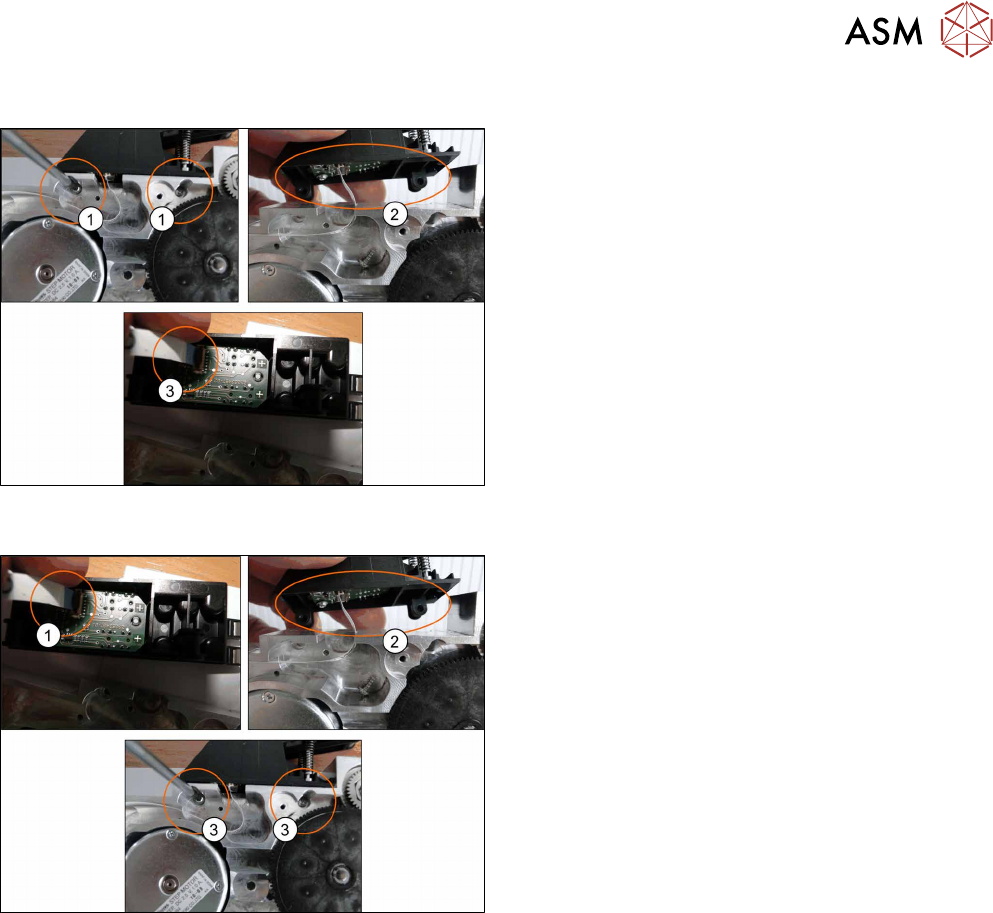
► Loosen and remove the TORX screws from the
foil rocker.(1)
► Push the foil rocker to the right(2)
► Remove the cable from the connection.(3)
8.9.1.2 Fitting the Foil Rocker Cpl.
► Insert the end of the flat ribbon cable (with the
blue side pointing upwards) as far as the stop in
the marked flat ribbon connection
. Fold the connection closed and make sure that
the cable is securely fitted. (1)
► Fit the foil rocker onto the feeder module
base.(2)
► Fix the foil rocker into place with 2 TORX
screws.(3)
► Refit the left and right side covers (see 8.3.2 "Fit-
ting the Left Side Cover" [}175], 8.3.4 "Fitting the
Right Side Cover" [}176]).
8 Repairs to SmartFeeder 2x8 mm X / Xi
8.9 Foil rocker
220 Service Manual SIPLACE SmartFeeder 4 - 8 mm X / Xi SIPLACE SmartFeeder 2 x 8 mm X / Xi 11/2020
8.9.2 Cable light barrier emitter
Spare part required
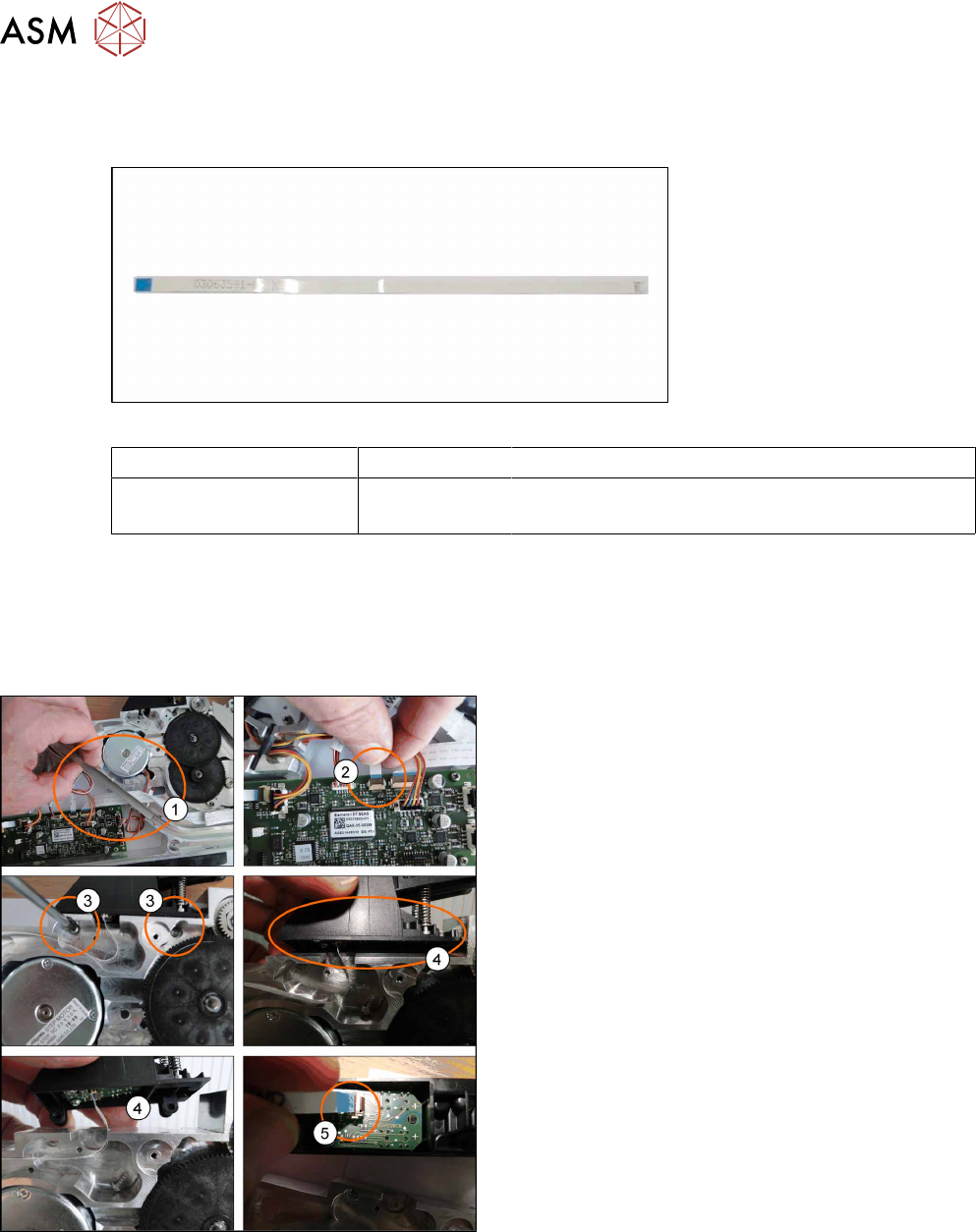
Fig.68: Cable light barrier emitter
Feeder module Item no. Designation
SmartFeeder 2x8mmX
SmartFeeder 2x8 mm Xi
03063591-xx Cable light barrier emitter
Tools required
●
TORX screwdriver 0.6Nm, size T8
●
Small flat-bladed screwdriver
8.9.2.1 Removing the light barrier emitter cable
► Place the feeder on a stable, level and clean sur-
face.
► Remove the left and right side covers. (See 8.3.1
"Removing the Left Side Cover" [}174], 8.3.3
"Removing the Right Side Cover" [}175])
► Remove the tape duct.(1)
► Unplug the photo interrupter cable from the main
board.(2)
► Loosen and remove the TORX screws (RF-
SN75-2.5x8-9.8) from the foil rocker.(3)
► Push the foil rocker to the right(4) and unplug the
cable.(5)