YSM40R_Mainte_E.pdf - 第117页
3-47 3 Periodic maintenance items 3.4.2 Cleaning air base MACS (4-beam type) T he function called “base MACS” is used to periodically chec k the coordinates of marks at each point in the machine with a fiducial camer a, …
3-46
3
Periodic maintenance items
1
Prepare for work.
1. Remove the feeder exchange carriage
on the rear of the machine.
2. Remove the tape cutter duct on the rear
of the machine.
3. Power off he machine.
4. Prepare a vacuum cleaner.
2
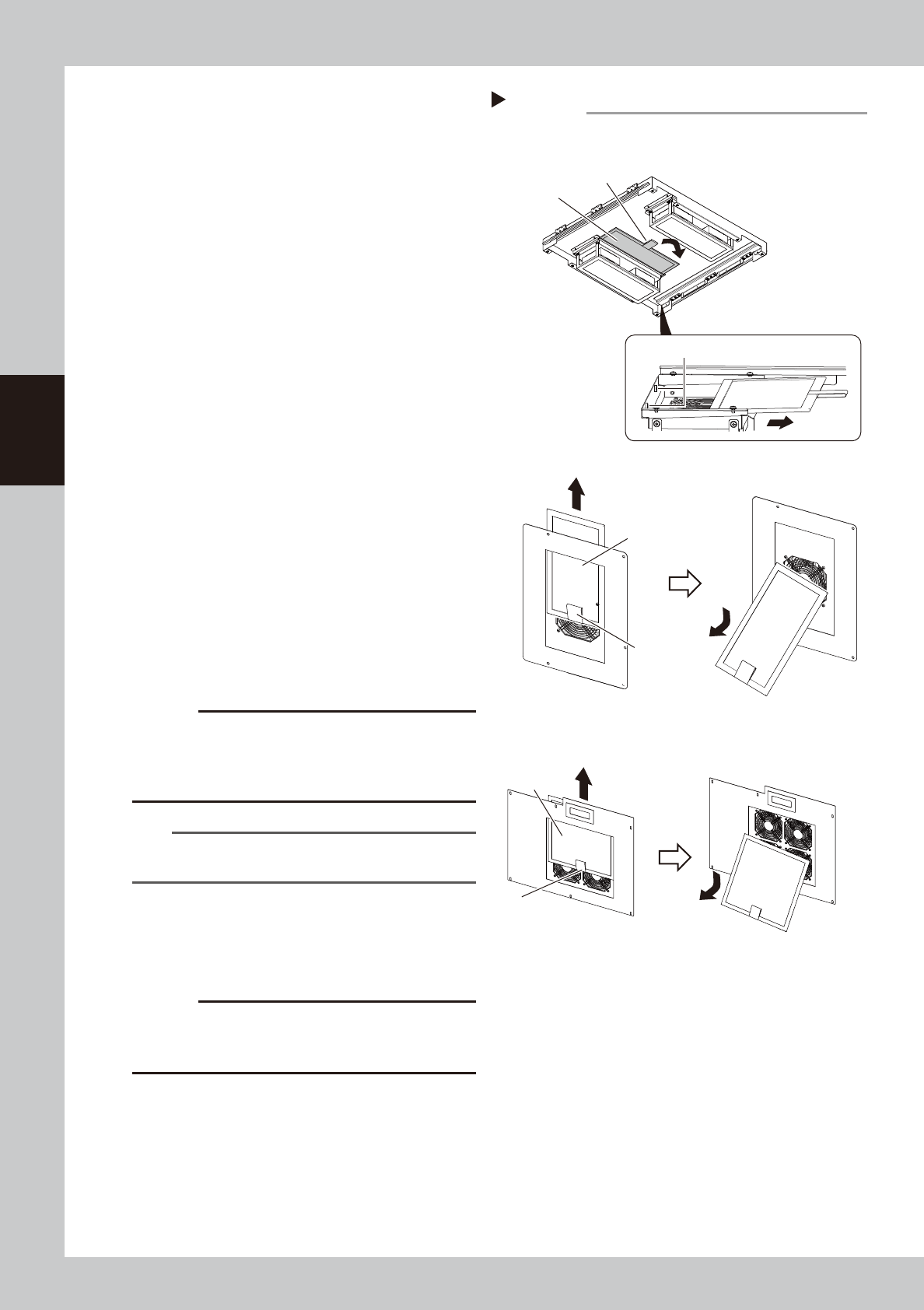
Detach the ceiling filter.
1. Open the safety cover on the rear of the
machine to access to the filter from the
inside of the machine.
2. While holding the filter by the handle,
pull out slowly so that no dust particles
are shaken off from the filter.
3. There are 2 ceiling filters. Detach both
filters.
533C5-N9-00
3
Detach the conveyor I/O board
filter.
While holding the filter by the handle, raise it
up slightly and then pull out downward.
4
Detach the rear-base filter.
While holding the filter by the handle, raise it
up slightly and then pull out downward.
5
Clean the filters.
Use the vacuum cleaner to suction out dust
and dirt.
c
CAUTION
If the filters are used while they are damp, the dust
combines with moisture and causes clogging. Since it is
enough to clean the filters with a vacuum cleaner, do
not wash the filters with water.
n
NOTE
If the dust cannot be removed or the filter has worn out,
replace the filter with a new one.
6
Return the filters to their original
positions.
Attach the filters by reversing the detaching
procedure.
c
CAUTION
The ceiling filter utilizes anti-drop magnets. When
returning the filter, insert it all the way and check that it
is securely held by the magnets.
7
Return the tape cutter duct to its
original position.
Detaching the filters
n Ceiling filter (Viewed from the inside of the machine)
n Conveyor I/O board filter
n Rear base filter
Step 2-4
Filter
Filter
Handle
Handle
Filter
Handle
Magnet
3-47
3
Periodic maintenance items
3.4.2 Cleaning air base MACS (4-beam type)
The function called “base MACS” is used to periodically check the coordinates of marks at each point in the
machine with a fiducial camera, in order to offset thermal expansion in the machine base.
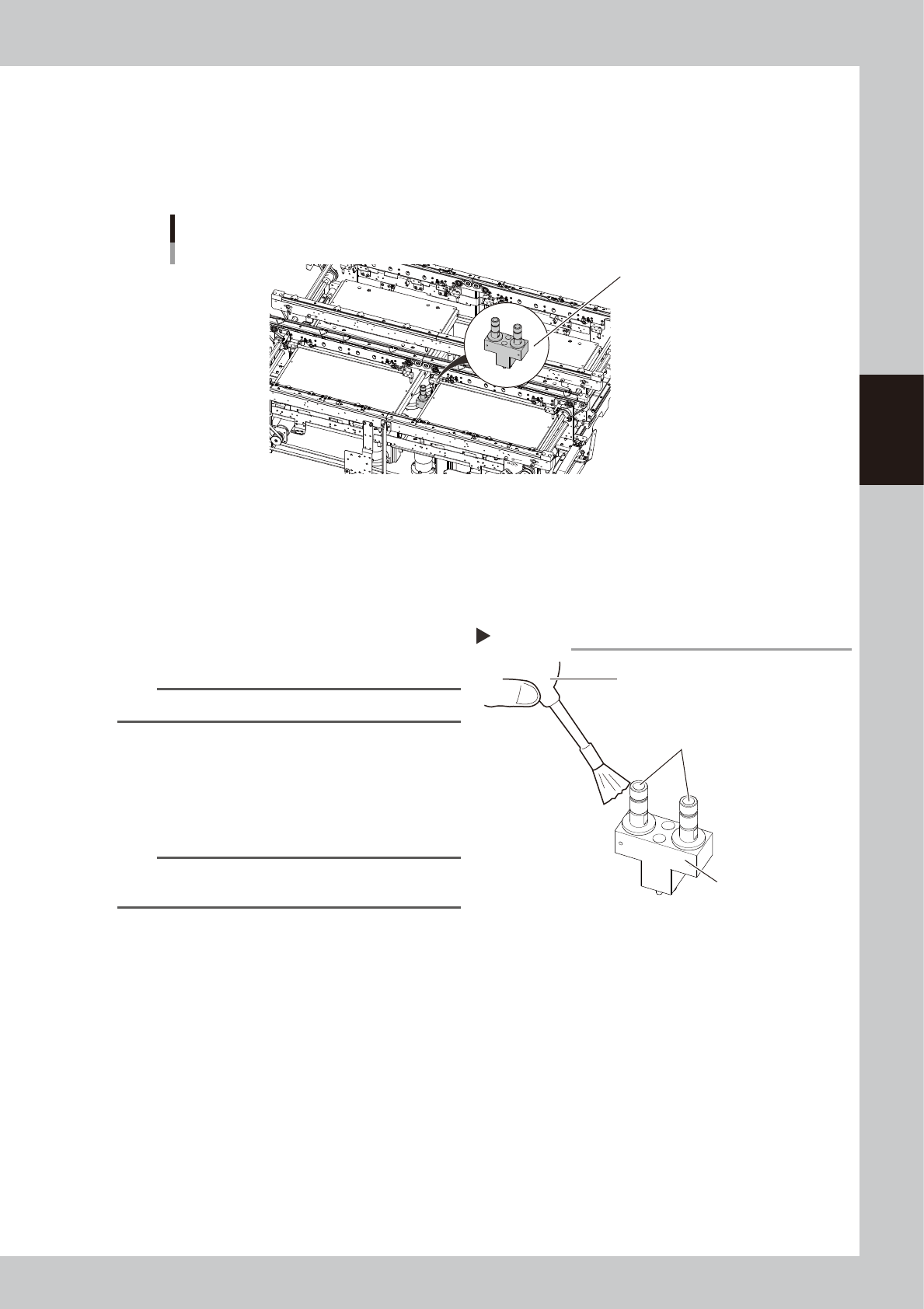
The “air base MACS” for the YSM40R 4-beam type machine utilizes marks used with an optical system tool.
The lens of this optical system tool requires periodic inspection and cleaning.
Air base MACS
Conveyor center section
Air base MACS
53348-N9-00
1
Prepare for work.
e
1. Remove all items sensitive to magnetic fields such as wristwatches and magnetic ID cards.
2. Press the emergency stop button to put the machine in emergency stop.
3. Use the CLAMP ON/OFF switch to lower the feeder exchange carriage and remove it.
2
Brush away dust from the lens with
blower brush.
53349-N9-00
TIP
Blower brush is sold as an option.
3
Clean the lens with a lint-free
cloth.
If dust is hard to remove, apply a few drops
of lens cleaner to the lint-free cloth and
wipe the lens clean.
n
NOTE
Use a lint-free cloth or wipe to clean the lens.
Lens cleaner is sold as an option.
Cleaning the air base MACS
Step 2
Air base MACS
Lens
Blower brush
3-48
3
Periodic maintenance items
3.5 Feeder exchange carriage
3.5.1 Cleaning/lubricating guide rail cover clamp
1
Detach feeder exchange carriage.
Use the CLAMP ON/OFF switch to unclamp
and detach feeder exchange carriage.
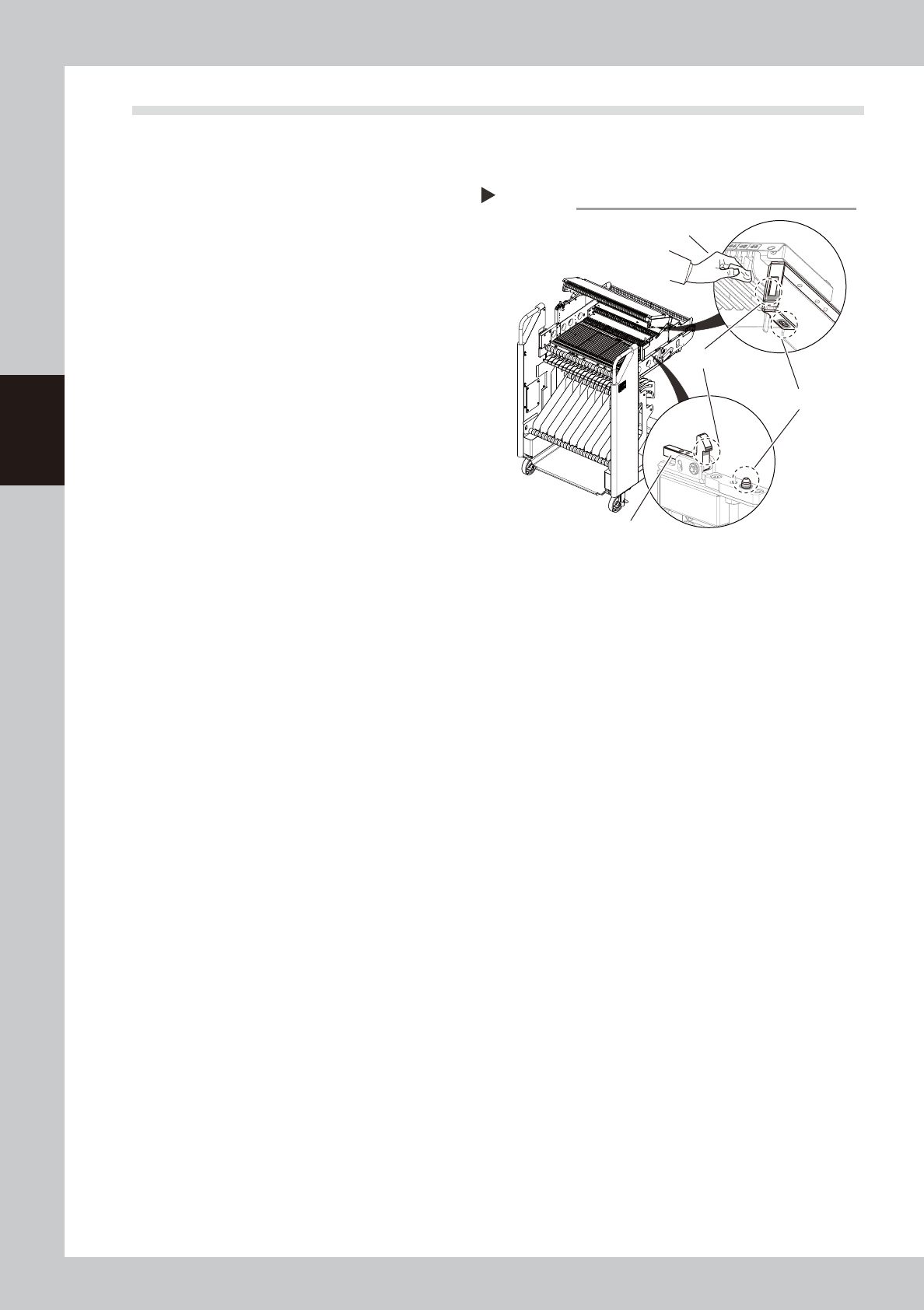
2
Open the feeder exchange carriage
cover.
Release the locks on the left and right of the
feeder exchange carriage. Raise the guide
rail cover.
3
Clean the clamp and positioning
sections.
Use a lint-free cloth to wipe the grease and
dirt from the guide rail cover clamp on the
left and right of the feeder exchange
carriage and also from the positioning
sections.
53350-N9-00
4
Apply grease.
Apply a uniform coat of the specified grease
(NSL) by hand to the cover clamps and also
to the positioning sections.
Cleaning the guide rail cover clamps
Step 3
Cover clamps
Positioning sections
Lock
Lint-free cloth